


He’s seen it dozens of times: a Shopify store grows, the catalog expands, and with it, chaos grows. At first, everything seems manageable — fifty, a hundred, two hundred products. But a year goes by, and managers start getting confused with tags, duplicating items, losing photos, and wondering why sales have dropped.
This is when the realization dawns: Shopify Product Upload is not just a mechanism for uploading products, but a living system on which SEO, customer trust, and internal business efficiency depend.
When we talk about consistent Shopify product upload, we’re not talking about routine, but strategy. It’s the ability to maintain order where information chaos usually reigns.
Every product, every card, every field must be designed uniformly — according to standards that create stability and recognizability.
The author recalls how, in one project, the owner of an online clothing store manually added products — someone wrote “women’s coat,” someone wrote “Women’s Coat,” and someone simply wrote “Coat.”
After six months, the tags stopped working, search engines got confused, and customers couldn’t find the models they wanted. It took weeks and thousands of dollars to fix everything.
It is precisely these mistakes that make the topic of consistent Shopify. As you manage product upload not just technical, but strategic. Three pillars of any e-commerce depend on consistency: search visibility, customer trust, and scaling speed.
In this article, he will explain what consistency really means in Shopify, why without it you lose your position in Google, how to avoid typical mistakes in the Shopify product upload process, and when it is worth entrusting this task to professional Shopify product upload services.
What is Consistent Shopify Product Upload?
If you ask a novice store owner what “consistent Shopify product upload” means, they will most likely answer: “It’s when I just upload products the same way.” But an experienced e-commerce product upload specialist will just smile.
Consistency is not about uniformity for the sake of uniformity. It’s about a system in which every element of the catalog is subject to brand logic and customer expectations. When the author first encountered a large project on Shopify with over 10,000 SKUs, he realized one simple thing: consistency is not a decorative trifle.
It’s the foundation. Without it, SEO collapses, analytics are distorted, and the team drowns in edits. Ideally, consistency in Shopify Product Upload manifests itself in five levels:
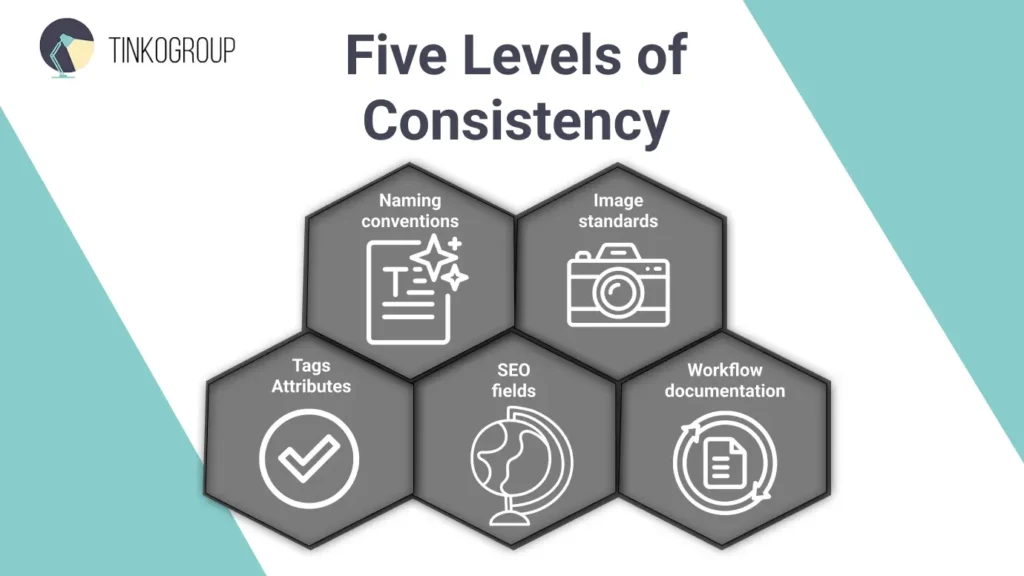
- Naming convention. Product names are formulated according to a single template: first the category, then the brand, then the key characteristic. Example: “Coat — Wool — Beige — Autumn Collection.” This not only looks good, but also helps search engines index pages correctly.
- Image standards. Each photo is centered, has the same background and size. For brands moving towards AI-driven visual recommendations, using Keypoint Annotation helps systems better understand product features. The author recalls a case when one client did not bother with image standardization, and the cards looked as if they had been collected from different websites. The CTR fell by 20%, and it took a week to restore visual balance.
- Attributes and tags. These often become the Achilles’ heel. When one manager writes “cotton,” another writes “Cotton,” and a third writes “100% cotton,” the system stops working. Shopify does not understand that these are the same thing, and the filters break.
- SEO fields. Metadata is not a formality but a silent engine of organic traffic. Properly written tags and descriptions allow a brand to grow without advertising costs. HubSpot notes that pages with consistent meta descriptions and structured headings receive up to 30% more clicks in search.
- Workflow documentation. Finally, consistency is impossible without instructions. Everyone who uploads products should have a checklist of what to fill in, where, and how. This reduces the human factor and allows the business to scale.
Consistency isn’t just about order. It’s about trust. When a customer opens a catalog and sees a consistent style, uniform descriptions, clear photos, and a logical structure, they feel that the brand is reliable. And search engines feel the same way: Google loves structured catalogs that are free of duplicates, omissions, and chaos. It’s an invisible but tangible signal: “This store can be trusted.”
Many e-commerce businesses improve these outcomes through better Shopify catalog management, ensuring products are organized in a way that supports navigation, filtering, SEO visibility, and customer confidence.
Why Consistency Matters for Shopify Stores
Sometimes online store owners underestimate the power of simplicity. It seems that small details — such as consistent headings, neat tags, and aligned photos — don’t matter.
But it is precisely these small details that build trust. Shopify isn’t just a platform, it’s an ecosystem where every detail interacts with another: SEO, user experience, analytics, inventory management. And all of this is held together by one thing — consistency.
When your catalog is organized, your data becomes transparent, your SEO improves, and your customers come back. When it’s not, even the most expensive marketing campaigns won’t save you.
SEO Benefits of Consistent Shopify Product Upload
From a search engine perspective, consistency is the language they understand best. Google does not read text the way humans do. It analyzes structure. When product cards are designed using different templates, each with its own meta descriptions and tags, search engines lose context.
A consistent structure in Shopify Product Upload helps to:
- create predictable URLs;
- form clean sitemaps;
- speed up the indexing of new products;
- improve internal linking.
In practice, it looks like this: an eco-cosmetics store standardized the names, descriptions, and alt tags of images — and organic traffic grew by 42% in three months without a single advertising campaign.
Shopify itself confirms this correlation: the official Shopify blog explicitly states that a consistent card structure simplifies navigation for search robots and improves rankings for competitive queries.

Reliable Data Services Delivered By Experts
We help you scale faster by doing the data work right - the first time

Customer Experience and Trust
The second reason why consistency in the Shopify Product Upload Process is critical is human perception. Buyers don’t analyze websites rationally: they read signals. And if the product cards look different — some have sizes listed, some don’t, one photo is large, another is blurry — the brain instantly concludes: “This place is a mess.”
A uniform catalog evokes the opposite feeling — calm and confidence. The buyer understands that they are dealing with a brand that cares about details. And that means it will take care of the customer too.
In one clothing store on Shopify, after bringing visual and textual orders, the number of returns decreased by 18%. Customers began to better understand what they were buying. Consistency here is not bureaucracy. It is the language of trust. It is not flashy, but it creates that very “premium” quality that cannot be bought with advertising.
Better Product and Inventory Management
Finally, the third aspect is data management. When there are hundreds or thousands of products in the Shopify catalog, the slightest error in the name, SKU, or tags can cost hours of work.
If one manager fills in the “Material” field as “Cotton” and another as “100% cotton,” filters stop working, reports break, and ERP integrations fail.
Consistency in Shopify product data entry turns chaos into a system. High Dataset Quality is not only vital for machine learning but also for e-commerce, where poor data can sabotage your business logic. Identical templates and checklists make work predictable and updates fast. This is especially important for bulk Shopify product uploads, when hundreds of cards are uploaded at once.For large e-commerce brands, consistency is not just a recommendation, but a prerequisite for scaling. Without it, each new category adds chaos rather than sales. As one senior content manager said: “Consistency is like cleanliness in a warehouse. As long as it’s there, the business grows. When it’s not there, you stumble over your own data.”
Common Shopify Product Upload Mistakes
In the world of e-commerce, even small mistakes when uploading products to Shopify can be costly. As your catalog grows, chaos can quickly accumulate: duplicates, poor-quality photos, incomplete descriptions — and this isn’t just an inconvenience, it means lost sales and SEO problems.
Common mistakes when uploading products to Shopify
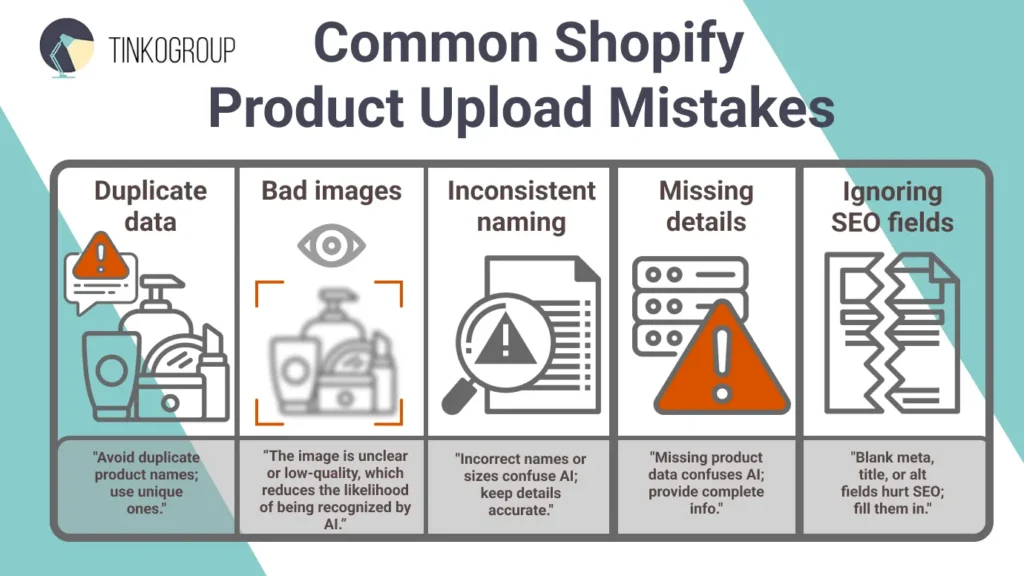
- Duplicate data. Often, the same product is uploaded several times with slight variations in the name or SKU. Consequences: customers see identical items, filters break, Google indexes duplicates — and rankings drop. Example: an online electronics store added the same accessory several times under different names. A week later, analytics showed that some orders were lost due to confusion in the shopping cart.
- Bad images. Poor-quality photos, different sizes, backgrounds, or orientations instantly reduce buyer confidence. When images are inconsistent, CTR drops and returns increase. Even if the product is excellent, the design kills conversion.
- Inconsistent naming. When some products are called “Leather Jacket,” others “Jacket Leather,” and still others “Leather Coat,” filters and search within Shopify stop working. The customer loses time, and the store loses sales.
- Missing details. Size, material, color, SKU, or tag — every missing detail complicates the purchase. For example, a clothing store that did not specify sizes for 20% of its items received a lot of support questions, which ate into the team’s working hours and reduced trust in the brand.
- Ignoring SEO fields. The absence of descriptions, meta tags, and alt tags for images directly affects search engine rankings. Even high-quality products remain invisible without proper SEO.
Real consequences of mistakes:
- Loss of organic traffic. Google indexes duplicate or incomplete content less effectively.
- Decreased conversion. Customers lose trust if product cards look inconsistent.
- Problems with analytics and inventory. SKU or tag inconsistencies break reports and make inventory management difficult.
Each of these mistakes is more common than it seems. That’s why Shopify product catalog management and standardization of all stages of product uploading are critical for any growing store.
How to Get Shopify Product Upload Right
A system error when uploading products can easily turn the process into chaos. To avoid this, it is important to build a Shopify Product Upload Process that can handle hundreds and thousands of SKUs, ensuring consistency, SEO, and customer convenience.
Standardized Templates and Style Guides
The first step towards stability is to create templates and style guides for all product cards.
This is not just a formality, but a real “coordinate system” for the team.
- Product titles: a unified structure (“Brand + Category + Model + Feature”) that immediately lets the customer know what they are looking for.
- Descriptions: same length and style — advantages are listed sequentially, technical characteristics are highlighted.
- Images: size, background, orientation — all elements are standardized.
For example, one cosmetics store that implemented such a template was able to reduce the loading time for a new collection by 40% and reduce the number of errors by 75%.
A style guide allows every employee or contractor to quickly navigate the rules and avoid creating their “own version of the product card,” which then breaks consistency.
Using Bulk Shopify Product Upload Tools
When a catalog exceeds hundreds of products, manual uploading is no longer efficient. This is where bulk Shopify product upload tools come in handy.
- CSV import via Shopify allows you to upload data in bulk, reducing the risk of human error.
- Platforms such as Matrixify or Excelify integrate with ERP, automating the synchronization of balances, prices, and descriptions.
- Even large stores with 10,000+ products use bulk upload to scale the process without losing quality.
Proper use of bulk tools saves hundreds of hours of work and makes the process predictable.
SEO-Friendly Titles and Descriptions
SEO is not a decorative feature, but a source of organic traffic.
- SEO friendly Shopify product upload starts with titles that include keywords but remain understandable to customers.
- Descriptions should be unique, structured, and focused on the benefits to the buyer.
- Image alt tags, meta descriptions, and internal links all strengthen the store’s position in search results.
Example: After optimizing all of its product pages with SEO-friendly descriptions, a sports nutrition store saw a 35% increase in organic traffic in two months.
Implementing Quality Control (QA)
Even with templates and bulk tools, errors are possible. Therefore, QA control is an essential part of the process.
- Check spelling and consistency of names and tags.
- Check compliance with the template and brand style.
- Test uploads before a mass catalog update.
Systematic QA helps catch small details that would otherwise go unnoticed: duplicates, incorrect prices, broken links.
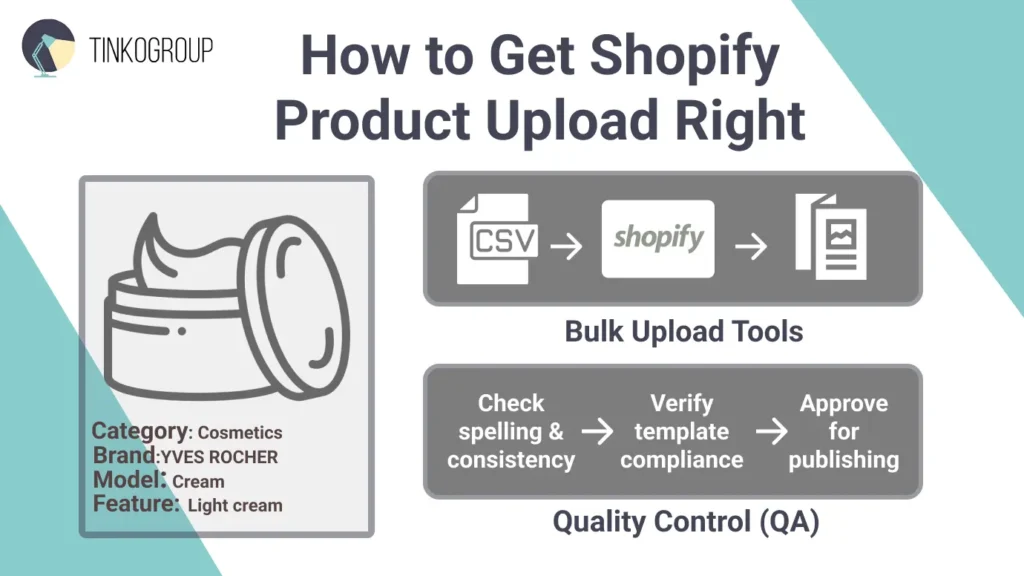
Tools like Copywritely and built-in Shopify checks allow you to automate part of the control, but a human eye is still necessary.
Best Practices for Consistent Shopify Product Upload
Even if the product upload process is set up and templates are created, maintaining consistency requires constant attention. Regular audits help identify duplicates, empty fields, and tag errors, which directly affect SEO and conversion. In one online accessories store, a quarterly audit resulted in the correction of 12% of product cards with incorrect sizes and missing alt tags, which increased CTR and reduced the number of support requests.
Automation is becoming a key tool for large-scale stores. Synchronization with ERP and CRM allows you to update prices and balances without manual input, reducing the time it takes to upload products from several days to a couple of hours. A clear catalog structure and correct category hierarchy simplify navigation for customers and search engines, while a consistent visual style for photos and cards creates a sense of professionalism and brand reliability.
Team training, checklists, and internal guidelines help maintain quality, even when new employees join the process. Combined with templates, automation, and regular monitoring, this allows stores to stay organized, scale, and minimize errors, turning Shopify product catalog management into a tool for strategic growth.
When to Use Shopify Product Upload Services
For large or fast-growing stores, outsourcing Shopify product upload services is a logical solution. When a catalog contains thousands of products, manual uploading takes too much time and the risk of errors increases.
Professional teams take care of standardizing names, descriptions, tags, images, and SEO fields, allowing the owner to focus on strategic tasks such as marketing, sales, and expanding the product range.
In one project, outsourcing bulk upload allowed more than 5,000 cards to be uploaded in a week instead of a month of manual work. Errors were reduced to almost zero, and the client received a catalog ready for sale with SEO-optimized names and descriptions.
When choosing a service, it is important to evaluate the team’s experience, QA methods, and the availability of templates and automation tools. Sometimes the cost seems high, but the time savings, reduction in errors, and ability to scale the business justify the investment. Shopify product listing services are especially relevant for stores with frequent product updates, seasonal collections, and complex catalog structures.
Conclusion
Consistent Shopify Product Upload is not just a technical task, but a strategic tool for e-commerce growth. Consistency in titles, descriptions, tags, images, and SEO fields directly affects search visibility, customer trust, and catalog management efficiency.
Companies that implement standardized templates, automation, and regular QA reduce errors, speed up product uploads, and increase conversion rates. When your catalog grows and products are updated frequently, Shopify product upload services help you scale your business without losing quality and control.
If you want to take your Shopify store to the next level, it’s worth implementing a systematic approach to product uploads or turning to professionals to ensure that all product pages are consistent, SEO-optimized, and ready to generate sales.
At Tinkogroup, we specialize in professional Shopify product upload services. Our expert team ensures that every product card is perfectly structured, SEO-optimized, and aligned with your brand standards.
Don’t let bad data hold your business back.
Contact Us Today for a Free Catalog Audit.
Why is consistency in Shopify product uploads so important?
Consistency is a strategic tool that directly impacts three pillars of e-commerce: search engine visibility (SEO), customer trust through professional presentation, and the business’s ability to scale without data chaos.
What are the main levels of catalog consistency?
A professional catalog should be standardized across five levels: naming conventions (using templates), image standards (uniform size/background), attribute and tag logic, SEO metadata, and clear workflow documentation for the team.
When should I consider using professional product upload services?
Outsourcing is recommended when your catalog exceeds hundreds of products, requires frequent updates, or involves complex bulk migrations, as professional teams ensure zero errors and SEO optimization while you focus on growth.