


Video annotation is the process of labeling objects, actions, and events in video frames so that machine learning models can learn to recognize and track them over time. This guide explains what video annotation means, which types exist, and how to annotate a video step by step, from planning to export.
It is written for ML engineers, product managers, and researchers who are preparing video data for computer vision models, from autonomous driving and sports analytics to retail and healthcare.
What is video annotation?
In a nutshell, video annotation is the process of carefully labeling, categorizing, or adding metadata to video content to make it more understandable, searchable, and useful for various applications. It involves identifying and tagging specific elements within a video, such as objects, actions, events, or emotions, to provide context and meaning to the visual information. Video event annotation goes beyond identifying individual objects or actions by capturing meaningful events and interactions within a video sequence.
This complex task is typically undertaken by human annotators who review video frame by frame or label selected keyframes, often aided by specialized software tools. Annotations can take various forms, such as outlines of different elements within a frame or temporal annotations marking the duration of certain events.
What makes video harder than images is time: one minute of footage at 30 frames per second already contains 1,800 frames, and every object has to keep the same identity from one frame to the next.
Demand for annotated video keeps growing as more products rely on computer vision: driver assistance, retail analytics, security, sports, and medical imaging all train models on labeled video.
Fundamental types of video data annotation
In general, video data annotation involves labeling or marking objects, actions, or events within video footage to train machine learning models. Here are some common types of video data annotation:
Bounding boxes
Video annotation often starts with drawing bounding boxes around objects of interest within video frames. This is used to identify and track specific objects or entities.
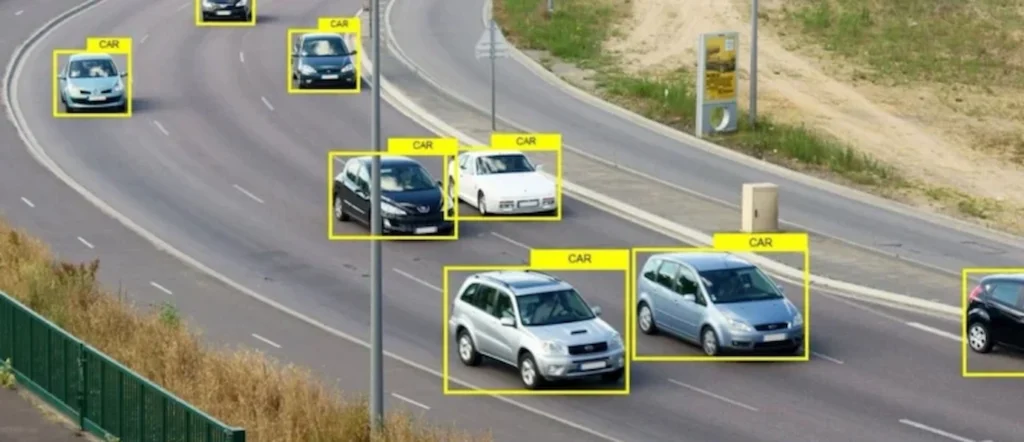
Instance segmentation
This is about annotating each pixel that belongs to a specific object, so that two cars of the same class get separate masks. Unlike bounding boxes, instance segmentation provides a more precise outline of object boundaries.
Semantic segmentation
Annotation involves labeling each pixel in a video frame with a class label, indicating the type of object or scene it belongs to. Semantic segmentation in video is useful for tasks like scene understanding or background separation.
Activity recognition
Video annotations concern labeling actions or activities performed by objects or individuals within video sequences. This could include actions like walking, running, sitting, or more complex activities.
Temporal annotation
This is about marking specific timestamps or time intervals within a video to indicate the occurrence of events, changes, or transitions. Temporal annotations are crucial for tasks like event detection or activity timing.
Pose estimation
Video annotation involves labeling key points or joints on human subjects within video frames to track and analyze body movements or poses. This is often used in sports analysis, fitness tracking, or gesture recognition applications. In fitness applications, workout video annotation helps identify individual exercises, label movements, and create structured visual data for exercise recognition and analysis.
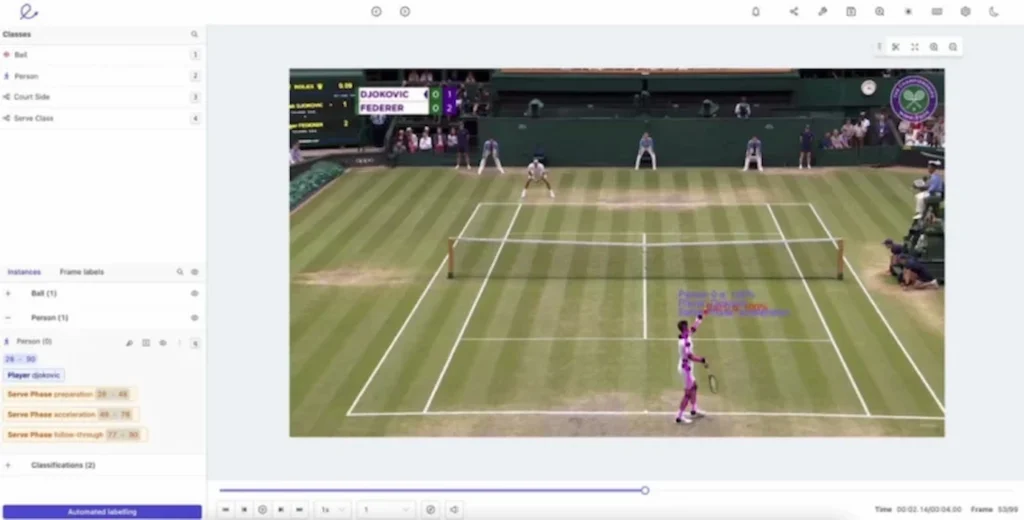
Emotion recognition
Annotation concerns labeling facial expressions or body language within video frames to understand the emotional state of individuals. This is used in applications like affective computing or sentiment analysis.
Text annotation
This is about identifying and transcribing text within video frames, such as subtitles, captions, or on-screen text. This is useful for tasks like video indexing, translation, or accessibility.
3D annotation
Video annotation involves labeling objects or events in 3D space within video sequences. This is used in autonomous driving, augmented reality (AR), or robotics applications, with techniques such as cuboid tracking video annotation enabling more accurate object tracking in surveillance AI.
Depth annotation
This is about estimating the depth or distance of objects within video frames. This is important for tasks like scene reconstruction, depth perception, or virtual reality.
These video data annotation types can be used individually or in combination depending on the specific requirements of the video analysis task.
Despite its significance, video annotation can be laborious and time-consuming, requiring skilled annotators and sophisticated tools. However, the benefits it offers in terms of enhanced understanding, automation, and innovation across various domains make it an essential technique. Let’s check these advantages together.

Reliable Data Services Delivered By Experts
We help you scale faster by doing the data work right - the first time

Main benefits of video annotation
Video annotation, the process of labeling or tagging video content with relevant metadata, has become increasingly important in various fields such as computer vision, machine learning, robotics, and more. The advantages of video data annotation are multifaceted and contribute significantly to advancing technology and various applications. Below are several fundamental benefits of video data annotation:
- Training machine learning models: Video data annotation plays a crucial role in training machine learning models, especially computer vision-related ones. By labeling objects, actions, scenes, and other relevant information within videos, annotation provides the ground truth data necessary for supervised learning algorithms to understand and recognize patterns. This facilitates the development of accurate and robust models for object detection, activity recognition, and video classification tasks.
- Improving model accuracy: Accurate annotation of video data helps improve the accuracy of machine learning models. By providing precise labels and annotations, data annotators enable models to learn from high-quality training data, leading to better performance and reduced errors. Consistent and detailed annotations also help reduce biases and help that model generalize well to new data.
- Enhancing object detection and tracking: Video data annotation enables models to be trained for object detection and tracking tasks. By annotating objects of interest within video frames with bounding boxes or segmentation masks, annotators provide the necessary information for algorithms to identify and track objects over time. This is essential for surveillance, autonomous vehicles, and human-computer interaction applications.
- Supporting semantic understanding: Semantic understanding of video content (recognizing actions, events, and object relationships) relies on accurate annotation. Annotated video data allows models to infer semantic information from visual cues, enabling applications such as video summarization, content recommendation, and video search. Semantic annotations also aid in generating descriptive captions or subtitles for accessibility purposes.
- Enabling autonomous systems: Video data annotation is necessary to develop autonomous systems, including robots and drones. By annotating videos with information about the environment, obstacles, and navigation paths, annotators assist in training models for perception, planning, and decision-making. This facilitates the deployment of autonomous systems in various domains, such as agriculture, logistics, and exploration.
- Facilitating behavioral analysis: Video data annotation supports behavioral analysis and understanding in psychology, sociology, and human-computer interaction fields. By labeling human actions, gestures, and expressions within videos, annotators enable researchers to study social interactions, cognitive processes, and user behavior. This can lead to insights that inform the design of products, services, and interventions.
- Driving innovation in entertainment and media: In the entertainment and media industry, video data annotation fuels innovation by enabling the creation of immersive experiences, personalized content, and interactive storytelling. By annotating video content with metadata such as scene descriptions, character identities, and emotional cues, annotators improve content discovery, recommendation, and adaptation across platforms and devices.
- Supporting medical diagnosis and treatment: In healthcare, video data annotation aids in medical imaging analysis, surgical training, and patient monitoring. By annotating medical videos with annotations such as anatomical structures, abnormalities, and procedural steps, annotators support diagnostic decision-making, surgical skill assessment, and treatment planning. This contributes to improved patient outcomes and medical education.
In general, by providing labeled video data, annotators enable the development of advanced technologies, facilitate research and innovation, and improve our understanding of the world.
Common industries using video annotations
Video annotation finds applications across various industries due to its ability to extract valuable insights and support tasks such as object detection, behavior analysis, and semantic understanding. Let’s explore how video annotation is utilized in the different sectors:
Medical industry
Video annotation is crucial in medical imaging analysis, surgical training, and patient monitoring. In medical imaging, videos from modalities like MRI (magnetic resonance imaging), CT (computed tomography) scans, and endoscopy are annotated to identify anatomical structures, abnormalities, and disease markers. Video annotations also assist radiologists and clinicians in diagnosing conditions such as tumors, fractures, and cardiovascular diseases more accurately.
In surgical training, videos of procedures are annotated to highlight critical anatomical landmarks, surgical steps, and best practices. Video annotations aid in teaching medical students and assist surgeons with skill assessment and performance improvement. Video annotation supports patient monitoring by tracking vital signs, movement patterns, and physiological changes over time, enabling early detection of health issues and personalized treatment plans.
Transportation industry
Video annotation is essential for developing autonomous vehicles, traffic monitoring systems, and transportation infrastructure planning. In autonomous vehicles, videos captured by cameras mounted on vehicles are annotated to detect and classify objects, including vehicles, pedestrians, cyclists, and traffic signs. Annotations provide the training data for machine learning models to perceive the environment and make real-time driving decisions.
Lane geometry is a task of its own: see how lane tracking video annotation keeps lane lines consistent across frames.
Traffic monitoring systems use video annotation to analyze traffic flow, identify congestion hotspots, and detect traffic violations. Annotations enable the extraction of traffic-related metrics such as vehicle speed, lane occupancy, and traffic density, supporting urban planning and transportation management efforts. Video annotation assists in the design and optimization of transportation infrastructure by analyzing vehicle trajectories, pedestrian behavior, and road usage patterns.
Architecture industry
Video annotation contributes to architectural design, construction planning, and building maintenance. In architectural design, videos of proposed building sites or existing structures are annotated to identify spatial dimensions, structural elements, and design features. Annotations aid architects and designers in visualizing design concepts, evaluating site conditions, and communicating ideas with clients and stakeholders.
During construction planning, videos are annotated to track progress, monitor safety compliance, and coordinate workflow activities. Annotations provide a visual record of construction activities, allowing project managers to identify bottlenecks, resolve conflicts, and meet project timelines. Video annotation supports building maintenance by documenting equipment installations, repairs, and maintenance procedures, facilitating asset management and facility operations.
Retail industry
Video annotation is used in retail for customer behavior analysis, inventory management, and store optimization. In customer behavior analysis, videos captured by in-store cameras are annotated to track customer movements, interactions, and purchasing behaviors. Annotations help retailers understand shopper preferences, optimize product placements, and enhance the overall shopping experience.
For inventory management, videos are annotated to identify and track inventory items, monitor stock levels, and prevent loss or theft. Annotations enable retailers to automate inventory counting, streamline replenishment processes, and minimize stockouts. Video annotation supports store optimization by analyzing foot traffic patterns, identifying high-traffic areas, and optimizing store layouts for improved navigation and customer engagement.
Thus, video annotation is a universal technology with applications covering multiple industries. By providing valuable insights from video data, annotation helps companies make informed decisions, improve operational efficiency, and deliver better products and services to their customers.
How to annotate a video?
In artificial intelligence (AI) and machine learning, video data annotation is essential in training algorithms to perceive and understand visual information. Here is how to annotate a video for machine learning in five steps. Annotating video data involves several intricate steps, each demanding careful attention and precision.
Below, we delve into the five main steps of video data annotation, clarifying their significance and best practices for achieving optimal results.
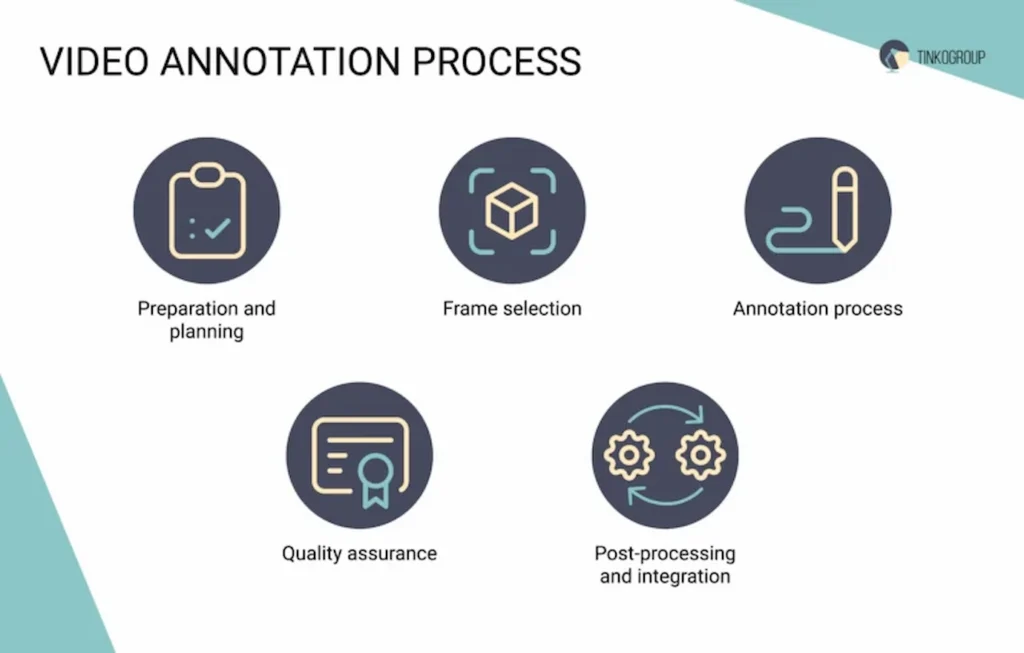
1. Preparation and planning
Effective preparation and planning are the bases for a successful video data annotation project. This initial step involves defining the project objectives, determining the annotation scope, and establishing guidelines.
Firstly, it’s essential to outline the annotation project’s goals clearly. A clear understanding of the intended outcomes guides subsequent decisions and ensures alignment with overarching objectives.
Next, defining the annotation scope involves identifying the types of annotations needed, such as bounding boxes, key points, semantic segmentation, etc. Considering factors like scenes’ complexity, objects’ diversity, and variability in lighting conditions aids in developing a comprehensive annotation strategy.
Annotation guidelines are vital in maintaining consistency and accuracy throughout the annotation process. These guidelines should contain annotation instructions, annotation tools, and protocols for resolving ambiguous scenarios, such as what to do when an object is fully hidden for a few frames. By investing time in thorough preparation and planning, annotation teams can streamline workflows and decrease potential challenges.
2. Frame selection
In video data annotation, frame selection involves strategically choosing frames that best represent the content and context of the entire video sequence. Given the vast number of video frames, selecting keyframes for annotation optimizes efficiency without compromising annotation quality.
Critical considerations for frame selection include:
- Diversity: Ensure that selected frames include a diverse range of scenes, objects, and actions in the video.
- Information density: Prioritize frames containing critical visual information, such as instances of object occlusion, motion blur, or complex interactions.
- Temporal continuity: Maintain temporal coherence by selecting frames representing smooth transitions between consecutive frames, facilitating seamless annotation.
Employing automated techniques, such as keyframe extraction algorithms or motion-based frame selection, can accelerate the frame selection process while preserving the representativeness of the annotated dataset.
Keyframes, interpolation, or frame-by-frame? Most tools let you label only keyframes and fill the frames in between by interpolation. That works well when objects move smoothly and stay visible. When movement is sudden, objects overlap, or a model must learn exact trajectories, every frame needs to be checked. We compare both approaches in our guide to frame-by-frame annotation.
3. Annotation process
The annotation process carefully labels objects, actions, or attributes of interest within the selected frames. Annotation tasks may vary depending on the project requirements, ranging from simple bounding box annotations to more complicated pixel-level segmentation.
To ensure accuracy and consistency, annotation teams should adhere to established guidelines and use intuitive annotation tools with features like zooming, panning, and object tracking. Quality control mechanisms such as inter-annotator agreement checks and regular feedback sessions improve annotation precision.
Each tracked object should keep the same ID for the whole clip, even after it disappears behind another object and comes back. Clear communication channels and good training materials help video annotators work faster and with fewer errors.
4. Quality assurance
The annotation QA process is a critical checkpoint in the video data annotation pipeline. It aims to identify and fix inaccuracies in the annotated data. Through systematic validation procedures and error analysis, QA mechanisms protect the integrity and reliability of the annotated dataset.
There are critical aspects of quality assurance in video data annotation:
- Anomaly detection: Employ automated anomaly detection algorithms to flag inconsistencies, such as misaligned annotations or outliers in annotation attributes.
- Sampling strategies: Implement random sampling techniques to select subsets of annotated frames for manual review, enabling thorough error detection and correction.
- Performance metrics: Use quantitative metrics, such as precision, recall, and F1-score (combines precision and recall scores), to evaluate annotation accuracy and assess annotator proficiency.
- Temporal checks: Play annotated clips back at normal speed. Boxes that “jitter” between frames or IDs that switch between objects are easy to spot in motion but hard to see frame by frame.
By integrating robust quality assurance protocols into the annotation workflow, companies can build confidence in the annotated dataset and ultimately enhance the performance of downstream machine learning models.
5. Post-processing and integration
The final step in the video data annotation process involves post-processing annotated data and seamlessly integrating it into downstream applications or machine learning pipelines. This phase has tasks such as data formatting, metadata enrichment, and integration with annotation management systems.
During post-processing, ensure compatibility with standard data interchange formats, such as JSON or XML, and common video formats such as MOT or COCO-style tracks, to facilitate interoperability with various machine learning frameworks and applications. Enriching annotated data with contextual metadata (timestamps, spatial coordinates, or object attributes) enhances the richness and utility of the dataset for subsequent analysis tasks.
Integrating annotated data into annotation management systems or version control repositories enables efficient data storage, retrieval, and version tracking, ensuring traceability and reproducibility throughout the annotation lifecycle.
In general, mastering the video data annotation process requires a systematic approach. Employing best practices and using advanced annotation tools and techniques, organizations can generate high-quality annotated datasets. These datasets are invaluable assets for training robust machine learning models and advancing computer vision applications across diverse domains.
Essential video data annotation techniques for success
Our experts have prepared some top practices in video annotation. By following these practices, you can enhance the quality of annotated datasets and the effectiveness of downstream applications. Let’s analyze these techniques.
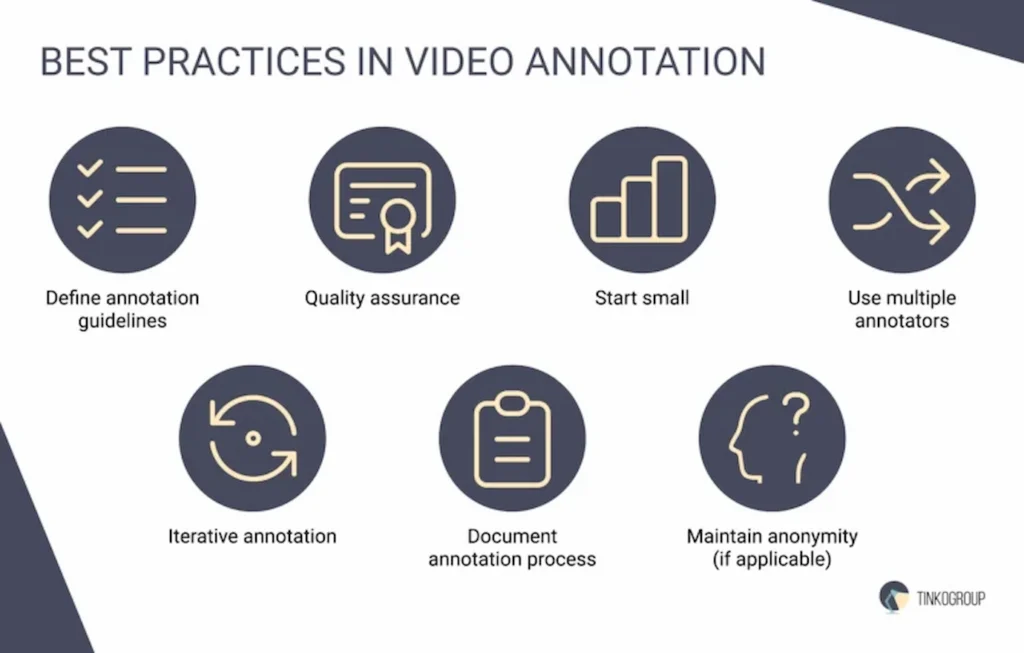
Define annotation guidelines
Establish clear guidelines for annotators to ensure consistency in video labeling. Guidelines should include definitions of categories, annotation methodology, and examples of different scenarios. Some computer vision projects require more specialized approaches, such as specialized lane-tracking workflows designed to preserve road geometry and lane trajectories across video frames.
Quality assurance
Implement quality control measures to maintain annotation accuracy. This may involve random checks of annotations, inter-annotator agreement tests, and regular feedback sessions with video annotators.
Start small
Begin with a small dataset and gradually scale up as you gain confidence in the annotation process. This allows you to refine your annotation guidelines and address issues early on.
Use multiple annotators
Employ multiple annotators to annotate each video segment independently. This helps to reduce individual biases and errors and allows for the calculation of inter-annotator agreement to measure annotation consistency.
Iterative annotation
Iterate the annotation process based on feedback and insights from initial annotations. This may involve refining guidelines, retraining annotators, or revising annotations based on new information.
Document annotation process
Keep detailed records of the video annotation process, including annotation guidelines, annotator training materials, and any revisions made during the annotation process. This documentation aids in reproducibility and facilitates future analyses.
Maintain anonymity (if applicable)
If the videos contain sensitive information or individuals, ensure that annotators do not have access to identifying information and adhere to strict privacy protocols. Blurring faces and license plates before annotation is a common first step; see our guide to privacy in data annotation.
Popular video annotation machine learning models
AI video annotation is crucial in machine learning, especially in computer vision applications that require understanding and analyzing video content. Here are some popular machine-learning models and techniques used for video annotation:
Promptable segmentation and tracking models (SAM 2, SAM 3)
These foundation models changed how video is annotated. Meta’s SAM 2 can follow an object through a video after a single click on one frame, using a memory of earlier frames. SAM 3, released in November 2025, goes further: it finds and tracks every object that matches a short text prompt, such as “yellow school bus,” across images and video. Annotation teams use them to draft masks and tracks that humans then correct.
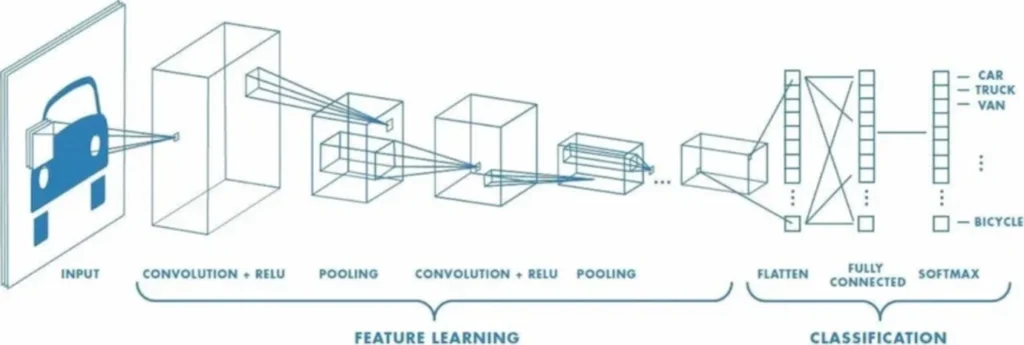
Convolutional neural networks (CNNs)
They are widely used for AI video annotation tasks. CNNs can be applied to frame-level analysis, where each frame of the video is treated as an individual image. Architectures such as ResNet, VGG, and Inception have been adapted for video annotation tasks.
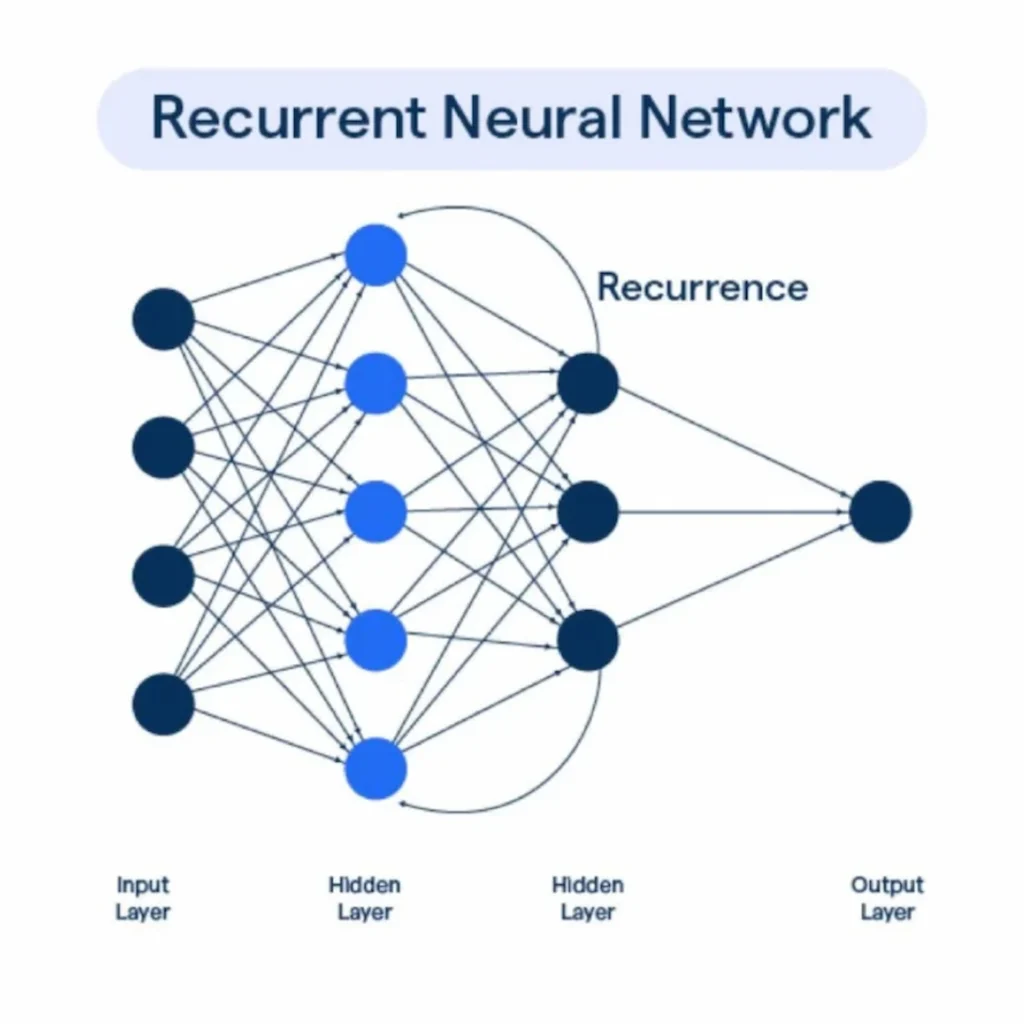
Recurrent neural networks (RNNs)
RNNs, particularly Long Short-Term Memory (LSTM) networks, are helpful for sequential data processing. In video annotation, they can be used to model temporal dependencies between frames. RNNs can capture the motion and temporal information in videos, making them suitable for action recognition and video captioning tasks.
You Only Look Once (YOLO)
This real-time object detection system can be used for video annotation by processing each video frame and detecting objects within it. This enables tasks such as real-time object detection, tracking, and annotation. YOLO’s efficiency allows it to process videos at high frame rates, making it suitable for applications like surveillance, autonomous vehicles, and video analysis in real time.
Attention mechanisms
These mechanisms are used to selectively focus on relevant parts of the video sequence while performing annotation tasks. They have been integrated into various architectures like CNNs and RNNs to improve performance in tasks such as video captioning and fine-grained action recognition.
Transformer models
These models, known for their success in natural language processing (NLP) tasks, have also been applied to video annotation tasks. By treating each frame or segment of frames as tokens, transformer architectures can be adapted to encode temporal relationships and perform annotation tasks.
Two-stream networks
In general, these networks consist of two separate streams, one for spatial information (RGB frames) and one for motion information (optical flow or stacked optical flow). By combining both streams, these models can capture appearance and motion features, improving performance in tasks such as action recognition.
Reinforcement learning
These learning techniques have been used for video annotation tasks. The model learns to generate annotations iteratively by interacting with the video data and receiving feedback on the quality of generated annotations. Reinforcement learning has been applied in tasks like video summarization and active learning for video annotation.
So, these are some prominent machine learning models and techniques used for video annotation. The choice of model depends on the annotation task’s specific requirements, including the video content’s complexity, available computational resources, and the desired level of accuracy.
Common challenges of video annotations
Nothing is perfect, so video annotation has challenges, ranging from technical complexities to subjective performance. Here are some of the significant challenges associated with video annotation:
- Temporal complexity. Unlike static images, videos have a temporal dimension, making annotation more complex. Annotators must precisely mark when an object appears, moves, or disappears within the video frame. This requires careful attention to detail and may involve annotating multiple frames to capture the complete temporal context accurately.
- Scalability. Video data is often large-scale, posing scalability challenges for annotation tasks. Manually annotating large volumes of video data can take time and effort. Developing efficient annotation tools and strategies to handle large-scale video datasets is essential for scalability.
- Subjectivity and ambiguity. Video data annotation often involves subjective interpretation, especially when labeling complex actions or events. Annotators may interpret the same video content differently, leading to inconsistent annotation. Establishing clear annotation guidelines and providing adequate training to annotators can help reduce subjectivity and improve annotation consistency.
- Labeling granularity. Determining the appropriate level of granularity for annotations is crucial but challenging. Depending on the specific application, annotators must decide whether to label individual objects, object parts, actions, or scenes. Balancing granularity with annotation efficiency and relevance to the task is an important consideration that requires domain expertise and careful thought.
- Labeling diversity. Videos often contain diverse content, including different object categories, appearances, and environmental conditions. Annotators need to account for this diversity when creating annotation labels to ensure the robustness and generalization of machine learning models. Handling diverse video labeling requirements while maintaining annotation quality is a significant challenge.
- Labeling occluded or partially visible objects. For example, video objects may be occluded, partially visible, or exhibit varying degrees of deformation, making accurate annotation difficult. Annotators must determine how to label such objects and account for uncertainties in annotation boundaries. Developing annotation techniques robust to occlusion and partial visibility is essential for accurate video analysis.
- Long-term dependencies. Videos often contain long-term dependencies and complex temporal dynamics that require capturing interactions and context over extended time spans. Annotators must annotate these dependencies accurately to enable practical video understanding and prediction. However, annotating long-term dependencies introduces additional complexity and requires sophisticated annotation techniques.
In general, addressing these challenges requires a combination of advanced annotation tools, clear guidelines, quality control measures, and domain expertise. Despite these challenges, accurate video annotation is essential for advancing research and applications.
Our expert annotation services await you
If you would rather not run video annotation in-house, Tinkogroup’s team labels video for computer vision projects: bounding boxes and tracking, polygons and segmentation, keypoints, and event tags, with QA built into every batch. The details are on our video annotation services page.
Our team works with the tools our clients prefer, most often CVAT and Labelbox. For an overview of the open-source tool many teams start with, see our article on CVAT, the Computer Vision Annotation Tool.
Final thoughts
Video annotation involves five key steps: planning, selecting keyframes, accurately labeling videos, checking for errors, and seamlessly integrating data. The hardest part is time: keeping objects, IDs, and boundaries consistent across thousands of frames.
At Tinkogroup, we are here to offer you expert solutions and support every step of the way. Want to advance your AI projects with precision and efficiency? Contact us today to learn more about our progressive data annotation services and how we can tailor them to meet your needs. Let’s turn your vision into reality together.
What is video annotation?
Video annotation refers to adding metadata or labels to various elements within a video, such as objects, actions, or events. This metadata enhances understanding and analysis, facilitating tasks like machine learning (ML) training, content indexing, and video search.
What is video labeling?
Video labeling involves identifying and categorizing different components or actions within a video. This process assigns descriptive tags or labels to objects, people, movements, or events, enabling efficient data analysis, classification, and interpretation. In practice, the terms “video labeling” and “video annotation” are used almost interchangeably.
How to annotate video data?
Annotating video data involves five steps: plan the task and write guidelines, select frames or keyframes, annotate objects and events, run quality checks (including playback for jitter and ID switches), and export the labels in a format your model can use.
How to annotate a video for machine learning?
Choose a tool such as CVAT, define the label set, and annotate keyframes, letting interpolation or a tracking model such as SAM 2 fill the frames in between. Then review the result frame by frame where objects move fast or overlap, and keep each object’s ID consistent for the whole clip.
What is the difference between keyframe interpolation and frame-by-frame annotation?
With interpolation, annotators label only selected keyframes, and the tool estimates the frames in between. Frame-by-frame annotation checks and corrects every frame. Interpolation is faster for smooth, predictable motion; frame-by-frame is needed when objects change direction suddenly, overlap, or disappear.