


Running a successful online store on the Shopify platform requires attention to detail, especially when it comes to Shopify product listings. Store owners often underestimate the importance of consistent and well-structured product cards, believing that simply adding a name, description, and image is enough. In practice, however, consistent product listings directly affect how customers perceive the store and how effectively it operates.
Why is this important? Imagine a store with hundreds of products where names are duplicated, descriptions have different formats, and images vary in size and style. Even an experienced buyer will have difficulty navigating, and the likelihood of a purchase will decrease. In this case, Shopify product listings become a source of confusion rather than a sales tool. On the contrary, well-structured and consistent listings allow customers to quickly find the products they need, evaluate their characteristics, and make a purchase decision.
In addition, Shopify product listings play a key role in SEO. Search engines evaluate the uniqueness and quality of descriptions, the completeness of attributes, and the correctness of SEO meta tags. Being a CCPA-compliant data company and following GDPR-compliant data company standards ensures that your store handles customer data with the highest level of trust. Incorrect names, incomplete descriptions, or mismatched tags can reduce the visibility of products in search results, even if they are high-quality and in demand. In practice, stores that have implemented standards for Shopify product upload consistency have seen a 15-30% increase in organic traffic within a few months.
Shopify store owners and managers need to understand that each product card is a point of contact with the customer and part of the store’s overall reputation. Effective Shopify product listings save the team time, minimize errors when adding products, and increase conversion by turning a regular catalog into a powerful sales tool.
Preparing for Product Listing
How to add a product on Shopify? Before you start adding products in bulk, it’s important to carefully prepare all materials and standards. This is especially critical for large-scale Shopify stores, where even small mistakes can lead to confusion and decreased sales. Proper preparation helps you create a Shopify product catalog workflow that is easy to maintain and scale.
Templates for Product Titles and Descriptions
Using templates for product names and descriptions is one of the most effective ways to ensure consistency and quality in Shopify product listings. Templates help content management teams write product cards faster, avoid mistakes, and maintain a consistent style, which is especially important when scaling a store.
A product name template should include key information that is needed by both the buyer and search engines. This usually includes the product type, its main characteristics, brand, color, and size. For example, instead of scattered options like “Leather bag” or “City bag,” you can use the standard: [Product type] + [Material] + [Color/Size] + [Brand]. This approach simplifies the Shopify product entry process, makes titles informative, and improves visibility in search results.
For product descriptions, templates help structure the text and include important elements. An effective template can consist of several blocks: a brief introduction, main features, uses, and key benefits. For example, for a backpack, you can use the following structure: a short description that clearly reveals the type and purpose; a list of features (material, volume, compartments); care or usage tips; SEO-optimized keywords. This format allows content managers to create texts quickly and makes it easy for buyers to digest the information.
Templates also help maintain a consistent style for all product cards, which improves the user experience and supports brand standards. When scaling a store and adding hundreds of new products, using templates becomes critical: the team can immediately see which elements should be included, how to structure the text, and which keywords to use for SEO. This reduces the likelihood of errors and maintains a high level of Shopify product upload consistency.
In practice, stores that have implemented templates for titles and descriptions have seen a 30-40% reduction in the time it takes to create new cards and a reduction in errors in attributes and texts to almost zero. In addition, standardized cards help with analytics: it is easier to track which products sell better and adjust descriptions or keywords based on conversion data.
Preparing Images and Graphics
High-quality images and graphics play a key role in successful Shopify product listings. They directly influence the buyer’s perception of the product, conversion rates, and overall impression of the store. Much like in computer vision annotation, where accuracy is everything, your product visuals must be precise and clear. Preparing visual materials is not just about uploading photos; it is a strategic process that requires planning and standardization.
First and foremost, it is important to maintain a consistent image style throughout the catalog. This applies to the background, lighting, shooting angles, and file size. For example, if a store uses a white background for all products, adding a random photo with a colorful background will disrupt visual consistency and may reduce buyer confidence. A consistent style helps to create a recognizable brand, makes the store interface more polished, and improves the user experience.
The next aspect is image quality. Sharpness, accurate color reproduction, and detailed photos allow the buyer to evaluate the product as fully as possible. For clothing or accessories, it is important to show the details of the seams, the texture of the material, and functional elements. For technology, close-ups of buttons, ports, and other important details are important. In addition to the main photo, it is recommended to prepare additional images from different angles and include infographics where necessary to highlight the features of the product.
Preparing graphics also includes creating banners, icons, and graphic inserts with the size or key features of the product. These elements help structure the card, draw attention to the advantages, and make the page more visually appealing. For example, for a backpack, you can add an infographic with the number of compartments and their functionality, and for shoes, a size chart.
It is important to consider image optimization for the web: the correct format, size, and compression without loss of quality speed up page loading and have a positive effect on SEO. Using alt tags with keywords increases visibility in search engines and helps comply with accessibility standards. This is directly related to Shopify product upload best practices and improves Shopify product data management.
Stores that systematically prepare images and graphics according to uniform standards see a 20-30% increase in conversion rates, a decrease in returns due to products not meeting customer expectations, and an improvement in brand perception. The implementation of image and graphic preparation standards is becoming an essential part of a scalable Shopify product catalog workflow, allowing the team to work faster and maintain high catalog quality as the product range grows.
Checking Prices and Attributes
Checking prices and attributes is a mandatory step before publishing Shopify product listings. It includes:
- prices and discounts;
- SKUs and barcodes;
- color, size, material, and other characteristics;
- SEO meta tag compliance.
For example, a store with 500+ products once had a 10% mismatch in size attributes, which caused confusion among shoppers. After implementing a systematic verification and Shopify product data management system, errors dropped to 1–2%.
This preparation minimizes human error, speeds up the product addition process, and creates a solid foundation for an effective Shopify product entry process.
Best Practices for Shopify Product Listings
Creating high-quality, consistent Shopify product listings isn’t just a formality. It’s the key to increasing conversions, improving SEO, and optimizing your team’s workflow. When product listings are done right, it saves time, reduces errors, and improves the customer experience.
In practice, many stores face the problem of chaotic titles and descriptions: one manager writes “City backpack,” another writes “20L city backpack for laptop,” and a third writes “City backpack with laptop compartment.” Such differences confuse shoppers, make searching difficult, and complicate automation. That is why standards for Shopify product upload consistency are essential for store growth.

Reliable Data Services Delivered By Experts
We help you scale faster by doing the data work right - the first time

Writing Product Titles
The product title is the first thing a shopper and search engine see. It should be:
- Informative: include the type of product and key features.
- Unique: avoid duplication so that SEO does not perceive the content as a repeat.
- Concise but complete: no more than 60-70 characters so that it is fully displayed in search results.
Practical example. A store selling kitchen gadgets increased its CTR by 18% after implementing standardized titles. It was decided that each title should include: product type, material, color, and volume/size. Previously, some products only had generic names like “Coffee Maker,” which reduced clickability.
Practical advice. Use templates, for example:
[Product type] + [Material/characteristic] + [Color/Size]. This speeds up the Shopify product entry process, and new managers immediately understand the rules.
Organizing Categories and Tags
The right structure of categories and tags improves navigation and SEO. In a chaotically organized catalog, buyers get lost, and search robots index pages inefficiently.
Key recommendations:
- Define the hierarchy of categories: main category → subcategories → second-level subcategories.
- Use tags to specify characteristics (e.g., color, size, material)
- Check the uniqueness of tags to avoid duplication.
Real-life example. A clothing store faced the problem that products were placed in several subcategories without a clear order. After implementing category and tag structure rules, customer complaints about product search decreased by 25%, and the time it took for content managers to process orders was reduced by almost half. This approach creates a stable Shopify product catalog workflow that is easy to scale when adding new collections.
SEO for Products
SEO is what turns Shopify product listings into a tool for attracting organic traffic. Simply adding keywords and SEO meta tags is not enough — it is important to understand what words customers use and how to properly integrate them into titles, descriptions, and image alt tags.
Specific practical steps:
- Use keyword research to include keywords in the first 100 characters of the title.
- For each product card, create a unique meta description 120–155 characters long.
- Optimize images: specify alt tags with key product characteristics.
Real-world example. An electronics store implemented unique SEO meta tags for 300 products, including brand, model, and function. After 3 months, organic traffic increased by 22%, and Google rankings for target queries rose by an average of 5–7 places.
It is also worth monitoring consistency: the Shopify product management guide ensures that descriptions, tags, and titles are formatted identically, allowing the team to quickly add product to Shopify and minimize errors.
Common mistakes and recommendations:
- Overly general names: “Coffee maker” → not obvious to buyers and poorly indexed by search engines.Solution: standardized templates for names.
- Mismatched tags and categories: a product appears in several categories without any logic. Solution: implement strict rules and verification at the product addition stage.
- Neglecting SEO: lack of keywords, SEO meta tags, alt tags.Solution: integrate SEO practices into description templates and checks before publication.
By following these practices, the store gets:
- consistent Shopify product upload consistency;
- faster Shopify product data entry;
- increased organic traffic and improved user experience.
Creating an Effective Workflow for Your Team
An effective workflow is key to scaling your Shopify store. Even if all your products are prepared correctly, without a well-organized team, the product entry process can become a bottleneck. Building a competent Shopify product catalog workflow helps save time, reduces errors, and makes your team’s work transparent.

Delegating Tasks
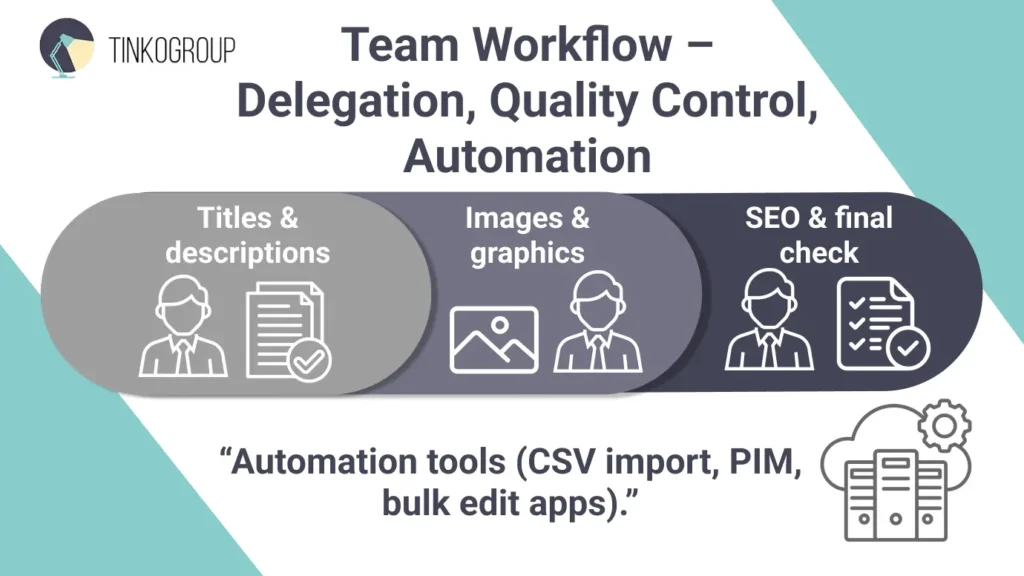
Dividing tasks among team members increases the speed and accuracy of the Shopify product entry process. In small stores, one person is often responsible for everything: writing descriptions, uploading images, and checking attributes. This leads to fatigue and errors.
Practical example. In a store with 800+ products, one manager manually uploaded all the cards, and about 15% of the products contained errors in attributes or names. After distributing responsibilities:
- Content managers create descriptions and write texts with keywords (Shopify product listings, Shopify product upload best practices).
- Designers process images and create graphics.
- Managers check prices, attributes, and SEO data.
Result — the number of errors decreased to 2–3%, and the speed of adding products almost doubled.
Tip: Use checklists for each step — this helps newbies quickly adapt and maintain the quality of Shopify product data management.
Quality Control
Quality control is another critical element. Even when tasks are distributed, errors can occur: images that don’t match names, incorrect attributes, incorrect SEO settings.
In practice. An electronics store implemented a two-level verification process: first, the content manager checks the content, then the quality manager. The result: the number of cards with errors decreased from 12% to less than 1%, and customer satisfaction increased by 20%.
Quality control recommendations:
- Compare titles and images to avoid discrepancies.
- Check that all attributes and SEO meta tags are correct.
- Use periodic audits of the entire catalog to maintain Shopify product upload consistency.
Tools for Automation and Efficiency
Shopify data entry automation allows you to scale your work without proportionally increasing the load on your team. There are various tools for Shopify product upload automation:
- Import via CSV or Excel: allows you to upload hundreds of products at once.
- Integrations with PIM systems: automatically pull descriptions, images, and attributes.
- Shopify apps for bulk editing: help you quickly update prices, tags, and categories.
Example. A home appliance store used an app to bulk upload products with templates. Previously, the team spent 40 hours manually adding 200 products. After implementing automation, the process took only 6 hours, while the number of errors decreased from 10% to less than 1%.
Using these tools helps the team focus on strategic tasks: sales analysis, SEO optimization, and visual content improvement, rather than routine work.
Common Mistakes and How to Avoid Them
Even experienced content management teams at Shopify sometimes encounter common problems that hinder the quality of Shopify product listings and affect sales. One of the most common mistakes is a mismatch between the product name and the image. When a product card is labeled “Red Leather Bag” but the image shows a blue model, shoppers become confused. This not only increases the number of returns but also reduces trust in the store. Stores that have implemented name and image verification as part of their quality control process have seen a 15-20% reduction in returns and fewer customer service inquiries.
Another common problem is incorrectly filled in attributes and missing SEO meta tags. For example, if the size and color are not specified for clothing, buyers will not be able to filter products correctly, and the absence of keywords in descriptions and names reduces visibility in search results. In practice, stores that have implemented attribute verification through import tables and unified templates have reduced the number of errors from 12% to 1-2%, while increasing organic traffic through proper optimization.
There is also a lack of consistency in the format of descriptions. Some managers write text in a continuous paragraph, others use lists, and still others apply different structures for SEO. This unsystematic approach makes it difficult for buyers to perceive information and reduces the effectiveness of SEO. Stores that have standardized their product descriptions have seen a reduction in the time it takes to add new products by about a third and an increase in user engagement on product pages, as the information has become more structured and easier to read.
In general, to avoid these mistakes, it is necessary to implement uniform standards for Shopify product listings, ensure quality control at every stage, and train the team to use templates for names, attributes, and descriptions. This approach not only speeds up the process of adding products but also creates a Shopify product catalog workflow that is easy to scale as the product range grows.
Manual vs. Automated Product Uploads
Adding products to a Shopify store can be done in different ways, and choosing between a manual and automated process directly affects the efficiency of your team and the quality of your Shopify product listings. For small stores with a limited catalog, manual uploading may be optimal, while for large stores with hundreds of products, automation is more suitable. Understanding the advantages and limitations of each approach allows you to build an efficient and scalable Shopify product catalog workflow.
Manual Shopify Product Entry Process
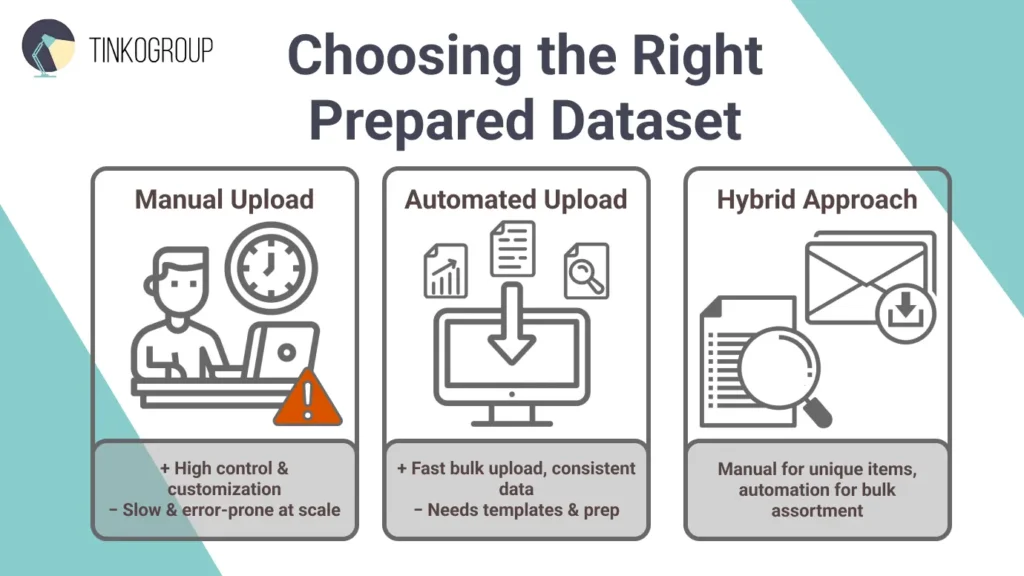
The manual process of adding products to Shopify is the foundation upon which quality control and card customization are built. As part of the Manual Shopify product entry process, each product is created manually, allowing for careful writing of Shopify product listings: names, descriptions, images, attributes, and SEO data. This approach is especially useful for unique or non-standard products where it is important to highlight the product’s features, brand, or exclusive characteristics.
Managers can adapt texts for specific marketing goals, integrate keywords for SEO, and optimize SEO meta tags for each card. For example, when adding designer bags, the manual process allows you to describe in detail the materials, accessories, and unique design elements, which is impossible to do automatically without losing accuracy.
The manual method also gives maximum control over the visual part of the product card. Managers can select the best photos, edit them, add infographics, and adjust images to brand standards. This is especially important for stores where visual presentation directly affects conversion. Stores that have implemented a manual approach have noted that customers return products less often and leave positive reviews thanks to accurate product visualization.
However, the manual process has its limitations. It requires significant time and concentration, especially when working with a large catalog. In large stores, adding hundreds or thousands of products manually can take days, reducing team efficiency. In addition, manual entry is prone to errors: mismatched names and images, typos in descriptions, incorrect attributes. All of this negatively affects Shopify product upload consistency and makes it difficult to scale the store.
To minimize these risks, experienced teams use a combination of templates and checklists. For example, each manager can follow uniform rules for names, descriptions, and attributes, while a separate specialist checks the compliance of SEO data and visual materials with standards. This approach allows you to maintain high-quality Shopify product listings, even when working with large volumes of goods.
The manual method is especially valuable for testing new categories, launching exclusive collections, or rare products that require an individual approach. It provides flexibility, control, and the ability to create truly unique cards that help the brand stand out from the competition and improve customer perception.
Automated Shopify Product Upload Process
Automating the addition of products to Shopify has become an integral part of the work of modern online stores, especially those with catalogs containing hundreds or thousands of items. The automated Shopify product upload process significantly speeds up the creation of Shopify product listings, reducing the human factor and ensuring Shopify product upload consistency. Instead of manual entry, each product is imported in bulk with pre-prepared templates for names, descriptions, images, and attributes.
The automation process involves several steps. First, product data is collected in CSV or Excel files, where all key fields are already specified: names, descriptions, prices, sizes, colors, SKUs, and SEO meta tags. Second, using integrations with PIM systems or special Shopify applications, this data is uploaded to the store in bulk. At the same time, images and additional graphic materials can be synchronized, which guarantees visual compliance with brand standards.
The advantages of automation are obvious. It allows you to process hundreds of products in hours instead of days, reduces the number of errors to almost zero, and ensures the consistency of all product cards. Stores that have implemented Shopify product upload automation have seen the time it takes to add 500 products reduced from four days to six hours, while the number of errors has dropped from 10-12% to less than 1%. In addition, automation allows teams to focus on strategic tasks — improving descriptions, visual presentation, SEO optimization, and marketing activities — instead of routine data entry.
There are various automation tools available. The simplest method is bulk import via CSV, which is suitable for similar products with the same attribute structure. More advanced stores use PIM systems that automatically pull data from external databases, keep prices and inventory up to date, and synchronize images. There are also Shopify apps for bulk editing that allow you to adjust categories, tags, prices, and SEO fields for hundreds of products at once, maintaining a consistent style and format for product cards.
Automation is especially effective for large stores. A well-designed data annotation pipeline logic can be applied to e-commerce data to ensure speed and accuracy. It creates a scalable Shopify product catalog workflow, allowing you to add new products without compromising quality or making mistakes, and to keep data up to date and accurate throughout the product lifecycle.
Combined with manual uploads for unique products, automation creates a flexible and efficient process. This combined approach allows stores to maintain a personalized approach to exclusive items while scaling a mass assortment with high accuracy, minimal errors, and complete data consistency.
Conclusion
Effective management of Shopify product listings is the foundation of a successful and scalable online store. Consistency, accuracy, and competent catalog organization directly affect conversion, SEO, and customer experience. Whether you use a manual method, automation, or a combination of both, the key task remains maintaining the consistency and quality of each product card.
Implementing proven processes, templates, and automation tools helps teams work faster, reduce errors, and create a uniform Shopify product catalog workflow that is easy to scale as the product range grows. Stores that apply these practices report improved search engine rankings, fewer returns, and increased customer satisfaction.
At Tinkogroup, we specialize in optimizing and automating the product listing process for Shopify stores. We help owners and teams create effective and scalable Shopify product listings by combining manual control with modern automation tools. Our goal is to save your team time, minimize errors, and improve the quality of your catalog. Learn more about our services on the Shopify product listing services page.
Create an organized, efficient, and scalable catalog today and ensure your store’s growth and sales stability with Tinkogroup’s expert solutions.
How long does it take to list 100+ products on Shopify?
The timeframe depends on the method: manual entry can take several days to ensure accuracy, while automated or hybrid workflows with Tinkogroup can reduce this to a few hours without compromising quality.
How do consistent product listings improve my store’s SEO?
Consistent titles, structured descriptions, and optimized alt tags help search engines index your products more accurately, leading to a potential 15-30% increase in organic traffic.
Why should I choose a hybrid listing approach over fully automated?
A hybrid approach offers the best of both worlds: automation handles bulk data for speed, while manual oversight ensures that unique features and visual details are perfectly represented to maximize conversions.