


Modern AI models are like live wizards. However, true magic starts long before a model is launched. It all begins with data preparation. People teach computers to see and understand the world, and they need to help the machines to perceive it not only as a collection of static objects but as a dynamic scene. Computers must recognize motion, expression, and details of objects. How do annotators translate the nuanced positions of a body, face, or object into data a machine can learn from? With the help of keypoint annotation.
Keypoint annotation belongs to advanced image annotation methods. Bounding boxes outline objects and segmentation fills them in, but keypoints mark exact spots – the corner of an eye, the tip of a finger, or the bend of a joint. It’s like connecting the dots, where every dot carries vital information about shape, posture, or position.
Most modern AI tools use a keypoint detection method. It powers fun AR filters on social media, as well as serious systems, for example, driver-assistance features in cars that help prevent accidents. However, keypoint annotation is often mixed up with other types of image labeling.
This article will clear up the confusion. You’ll learn what keypoint annotation is, when to use it, where it works best, and what to watch out for if you want to make it part of your computer vision workflow.
What Is Keypoint Annotation?
Keypoint annotation is the process of marking important points on an image or video. These marks are called keypoints or landmarks. They enable computers to understand the position and structure of objects. Every mark is assigned a label and two-dimensional coordinates (x, y). Sometimes, annotators use even three coordinates (x, y, z) if they need to show depth. Everyone can visualize how a cartographer places tags on a map. Keypoint annotation in computer vision works the same – the image is the map, and the keypoints are its most important features.
The idea of image annotation with keypoints is older than the term “keypoint annotation” itself. In fact, the practice goes back to the 1960s, when computer scientists like Woody Bledsoe, Helen Chan Wolf, and Charles Bisson were trying to teach machines how to recognize faces. Their system was half-human, half-machine: a person would sit down with a graphics tablet and manually mark facial coordinates – the pupils, corners of the eyes, and the widow’s peak in the hairline. The computer would then crunch the numbers, comparing distances like eye width or mouth size to try to find a match. It was slow, but it showed the world that annotating points could unlock machine vision.
In the 1970s, Takeo Kanade created one of the first systems that attempted to automatically locate facial landmarks, like the chin or the distance between eyes. It wasn’t perfect, but it was a turning point. Machines were starting to do some of the “dot marking” themselves. Kanade’s 1977 book on facial recognition confirmed the idea that computers could learn from structural points and not only images.
In the 1990s, Tim Cootes and his team introduced Active Shape Models. These models relied on consistent points along the body, face, or other objects. They did not simply recognize a face but mapped its structure by joining points into shapes. This shift toward skeleton-like models made keypoint annotation a must in AI training.
So when did the actual term “keypoint annotation” appear? It actually grew out of necessity. As computer vision moved into the 2000s and 2010s, researchers and companies started building large public datasets – like COCO Keypoints – and commercial annotation tools. They needed a common way to describe the work of marking these critical spots. Thus, “keypoint annotation” became a common term in data annotation, and “landmark annotation” remained a preferred term in medicine or biometrics.
So, we can sum up that a “keypoint” is any important point that shows the shape or function of an object, and a “landmark” is actually the same thing but used for biological or anatomical points.
How Keypoint Annotation Works in Computer Vision
The process has several equally important stages:
Upload images or videos ➝ Bring all your raw images or video clips into an annotation tool to get started.
Set up the keypoint skeleton ➝ Decide which points to track and connect them to form a simple structure of the object.
Place the keypoints on each frame ➝ Annotators carefully mark every important spot – like joints, facial features, or object edges – in each frame.
Review for accuracy ➝ Go through the dataset to make sure points are consistent and precise and correct mistakes, if any.
Export the annotated data ➝ Save the dataset in a format that AI or machine learning models can use to learn.
Use interpolation to fill in the rest ➝ Many tools let you label only key frames, and the software automatically fills in the intermediate frames.
Keypoint vs. Landmark Annotation – Is There a Difference?
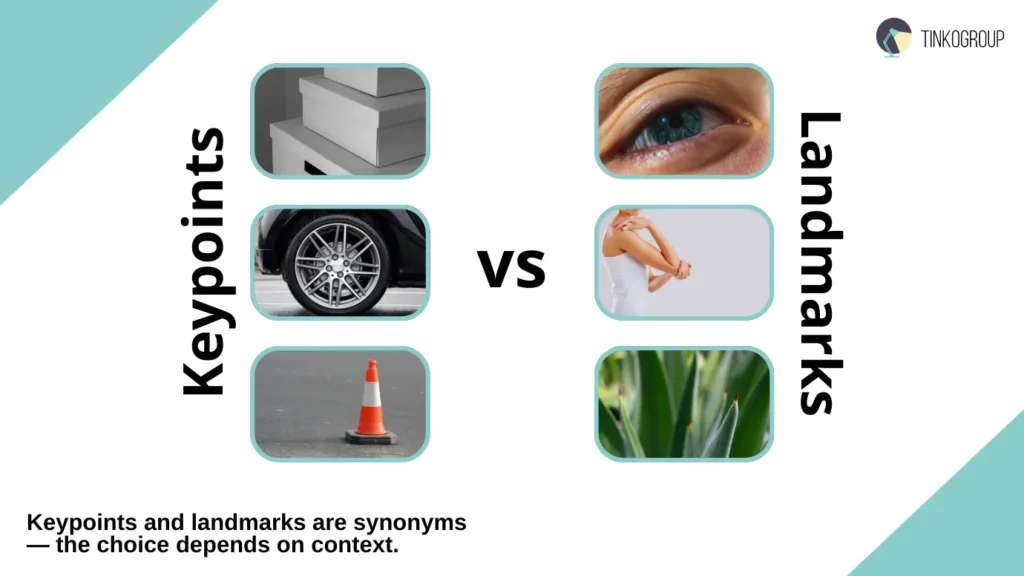
A keypoint and a landmark are synonyms. But are they interchangeable in a data labeling process? Actually yes. The choice of term may depend on context, community, and personal preference. However, there is still a little nuance:
Keypoint is a general term for any point that is important for describing the shape, position, or condition of an object. It can be the corner of a cardboard box, the center of a wheel, or the tip of a traffic cone. Keypoints are used in robotics, industrial automation, and object detection and help machines better understand the structure of things.
Landmark is usually used in biological or anatomical settings. It means a natural, stable, and easily recognizable point on a living or organic being. These are the corners of the eyes, joints on the body, or points on a leaf. Landmarks help AI models understand the shape and movement of organic objects more accurately.
Why Do Different Teams Use Different Names?
You may have noticed that some teams say “keypoints” and others prefer “landmarks.” Why is it so?
Academic background. Landmarks are common in the fields of biomechanics, anatomy, or anthropology. It emphasizes natural, anatomical points. Meanwhile, teams in robotics, industrial automation, or general computer vision tend to use “keypoint” because it’s a broader term for any important point on an object.
Tools. The annotation software you choose can influence terminology, too. Many platforms standardize one term throughout their interface. If you use a particular tool, you will also adopt its preferred language.
Project focus. The type of project also matters. Facial emotion recognition is always “facial landmarks,” and a robotics project uses “grasping keypoints.” The terms are tied to what the points represent and how they’re used.
So, what’s the industry standard? Major annotation platforms and tools support both terminologies. So, you shouldn’t worry too much about whether you call them “keypoints” or “landmarks.” Focus on the consistency of your project. Make sure every point is clearly defined in your guidelines, choose a term that works for your team, and stick with it. When you’re picking annotation tools or outside services, focus on whether they can handle the kind of point labeling you need – the name itself isn’t important.
Where Keypoint Annotation Is Used
You may believe keypoint annotation is a niche technical term, but its impact is everywhere. It gives a computer the ability to see objects in detail. When AI knows exactly where important points are, it can analyze movement, predict what may happen next, and even interact with the environment. In short, it turns simple recognition into true understanding.
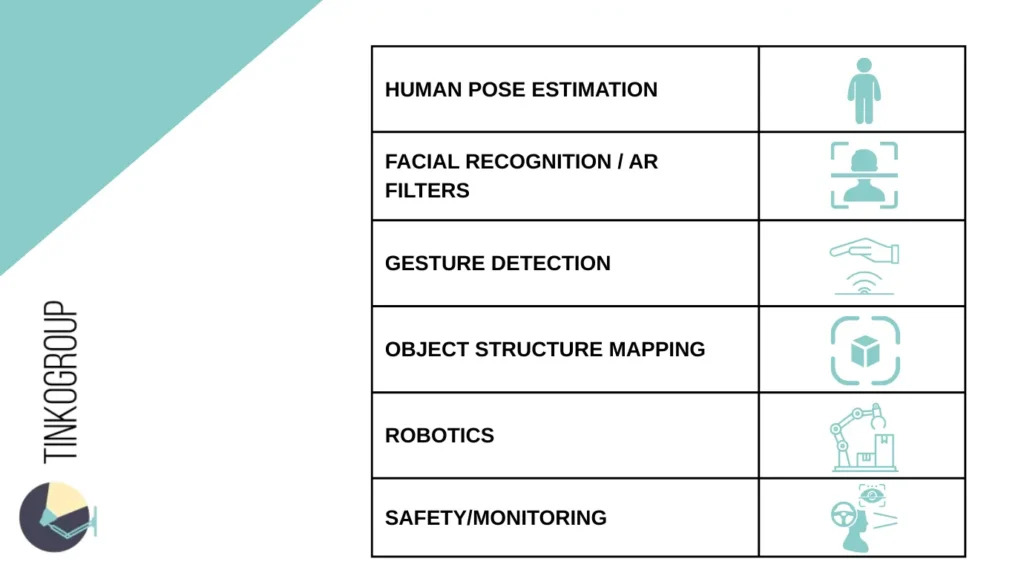
Human Pose Estimation
One of the coolest and most common uses of keypoint annotation is teaching computers to read the human body. For this, annotators put digital points on joints – shoulders, elbows, hips, knees, ankles – and AI can sketch a skeleton and follow how a person moves through space.
And this is not laboratory research anymore. Pose estimation annotation is already inside many apps we use. HomeCourt, for example, turns your phone into a basketball coach. It uses pose estimation and tracks your shooting form, measures your jump height, and gives you real-time feedback. The same tech is used in physical therapy apps, helping patients make sure they’re doing exercises the right way and avoiding injuries. Many keypoint detection models use OpenPose, an open-source project that made large-scale pose estimation possible.
Facial Recognition and Analysis
It’s incredibly difficult to teach a computer to read facial expressions. But landmark annotation can help a lot. Annotators mark dozens of points around the eyes, mouth, nose, and jawline and create a detailed facial map that AI can interpret.
You have definitely used social media apps with this feature. Instagram and Snapchat use this technology to align AR filters like sunglasses, puppy ears, or makeup effects. Thanks to facial keypoints, the filters move naturally as you smile, wink, or turn your head.
Gesture Detection
Our hands are second only to our faces when it comes to expression. With keypoint annotation on fingers and joints, AI models can interpret absolutely any gesture, from a simple wave to a complex hand signal.
This has been a breakthrough for touchless interfaces. In hospitals, doctors can flip through scans without touching a screen and keep sterile environments clean. In public spaces, kiosks can respond to pointing or waving instead of button presses, cutting down on germ spread.
In VR, hand tracking has made much more serious experiences. Systems like Meta’s Quest hand tracking or Google’s MediaPipe Hands use keypoint-based models to translate your real movements into the virtual world. You don’t need clunky controllers, as your hands themselves become the interface.
Object Structure Mapping
Keypoints work for objects equally well. Structural points on objects give AI a deep understanding of how they’re built and how they behave.
Take manufacturing, for example. Factories use AI to check if products are assembled correctly. They mark keypoints on a car chassis, for example, and the system checks if every part is aligned perfectly. Even a tiny deviation can be flagged before the car leaves the assembly line.
Or look at autonomous vehicles. Self-driving cars rely heavily on keypoints to map and track other vehicles, bicycles, and even pedestrians. It’s not enough to see “a car” – they need to know where its wheels and edges are to predict how it will move. This structural mapping makes navigation safe.
Robotics
Keypoint annotation has seriously changed robotics. Robots don’t have intuition, so they need a roadmap to interact with the physical world. Keypoints give them that.
In warehouses, robotic arms use keypoint maps to pick up boxes, mugs, or oddly shaped objects without dropping or damaging them. In hospitals, surgical robots rely on keypoints to identify anatomical landmarks and perform procedures with sub-millimeter precision. In factories, robots assembling tiny electronics use them to ensure every component is placed in the right spot.
What’s exciting is that robotics plus keypoint annotation is moving closer to human-like dexterity. We’re watching machines learn how to “see” not just in terms of objects but also in terms of structure, alignment, and movement.
Safety and Monitoring
Keypoint annotation isn’t just about efficiency or entertainment—it plays a critical role in keeping people safe. By analyzing body posture and facial markers in real-time, AI systems can prevent accidents before they happen. Driver Monitoring Systems are a prime example. Modern vehicles use facial keypoints to track driver fatigue or distraction. If the system detects that your eyes are closing or your head is nodding off, it sounds an alert.
Security and Public Safety also rely on this technology. Smart cameras can now watch for unusual body movements rather than just recording video. They can automatically detect if a person falls, shows signs of aggression, or struggles with a heavy load, sending an instant alert to security personnel.
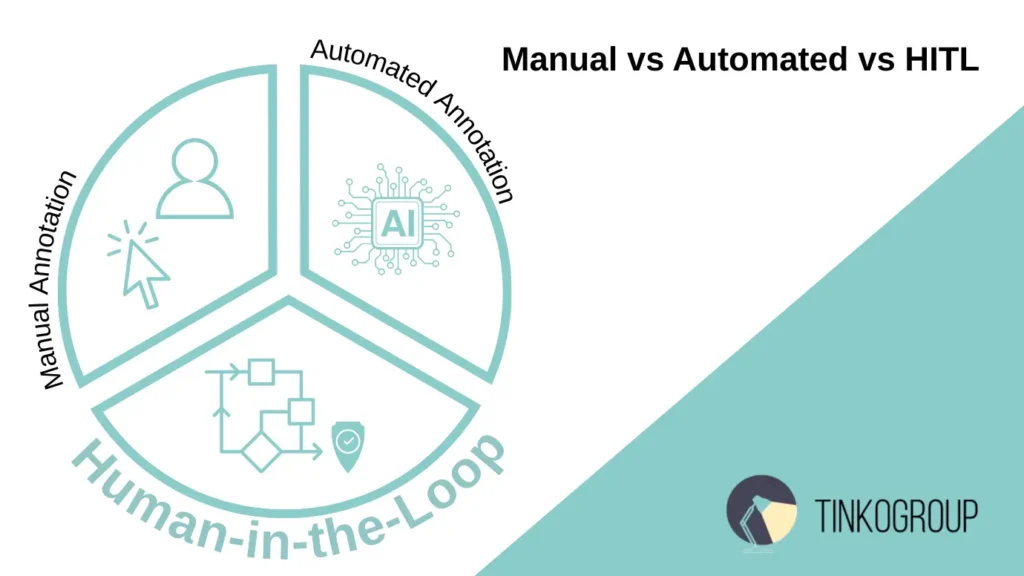
Manual vs Automated vs HITL
Teams often hesitate on whether to rely on humans, machines, or a mix of both for annotating keypoints. Each approach has its strengths and weaknesses.
Manual Annotation
Manual annotation means human annotators carefully place every keypoint by hand. This method has a clear advantage, as it offers the highest level of accuracy. It’s essential for creating initial “ground-truth” datasets and is often the only choice for complex objects or entirely new types of data where there are no pre-trained models.
But manual annotation comes with drawbacks. It’s slow, complicated, and expensive. Annotators can also experience fatigue, which can lead to mistakes. Even if it’s the gold standard for accuracy, the human-only approach is not suitable for big projects.
Automated Annotation
You can use machines to do the job. A trained model can pre-annotate thousands of images instantly and reduce cost and effort. Automation also ensures consistency, because the model applies the same logic to every frame or image.
However, this method isn’t perfect either. It requires a pre-trained model, which itself depends on an initial manually annotated dataset. If the model isn’t highly accurate or lacks human oversight, it can lead to errors and flawed annotations.
The Winner Is Human-in-the-Loop (HITL) System
You will get the best outcomes when you involve both humans and machines. In this case, a small set of data is first manually annotated to create a reliable ground truth. This data trains a preliminary model, which then suggests keypoint locations on new images.
Humans review and correct the model’s suggestions and don’t annotate from scratch. These corrections are fed back into the model, making it more accurate over time.
So, you get a virtuous cycle where human expertise guides the AI, and automation handles the repetitive work. HITL systems are fast, scalable, and precise – the best solution for modern keypoint annotation pipelines.
Key Challenges in Keypoint Annotation
At first glance, keypoint annotation looks simple – you drop dots on joints, faces, or objects and move on. But anyone who’s actually done it knows how tricky it can be. Every little detail matters, and sometimes more than you think.
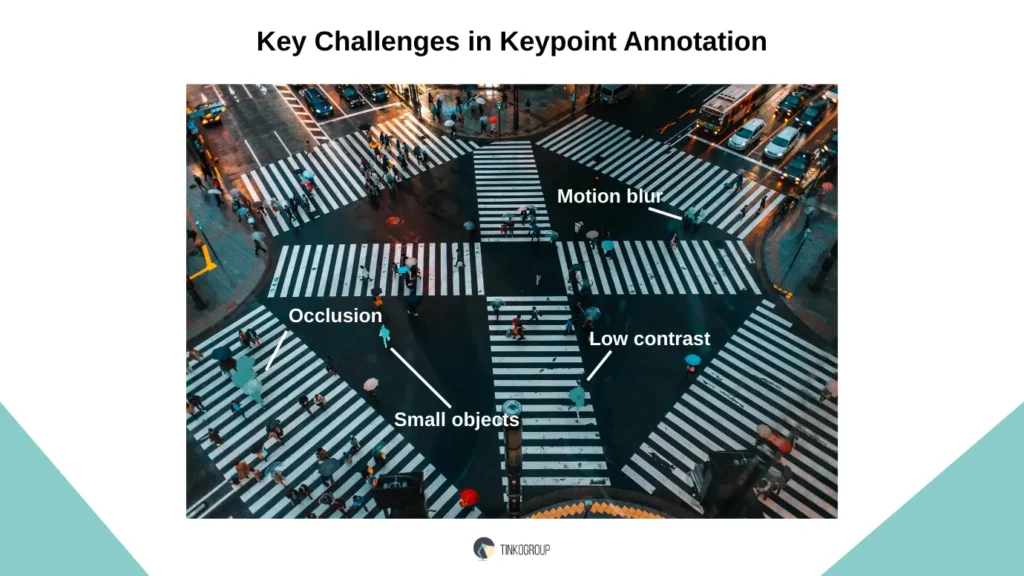
Occlusion. Even one pixel off can mess things up. For example, if a wrist keypoint is marked slightly too high, the model may think an arm is bent at a different angle. That small slip can lead to totally wrong predictions.
Consistency. Two people may see the same image differently. One annotator may place a “shoulder” here, another slightly there, especially if the person is in a jacket or turned sideways. Without clear rules, these tiny differences pile up and confuse the model.
Low contrast. Sometimes, not every point is visible. How do you make marks in this case? Do you guess? Skip it? Mark it as hidden? Teams need guidelines for these moments; otherwise, annotations become full of mistakes.
Small or moving objects. Try putting keypoints on a blurry basketball video or a tiny machine part zipping along a conveyor belt. It’s tough. Annotators have to pause, zoom in, and replay frames, and even so, it’s still easy to miss. Plus, it’s tiring work.
Sometimes there isn’t one right answer. Deciding exactly where to place a landmark isn’t always obvious, which makes the work of annotators really hard.
How to Ensure Quality in Keypoint Annotation
Good keypoint annotation requires a bit of planning. Successful projects keep an eye on quality at every step, from the start to the finish. Here’s what you can do:
- Set clear, visual rules. It starts with clear rules that help everyone understand what to do:
- Examples you can see. Show images of where a keypoint should and shouldn’t go. Visuals are much easier to follow than text alone.
- What to do when points are hidden. If a shoulder is covered by clothing or a hand is out of frame, explain whether annotators should mark it as hidden, skip it, or make their best guess.
- How precise to be. Set a clear standard, like “within two pixels of the joint,” so everyone knows what counts as accurate.
- Tricky situations. Odd poses, poor lighting, or unusual shapes will come up. Spell out how to handle them so annotators don’t have to guess.
- Check early and often. Quality doesn’t happen on its own; you have to build it in. A few simple checkpoints can make all the difference:
- Check for consistency. Compare how different annotators label the same image to spot any drift in interpretation.
- Layer in reviews. Let senior team members review everything at an early stage. Once things are steady, switch to spot checks.
- Use smart tools. Use specialized platforms to catch mistakes, like missing keypoints or markers placed outside the image.
- Train your team. If you believe that a PDF file with instructions is enough, you will never succeed. Let annotators practice on real images, run through tricky cases together, and give feedback in real time. A little effort here saves endless rework later.
- Don’t ignore edge cases. Sooner or later, each annotator will come across weird poses, bad lighting, and blurry video frames. Decide upfront how you want them handled and document it. This way, annotators won’t be inventing their own rules as they go.

Reliable Data Services Delivered By Experts
We help you scale faster by doing the data work right - the first time

Tools for Keypoint and Landmark Annotation
The success of your annotation project largely depends on the tool you use for it. A good platform saves you hours of manual work, simplifies the task for your team, and guarantees the overall quality. You will find many keypoint annotation services online. But how do you know which one fits your needs best? Let’s walk through some of the most popular tools used in research and industry today.
CVAT (Computer Vision Annotation Tool)
CVAT is an open-source tool that is rich in features and free to use. It is ideal for developers, small teams, or researchers who want more control over the data labeling process.
Benefits. The platform allows you to create custom keypoint skeletons for tracking human poses. You can also pre-define a set of connected keypoints (e.g., a human body with 17 joints) to standardize the annotation process and save time. CVAT has a helpful community where people share tips, tricks, and plugins.
Considerations. You need a bit of technical knowledge for platform deployment. So, CVAT is not the easiest choice for beginners
CVAT is a great option if you want flexibility and customization and have the technical resources for the setup work.
V7
V7 is a modern, cloud-based platform that helps teams speed up the entire annotation process. It’s designed for groups that want to work quickly and make the most of AI-assisted tools.
Benefits. Keypoint annotation is very intuitive – you can easily create custom skeletons for anything, from human poses to mechanical parts. The platform’s automation is a real time-saver: its built-in AI can pre-label your data, so annotators spend less time starting from scratch. The clean, user-friendly interface also makes it easy for new users to get going.
Considerations. V7 is a paid keypoint annotation tool, and costs can add up for large datasets or projects with advanced enterprise features.
V7 is ideal if you want a smooth, automated workflow that minimizes manual work, and your budget allows for a premium tool.
Labelbox
Labelbox is a cloud-based platform for teams handling large, complex AI projects. It’s designed to help organizations manage big datasets, multiple annotators, and thorough quality checks.
Benefits. Labelbox makes keypoint annotation flexible and customizable, so you can set up unique schemas for your project. Its collaboration tools are top-notch and let teams review work and track progress. The developer API is also strong and easy to integrate into larger workflows.
Considerations. The tool is aimed at enterprises and can be pricey for smaller teams or solo researchers. Its many features can also feel a bit overwhelming at first.
Labelbox is fine if you’re part of a large team that needs a reliable, scalable platform that keeps everyone on the same page.
Supervisely
Supervisely is a landmark annotation tool that is easy to use but has powerful features. It works in the cloud or on your own servers and is very flexible.
Benefits. Beyond simple keypoints, Supervisely can handle complex graph structures that link landmarks, which is great for medical, biological, or industrial projects. It also combines dataset management and neural network training in one place, so you can move smoothly from labeling to improving your models.
Considerations. If you’re new to annotation platforms, you may be confused by so many options and customization possibilities.
Supervisely is a solid choice if you need a flexible, powerful tool for specialized projects and want training tools built right into your workflow.
Amazon SageMaker Ground Truth
Amazon SageMaker Ground Truth is Amazon’s built-in solution for data labeling, designed to slot neatly into the broader AWS ecosystem. For teams already working heavily in AWS, it feels like a natural extension of the workflow.
Benefits. Its biggest plus is integration. You can store data in S3, label it in Ground Truth, and train models in SageMaker without ever leaving the ecosystem. It easily scales, and you don’t have to build your own annotation workforce from scratch.
Considerations. Costs are on a pay-as-you-go basis, which is convenient, but the tool can get expensive for large projects. The platform also depends on AWS, which is restrictive if you prefer more flexible, standalone tools.
Ground Truth is a smart choice if you use AWS and want a streamlined, cloud-based solution for labeling.
| Tool | Type | Keypoint Support | Best For | Pros | Cons |
| CVAT | Open-source, self-hosted | Excellent, custom skeletons | Researchers, devs | Free, video interpolation, active community | Needs technical setup, basic UI |
| V7 | Cloud SaaS | Strong, custom templates | Teams needing automation | Polished UI, auto-annotation, dataset mgmt | Expensive at scale |
| Labelbox | Cloud SaaS | Full support | Enterprise teams | Robust collaboration, strong API | Costly for small projects |
| Supervisely | Cloud & self-hosted | Advanced graph structures | Medical/industrial use | Flexible, NN training integration | Steeper learning curve |
| AWS Ground Truth | Cloud (AWS) | Custom templates | AWS teams | Tight AWS integration, scalable workforce | Expensive, less flexible outside AWS |
How to Choose a Keypoint Annotation Provider
Don’t underestimate the role of the annotation partner. The success of your model fully depends on the data it learns from. So, these few steps will help you find a decent vendor:
Look for Experience
Find providers with expertise in your field. Ask how their annotators are trained and what landmark annotation techniques and guidelines they use.
Prioritize Safety
Main things to check are encryption, strict access controls, and compliance with regulations (GDPR, HIPAA and the like). Ask how your data is protected and if it can be safely deleted after the project.
Scalability and Speed
Even a small project may grow and need hundreds of thousands of images annotated. Check if your provider can scale without quality issues and delays.
Check Prices
Before you sign a deal, check how much you will pay per keypoint or per image or per project. Make sure there are no hidden fees.
Some landmark annotation outsourcing providers can speed up your project – they use AI to pre-mark points, check quality automatically, or provide custom tools. These extras help make the work faster and more accurate.
Keypoint annotation teaches AI to see the world in fine detail. It allows computer vision models to analyze human motion, recognize facial expressions, and inspect industrial parts with precision. Sure, it comes with challenges, but the right process and experts make it achievable.
Looking for expert help with keypoint annotation?
Tinkogroup knows keypoint and landmark annotation inside out. Our team brings experience, careful quality checks, and keypoint annotation best practices to come up with accurate and reliable data.
Don’t let annotation bottlenecks slow your project or introduce costly errors. Reach out to Tinkogroup for a free consultation, and let’s create a high-quality dataset your AI can truly learn from!
What is the difference between keypoint annotation and bounding box annotation?
Bounding boxes only outline objects, while keypoint annotation marks precise points that describe structure and movement, such as joints, facial features, or object edges. Keypoints allow AI models to understand posture, motion, and spatial relationships, not just object presence.
How many keypoints are usually needed for one object?
It depends on the task. Human pose estimation commonly uses 17–33 keypoints, facial analysis may require 68 or more landmarks, and industrial objects can need anywhere from a few structural points to dozens. The key rule is to use enough points to capture movement or structure without adding unnecessary complexity.
Can keypoint annotation be automated without losing accuracy?
Fully automated keypoint annotation is rarely accurate on its own. The best results come from a Human-in-the-Loop approach, where AI pre-labels keypoints and human experts review and correct them to ensure consistency and high-quality training data.