


Project leads in the AI sector often emphasize a crucial point: “Custom tagging and attribute annotation are fundamentally different, and confusing them is a risk no project should take.” Looking back at the era before advanced neural networks, data was collected manually—employees spent hours marking each object. Mistakes were costly, and models often “learned” incorrectly.
Now that automatic generators and pre-trained models are available, many companies assume minimal effort is enough. However, understanding the distinction between custom tagging and attribute annotation is critical for model accuracy and gaining real business insights.
The purpose of this article is to help readers understand when simple tags are sufficient and when the depth of model attribute annotation is critical for models to work accurately and for businesses to gain real insights. The article is intended for product managers, founders of AI startups, and data scientists who are considering outsourcing training data annotation.
What Is Custom Tagging?
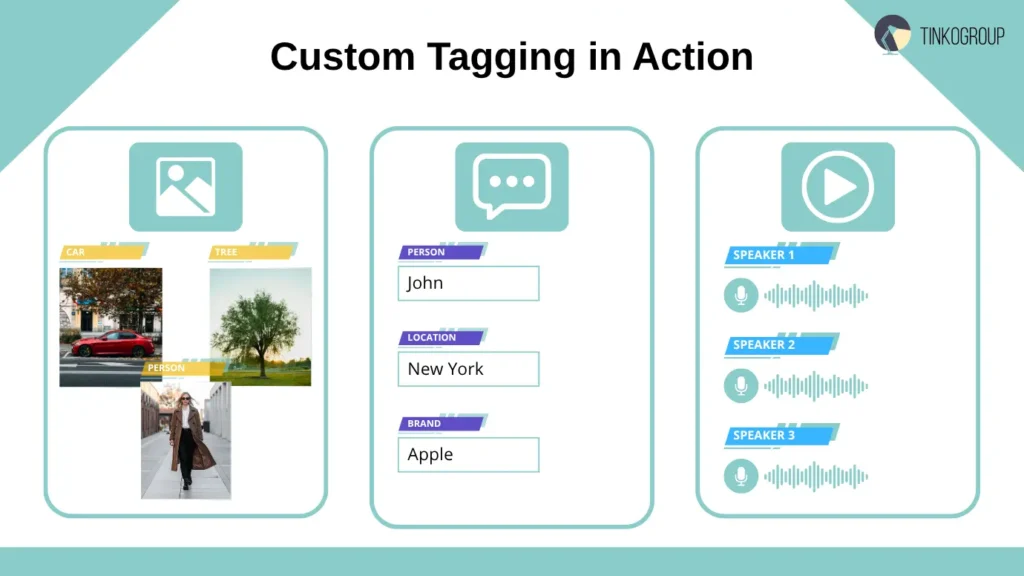
Custom tagging is the process of categorizing data, in which each object is assigned a label describing its class.
Real-world examples from projects:
- Computer vision annotation. When training a model to recognize vehicles, images were labeled as “car,” “motorcycle,” or “bicycle.” Here, it was important to quickly process thousands of photos without delving into details such as brand or color.
- Text. Our team worked on a review analysis system where each review was labeled as “positive,” “negative,” or “neutral.” This is a classic example of basic custom tagging, allowing the model to quickly learn to distinguish the general tone of the content.
- Audio. When working on a system for transcribing calls between operators and customers, audio files were divided into segments labeled “speaker A” and “speaker B,” which allowed the model to understand who was speaking at any given moment.
Advantages:
- Easy to implement and train annotators.
- Lower cost than complex attribute annotation.
- Scalability for large data sets.
Limitations:
- Low detail: the model does not understand nuances.
- Only suitable for basic classification.
- For complex tasks, such as contextual recommendations, additional information is needed.
Practitioner tip: Many startups use custom tagging solutions for MVP when the task is to quickly train the model, test the hypothesis, and get the first results.
What Is Attribute Annotation
Attribute annotation is the process of adding properties or characteristics to each data object to give the model a deeper understanding of the context. If custom tagging answers the question “what is it?”, then attribute annotation answers the question “what properties does this object have?”.
Real-world examples:
- Car: In a project for an automotive marketplace, simply labeling an object as a “car” was not enough to meet the client’s needs. Thanks to these attributes, the system could sort cars by color, brand, and type. Such detailed data is a cornerstone of how AI revolutionizes the automotive industry. To train a model that could truly power a high-end search engine, our team didn’t just annotate “car”—we added specific attributes:
color = red
type = sedan
brand = Tesla
Thanks to these attributes, the system could sort cars by color, brand, and type, making the search more accurate and personalized for buyers.
- Text sentiment: In an NLP project to analyze product reviews, the team used attribute annotation, noting not only the tone (positive/negative/neutral) but also the subject of discussion. For example:
tone = positive
subject = product feature
This allowed the model not only to determine the overall tone, but also to understand which product features customers were talking about.
Voice: when working on AI for call centers, audio segments were tagged with attributes of emotions and voice characteristics:
emotion = anger
pitch = high
speaker_role = customer
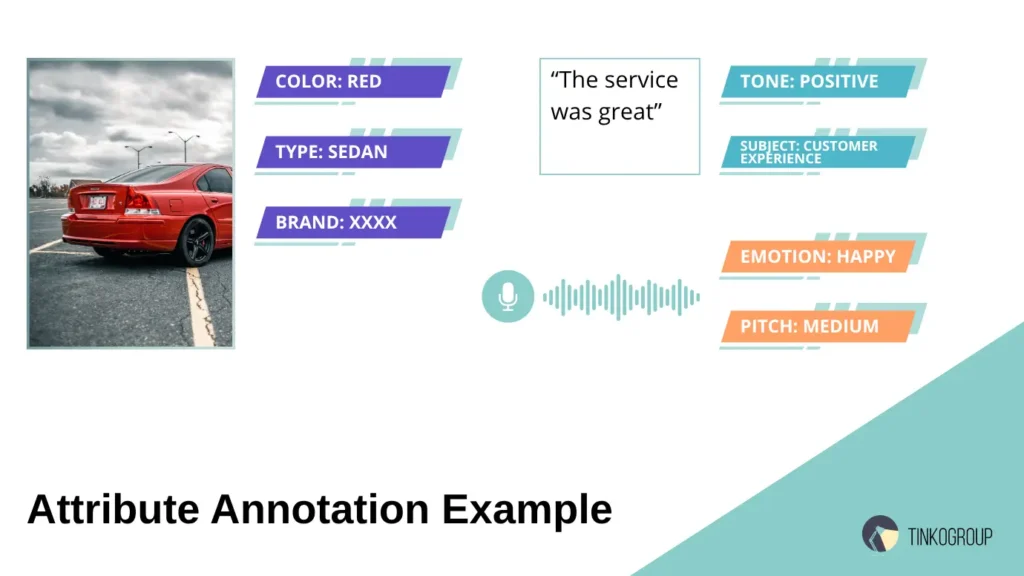
This approach helped models recognize emotional states, identify key moments in conversations, and provide recommendations to operators in real time.
Advantages:
- Rich data — models receive context that allows them to make more accurate decisions.
- Context-dependent AI — the system understands nuances that cannot be captured by simple tags.
- Improved user experience — search, recommendations, and classification become more accurate.
Complexities and challenges:
- Complex annotation rules — it is necessary to clearly describe which attributes to assign and how to assign them so that different annotators act in the same way.
- More labor-intensive annotation quality assurance — checking inter-annotator agreement becomes critically important.
- Increased costs — training annotators and verifying data requires more time and resources.
Real-life Case Study
In an autonomous driving project, our team encountered a situation where drivers and pedestrians looked the same in videos for a simple model with tags. Only the introduction of model attribute annotation allowed the addition of attributes: “pedestrian → crossing = yes/no, direction = left/right, age_group = adult/child,” which dramatically improved the model’s accuracy in predicting road behavior.
Custom Tagging vs Attribute Annotation — Key Differences
Our team often uses a simple analogy in meetings with clients and partners to clarify the distinction:
“Custom tagging answers the question ‘What is this?’, while attribute annotation answers the question ‘What properties does this object have?'”
This helps business and technical leaders quickly understand the difference between the approaches and plan training data annotation techniques correctly.
Comparison table:
| Parameter | Custom Tagging | Attribute Annotation |
| Question | What is this? | What is it like? |
| Detailing | Low, basic categories | High, object characteristics |
| Application | Basic classification, filters | Context-dependent tasks, analytics, recommendations |
| Complexity | Simple implementation, easy custom tagging solutions | Requires detailed annotation guidelines, complex QA |
| Cost | Cheaper | More expensive, requires qualified annotators |
| Advantages | Fast, scalable, cost-effective | More accurate models, context-aware AI, better UX |
A Real-Life Example
In a project for a large e-commerce platform, our team decided to test the effectiveness of both approaches.
Custom tagging: all products were tagged by category — “shoes,” “clothing,” “accessories.” The model quickly learned the basic classification, but could not distinguish between “red Nike sneakers 42” and “blue Adidas sneakers 41.”
Attribute annotation: each product was assigned attributes — color, brand, size, type. The model began to understand complex user queries and provide accurate recommendations.
Conclusion: these approaches do not compete with each other, but complement each other. For an effective project, you need to use custom tagging data comparison to understand where simple tags are sufficient and where attributes are critical.
[
{
“object”: “sneaker”,
“tags”: [“footwear”, “sports”],
“attributes”: {
“brand”: “Nike”,
“color”: “red”,
“size”: 42,
“type”: “running”
}
},
{
“object”: “sneaker”,
“tags”: [“footwear”, “sports”],
“attributes”: {
“brand”: “Adidas”,
“color”: “blue”,
“size”: 41,
“type”: “casual”
}
}
]
Expert commentary: JSON demonstrates how the combination of custom tagging and model attribute annotation transforms simple classification into a powerful tool for search, analytics, and personalized recommendations.
When Are Simple Tags Enough?
Deep attribute annotation is not always necessary for a project. Sometimes simple custom tagging is enough to quickly train a model and achieve business goals. Our experts cited an example from her first startup: the team was working on a spam filtering system for corporate email.
Real-life examples of simple tagging
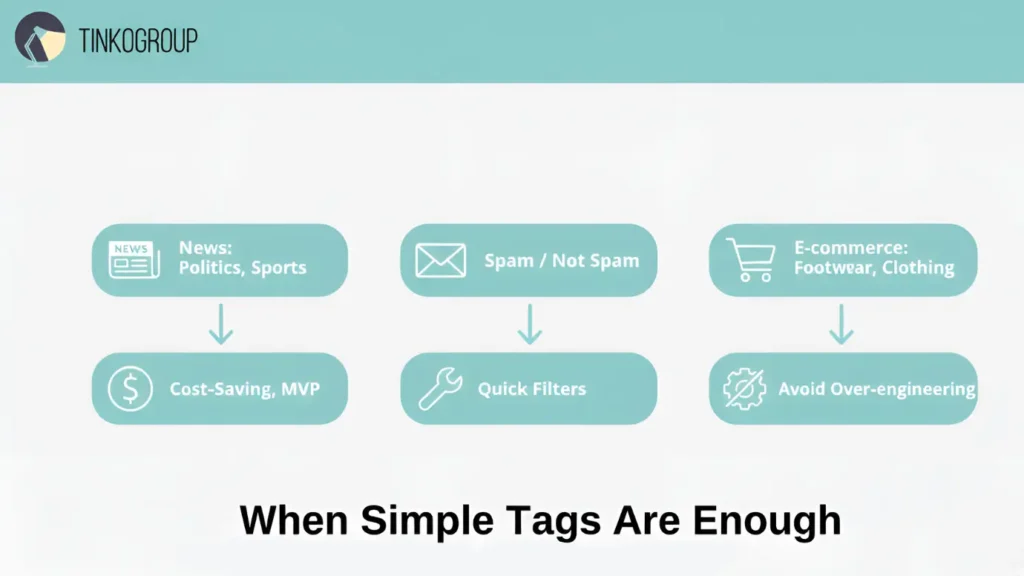
- Basic classification tasks. In a project for a news aggregator, articles were classified as “politics,” “sports,” or “technology.” Custom tagging allowed the model to quickly distinguish between categories without additional attributes. Time saved on annotation: the team processed tens of thousands of articles in a week.
- Spam detection (spam / not spam). For the email platform, it was enough to assign “spam” or “not spam” tags to emails. Attributes such as “subject,” “tone,” and “emotion” were unnecessary—the task was purely binary.
- Product categorization in e-commerce. At the initial stage of the marketplace, products were labeled according to basic categories such as “footwear” or “clothing.” This basic custom tagging
allowed the platform’s MVP to be launched. For those looking to maintain this efficiency at scale, a consistent Shopify product upload process is essential. - Cost-saving scenarios. In startups with limited budgets, simple custom data tagging helps minimize the cost of training annotators and QA.
- Avoiding over-engineering annotation. Sometimes overly detailed annotation hinders a project: the model becomes overloaded with unnecessary attributes, and the team spends resources on checking unnecessary data.
Custom tagging solutions are ideal for tasks where quick classification, basic filtering, or budget savings are sufficient. The main thing is to understand that this is only the first step, and more complex models will require attributes.
When Do You Need Attributes?
In projects where accuracy, context, or personalization are important, attribute annotation becomes not just useful, but critically necessary. A common principle we follow is: “Tags give direction, attributes give depth.”
- E-commerce search:
- Scenario: a user searches for “red Nike sneakers, size 42, men’s.”
- Without attributes: a model with custom tagging only sees “shoes → sneakers” and returns hundreds of irrelevant products.
- With attributes: the model takes into account color, brand, size, and gender, allowing it to return accurate results.
- Effect: in one marketplace project, search conversion increased by 27% and average search time decreased by 35%.
- Expert comment: “Without attributes, any attempt at personalization becomes a guessing game.”
- Autonomous driving:
- Scenario: A self-driving car’s camera detects pedestrians, cyclists, and cars at an intersection.
- Attributes: crossing = yes/no, direction = left/right, speed, age_group = adult/child.
- Result: The model predicts the behavior of objects, avoids false positives, and reduces accidents.
- Real-world case: in a pilot project for autonomous transport, the accuracy of predicting pedestrian behavior increased from 82% to 96% after the introduction of model attribute annotation.
- Healthcare imaging:
- Scenario: analysis of medical images to detect tumors.
- Attributes: size, stage, tumor type, location.
- Effect: Doctors receive reliable recommendations for diagnosis, increasing trust in AI.
- Real-life case: In an oncology project, a system with attributes detected small tumors with 94% accuracy, while basic classification without attributes achieved only 78% accuracy.
- NLP sentiment analysis:
- Scenario: analysis of product reviews.
- Attributes: tone = positive/negative, subject = product feature, intensity = high/medium/low.
- Effect: AI is able to identify the strengths and weaknesses of a product and build analytics based on specific features, not just the overall tone.
- Expert comment: “Without attributes, marketers only see general trends, but do not understand what exactly the customer likes or dislikes.”

Reliable Data Services Delivered By Experts
We help you scale faster by doing the data work right - the first time

Why Attributes Are Critical
Attributes play a critical role in training AI models because they allow the system to see not just the class of an object, but its specific characteristics. When a model receives attributes, it understands what kind of object it is dealing with: its color, size, brand, age group, and other properties, which directly affect the accuracy of predictions. For example, in one e-commerce project without attributes, the system returned all “red bicycles” without distinguishing whether they were intended for children or teenagers. After implementing attributes, the accuracy of searches for “children’s red bicycle” increased by 30%, and the number of irrelevant results decreased by almost half.
In addition, attributes allow models to make decisions based on context. In an autonomous driving project, for example, the system must distinguish between pedestrians: the same “pedestrian” object behaves differently depending on age, direction of movement, and whether they are crossing the road. Without these characteristics, AI sees everyone the same, which can lead to errors and reduced road safety.
The use of attributes also directly improves the user experience. In services with product search, recommendations, and analytics, when data is marked with attributes, users get fast and accurate results. When searching for “blue Nike sneakers size 42,” only detailed tagging with attributes provides relevant products, speeds up the selection process, and increases trust in the platform. Simple tags in such cases do not provide the necessary accuracy and can create inconvenience.
Correct annotation of attributes also saves resources in the long run. When data is structured from the outset, the model learns more accurately and requires fewer adjustments and retraining. This reduces the cost of the annotation and development team, lowers the risk of errors, and speeds up the implementation of AI systems.
As a result, attributes transform simple classification into a tool for real-world AI applications. They add depth and context, allowing models to understand the characteristics of objects, make more accurate decisions, and provide users with relevant and fast results. For businesses, this means not only improving the accuracy and efficiency of models, but also adding real value to AI training data, turning annotation into a strategic resource that directly impacts product success.
Common Mistakes in Using Tags & Attributes
Even experienced teams sometimes make mistakes when annotating data. Our team has seen projects nearly fail because of a careless approach to tags and attributes. Below, we will examine typical problems and ways to avoid them.
Mixing Tags and Attributes
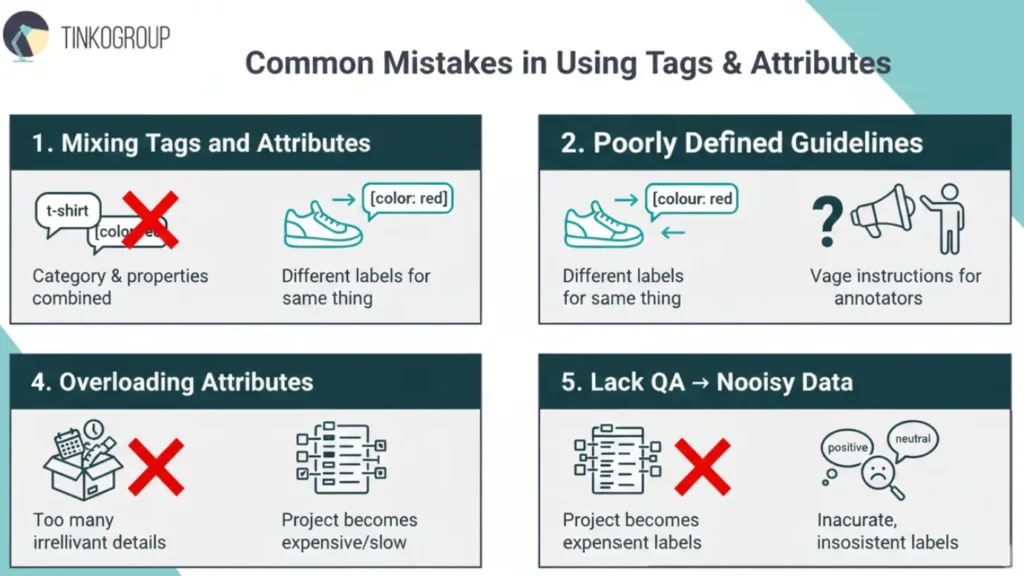
One of the most common mistakes is confusing custom tagging and attribute annotation. Teams sometimes combine the category and properties of an object in a single field. For example, when annotating clothing, instead of separating tags = “t-shirt” and attributes = {color: red}, annotators simply write “red t-shirt” in a single field. This creates confusion for the model: it does not understand what is a class and what is a characteristic. In a real marketplace project, this error led to inaccurate searches by color and product type, and recommendations showed irrelevant items. The expert advises to always clearly distinguish between tags and attributes so that the model can distinguish between “what it is” and “what properties it has.”
Inconsistent Attributes Across Datasets
Another common mistake is the inconsistent use of attributes in different parts of the dataset. For example, some annotators wrote “color = red,” others wrote “colour = red,” some used “size = M,” and others used “size = Medium.” Such discrepancies create noisy data, and the model begins to treat identical objects as different categories. In a shoe classification project, this led to a 12% decrease in the accuracy of filter searches. The expert emphasizes that standardized annotation guidelines and attribute dictionaries are essential for consistent labeling.
Poorly Defined Annotation Guidelines
Poorly designed instructions for annotators are another mistake that is often hidden. For example, in an audio analysis project, annotators were instructed to “mark the emotion in the recording” without specifying what to consider a “neutral” or “strong” emotion. As a result, each annotator interpreted emotions in their own way, which led to low inter-annotator agreement. The expert notes that detailed annotation guidelines, examples, and a glossary of terms are critical to ensuring data quality.
Overloading Attributes with Irrelevant Details
Sometimes teams overload attributes that are not needed for the model. For example, when tagging products on e-commerce platforms, they added “box weight” or “date of manufacture,” even though the model only used brand, color, and size. Such overloading increases the cost of the project, complicates QA, and can reduce the effectiveness of the model, as it begins to take unnecessary features into account. The expert advises to record only those attributes that actually affect the task.
Lack of QA → Noisy Data
Finally, the lack of quality control is a critical mistake. If you don’t regularly check annotations and inter-annotator agreement, the data becomes noisy. In an NLP project analyzing product reviews, the same review was labeled as positive and neutral by different annotators, which reduced the model’s accuracy by 15%. The expert emphasizes that regular consistency checks are vital. Without them, dataset quality suffers, and poorly annotated data can ultimately sabotage your AI models.
How to Decide the Right Level of Annotation Detail
Choosing the right level of detail when annotating data is not just a technical task. It is a strategic decision that directly affects model performance, development speed, and the quality of the final product. Experienced AI project managers often emphasize “If you don’t understand why you are annotating data, no model will help.”
Determining the level of annotation requires a comprehensive approach that takes into account the business goal, model objectives, available resources, and quality requirements. Below is a step-by-step framework that our team uses for all projects.
Step-by-Step Framework
Before you start annotating data, it is important to understand that the annotation process is not a mechanical process of adding tags and attributes. Each step must be justified in terms of business objectives, model type, and real value for the end product. This process can be compared to preparing a recipe: first, you need to understand what you want to cook, what ingredients you have, and how to combine them correctly.
The step-by-step framework allows you to take a systematic approach to choosing the level of detail for annotation and minimize risks. It answers key questions: what data is really needed to solve the problem, where simple custom tagging is sufficient, and where attributes (attribute annotation) are critical.
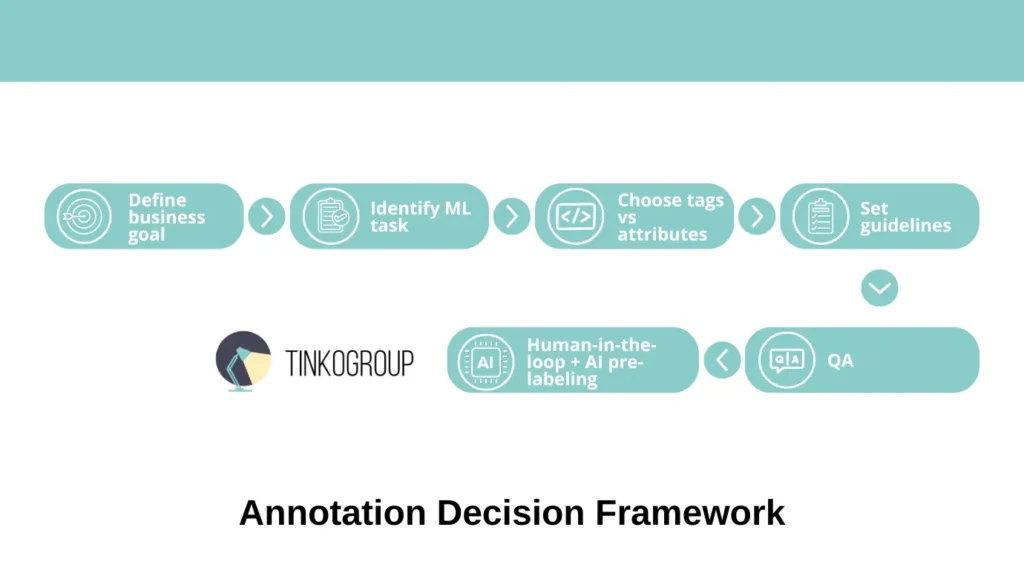
In this approach, each step logically follows from the previous one: from defining the business goal to implementing QA and using human-in-the-loop with AI pre-labeling. Such a framework not only saves the team’s resources and time, but also creates high-quality AI training data that actually increases the accuracy of models and improves the user experience.
- Define business goals. The first step is to clearly define the project goal. Teams often start annotating data without understanding the end result, which leads to unnecessary work and model overload. For example, in an e-commerce startup, the team first annotated all product details, including the date of manufacture, package weight, and even the lining material, even though the ultimate goal was simply to filter products by category and color. As a result, some of the data turned out to be unnecessary, and the project lost months. Experience shows that if the goal is basic classification or a quick MVP, custom tagging is sufficient; if the task is personalized search, recommendations, or behavior prediction, attributes are needed.
- Identify required ML tasks. At this stage, it is important to determine exactly what machine learning task is being solved. Different types of ML tasks require different levels of detail. For text classification, simple tags may be sufficient: for example, “spam/not spam” or “politics/sports/technology.” For complex tasks, such as predicting pedestrian behavior in autonomous driving, recognizing details in medical images, or analyzing the tone of reviews with object clarification, deep model attribute annotation is needed. For example, in an NLP project for analyzing reviews, simple positive/negative tags did not allow the model to understand which product features were being discussed, whereas adding the attributes “subject = product feature” and “intensity = high/medium/low” significantly improved the accuracy of the analytics.
- Choose tags vs attributes. Based on the goal and type of ML task, a decision is made on what to tag as custom tagging and what to tag as attributes. It is important to understand that tags and attributes do not compete with each other, but complement each other. For example, in an e-commerce project, products were tagged with “sneakers” and “shoes,” while the attributes color, size, and brand provided accurate search results and recommendations. Without attributes, the user received hundreds of irrelevant products, but with attributes, search conversion increased by 25%. The expert notes that it is always necessary to balance annotation speed and data value.
- Set clear annotation guidelines. The next step is to prepare detailed annotation guidelines. Our experience shows that it is the instructions that determine the quality of the data. Each field, tag, and attribute must be clearly described. It is necessary to provide writing standards (e.g., color = red/blue), examples of complex cases, and recommendations for ambiguous situations. In one project on medical image annotation, the lack of such instructions led to two annotators annotating the same images differently, reducing the accuracy of the model by 15%.
- QA with inter-annotator agreement. Data quality control is a critical step. Regular checks of inter-annotator agreement allow discrepancies to be identified and instructions to be corrected. For example, when analyzing reviews, several annotators labeled the same review as positive and neutral, which led to data conflict and reduced model accuracy. After implementing QA with consistency checks, model accuracy increased by 12%. The expert emphasizes that QA should be an ongoing process, not a one-time check.
Use of Human-in-the-Loop Annotation + AI Pre-Labeling for Efficiency
For large amounts of data and complex projects, human-in-the-loop annotation combined with AI pre-labeling is an effective approach. The model first automatically labels the data, and then a human checks and corrects errors.
Example: In a project to label images of cars, AI pre-assigned the attributes color, brand, and type, and the team of annotators only checked and corrected errors. This approach reduced annotation time by 40% without compromising quality and sometimes even increased annotator consistency, as they saw standardized examples from AI.
Expert commentary: “AI pre-labeling saves time and reduces the human error factor, but it cannot completely replace humans. Human-in-the-loop allows you to maintain quality and train annotators on complex cases.”
Conclusion
In the world of AI and machine learning, data quality determines the success of the entire model. As experience from numerous projects has shown, custom tagging provides broad classification of objects, allowing models to quickly understand what is in the dataset. However, the tags themselves only provide a basic structure and are unable to convey the nuances that are critical for accurate predictions and personalized decisions. This is where attribute annotation comes in—it adds depth and context and makes data truly informative for complex tasks.
Best practices show that tags and attributes work in tandem, rather than as mutually exclusive approaches. The combined use of custom tagging solutions and model attribute annotation allows you to create high-quality AI training data that improves model accuracy, enhances user experience, and makes prediction results more reliable. In real-world projects, this means fewer errors, more efficient searches, accurate recommendations, and confidence in analytics.
If you are looking for a way to build a scalable and high-quality data annotation process, Tinkogroup offers a full cycle of solutions: from preparing detailed annotation guidelines and training annotators to implementing QA, human-in-the-loop approaches, and automation using AI pre-labeling. Our team helps clients create custom tagging data comparisons, implement annotation quality assurance, and optimize training data annotation to ensure projects are successful from day one.
For details about our services and examples of successful cases, visit the Tinkogroup Services page.
What is the main difference between custom tagging and attribute annotation?
Custom tagging identifies what an object is by assigning a general category (e.g., “Car”). Attribute annotation describes what it is like by adding specific details (e.g., “Red,” “Tesla,” “Sedan”). While tags provide a basic structure, attributes provide the deep context necessary for complex AI tasks.
When should I choose simple tagging over complex attributes?
Simple tagging is sufficient for binary classification, basic filtering, or when launching an MVP on a limited budget. It is the best choice when speed and cost-efficiency are prioritized over granular data insights.
How does attribute annotation impact business performance?
Detailed attributes directly improve the user experience by enabling accurate search, personalized recommendations, and advanced analytics. In real-world applications, this can lead to significant growth, such as the 27% increase in search conversion seen in our e-commerce projects.