


Let’s start with the fact that accurate Shopify data entry is not just routine work, but a fundamental element of a successful store. The speed of order processing, the accuracy of analytics, and customer satisfaction depend on how correctly the product cards are filled out. The slightest errors in names, descriptions, or attributes can lead to customer confusion, lower conversion rates, and increased returns.
An effective Shopify data entry process also saves your team time and reduces the burden on customer support. For example, one small store with 300 products spent five days manually creating cards, making about 12 mistakes. After implementing automation systems and manual entry standards, the team reduced the time it took to add the catalog to three hours, with only one mistake, which directly impacted sales and the store’s rating.
What is Manual Shopify Data Entry?
Before moving on to automation, it is important to understand how manual Shopify data entry works and why this method is still relevant for many online stores. Despite the development of technologies and integration tools, manual work remains a basic step in catalog management. It helps you see how the Shopify product upload process itself works and assess which aspects of the business can be improved or automated in the future.
How It Works
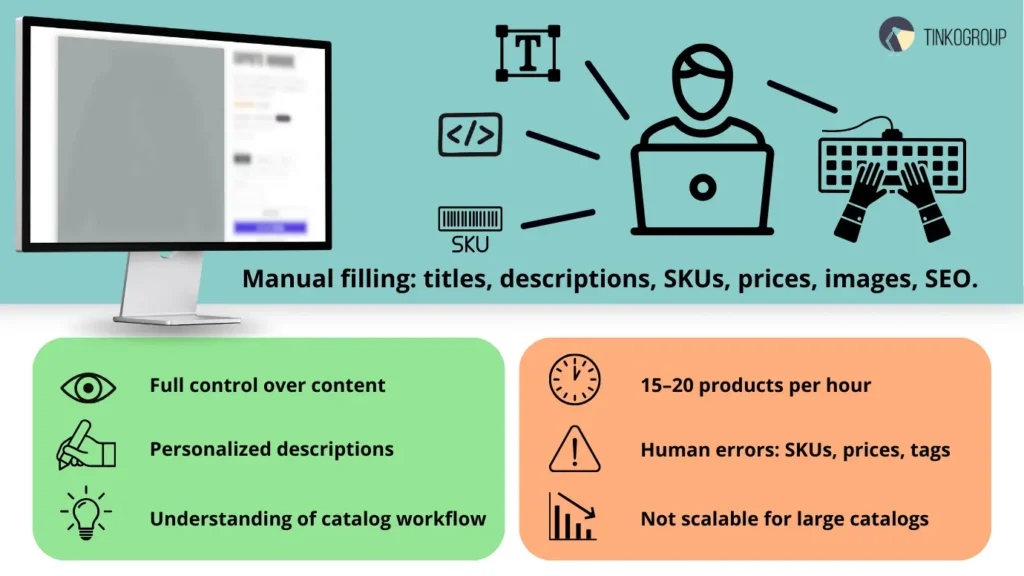
With manual product entry Shopify, an employee manually adds each product to the system. This includes entering the name, description, SKU, prices, tags, categories, and attributes. The specialist also uploads images, adds SEO meta tags, and configures product availability.
This work is usually performed by content managers or eCommerce specialists who ensure data consistency and accuracy. In small online stores, the process can be quite manageable, especially if the catalog contains up to 200–300 items. However, maintaining high Dataset Quality becomes difficult as the range increases.
However, as the range increases, manual data entry for Shopify becomes a routine and time-consuming process where it is easy to make mistakes: mix up SKUs, fail to update prices, or forget the correct tags for SEO.
Pros
The main advantage of the manual method is complete control. The owner or manager sees every detail of the card, can quickly adjust the content, monitor the visual style, and ensure that the descriptions match the brand.
For small brands with a personalized approach — such as handmade boutiques, design studios, or startups with a limited number of SKUs — this is the optimal solution. Manual Shopify data entry allows you to make content more “lively”: adapt texts to the season, highlight product features, or add individual touches.
In addition, manual work helps you gain an understanding of how the Shopify product management workflow works — what data affects conversions, how customers behave, and which tags give the best search results.
Cons
The main disadvantage of the manual Shopify data entry process is time. Even at a good pace, a specialist can enter no more than 15–20 cards per hour. If the assortment includes hundreds or thousands of products, speed becomes a critical factor.
In addition, the human factor remains inevitable. An error in a single digit can lead to an incorrect price, and a missing tag can reduce the visibility of a product in search results. When scaling a store, manual data entry becomes vulnerable and inefficient.
In practice, owners faced with catalog growth often switch to partial automation or begin to outsource Shopify data entry services to maintain quality while increasing volume. In such cases, teams specializing in Shopify data entry services ensure accuracy, standardization, and speed — without losing control over content.
What is Automated Shopify Data Entry?
As online stores grow, owners increasingly find that manual data entry can no longer cope with the volume. This is where automated Shopify data entry comes in — a solution that optimizes and scales the catalog management process.
Automation doesn’t just speed up product uploads. It changes the approach to management: it frees up team resources, reduces errors, and helps maintain consistent product card quality at high volumes. In today’s Shopify data entry process, automation has become an integral part of effective inventory management and helps to scale data annotation workflows for large catalogs.
How Automation Works
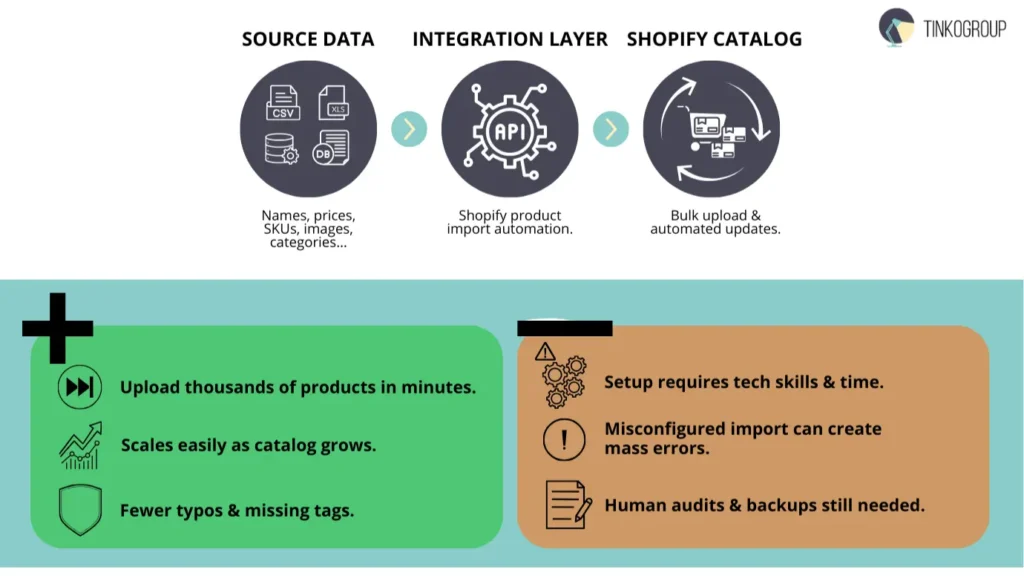
The essence of Shopify product import automation is that product data — names, prices, descriptions, images, categories — is automatically transferred from one system to another. This can be an ERP platform, a supplier’s CSV file, or a marketplace content database.
Shopify product upload services and specialized data annotation service providers are used for this purpose. Popular solutions include Matrixify (formerly Excelify), Stock Sync, CedCommerce, as well as proprietary API integrations via Shopify product data management platforms. This approach is particularly useful when the product range is updated daily or when there are several suppliers.
For example, a clothing brand can automatically upload new collections via Shopify bulk upload, synchronizing them with the supplier’s database. This frees employees from routine data copying and allows them to focus on visual content and marketing.
As a result, data entry for Shopify becomes a systematic process rather than a manual task, and the team is able to work strategically rather than simply entering data mechanically.
Pros
The main advantage of Shopify product listing automation is speed. A single script or integration can update thousands of cards in minutes, which is especially important when working with seasonal collections, promotions, or large catalogs.
The second factor is scalability. The automated Shopify data entry process easily adapts to the growth of the store: if today there are 300 products in the catalog, and in six months there are 3,000, the system will cope without additional time and resources.
In addition, automation minimizes the human factor. Integrations help avoid typos, duplicate SKUs, or missing tags. This is especially important for SEO and analytics, where every detail — from meta descriptions to category structure — affects search visibility.
Companies using ecommerce data entry Shopify with automated scripts report increased data accuracy and a reduction in manual tasks by up to 70%.
Cons
However, like any technology, automation has its limitations. Setting up systems requires time and technical skills. For small businesses, integrations can seem complex or costly, especially when connecting multiple data sources.
Another risk is associated with automation errors. An incorrectly configured import can result in a mass update of incorrect prices or the deletion of product cards. Therefore, it is important to conduct regular audits and have backup copies of your data.
In addition, it is not always justified to implement a fully automated cycle. For example, in niche stores with unique products, manual editing of texts or images remains necessary — it adds individuality and helps to stand out.
That’s why experienced teams use a hybrid approach: the main upload is done through Shopify’s automated product upload, and the final touches are done through manual editing. This balance provides speed while maintaining human control over the brand.

Reliable Data Services Delivered By Experts
We help you scale faster by doing the data work right - the first time

Comparing Manual vs. Automated Approaches
As businesses grow, store owners begin to seek a balance between speed, accuracy, and cost. A comparison of manual product entry Shopify and automated product upload in Shopify shows that both approaches have their merits — the question is which one is right for your stage of development. This choice directly affects how the Shopify product management workflow operates, how quickly product cards are updated, and how stable the data in the catalog is.
Efficiency
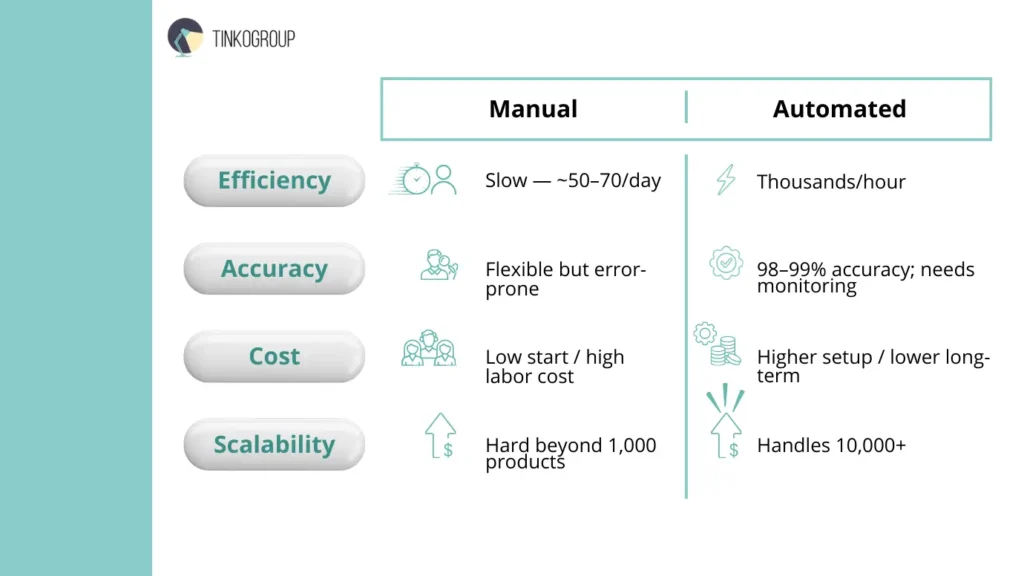
In terms of efficiency, the difference is obvious. Manual product entry in Shopify is a process in which each product is added manually: an employee fills in the fields, uploads images, and checks tags. This approach allows you to control the content, but it requires significant time resources.
According to agencies that outsource Shopify data entry services, a manager can add about 50-70 products per day if SEO and visual design standards must be met. This means that with a large volume of products, the process can take weeks.
On the other hand, automated product upload Shopify does the same job in hours. Using Shopify bulk upload tools or specialized plugins, you can import thousands of cards via CSV or API integrations.
Automation is especially useful for stores with frequently updated product ranges, such as fashion, electronics, or FMCG. Here, every minute of delay costs sales and ratings. Thus, automation significantly outperforms manual entry in terms of efficiency, especially in the context of business scaling.
Accuracy
When it comes to data accuracy, the situation is more complicated. Manual data entry for Shopify is usually more flexible — a person can notice unusual errors, correct the description format, improve the text, or tweak SEO. This is especially important for premium brands, where details affect the perception of the product.
However, the human factor remains a vulnerability. Errors in prices, SKUs, tags, or categories can lead to confusion in the warehouse or lower conversion rates. With volumes exceeding 1,000 items, the risk of inaccuracies grows exponentially.
Shopify product listing automation solves this problem systematically. Integrations and templates reduce the likelihood of typos, ensuring consistent descriptions, correct SEO meta tags, and accurate attributes. In large stores, automation increases accuracy to 98–99%.
However, even an automated system needs to be monitored: an incorrectly configured import can lead to massive errors. That’s why successful companies use double-checking — scripts and human audits.
Cost Considerations
In terms of costs, understanding data annotation pricing is essential when deciding between internal teams and automation. There is no need to purchase subscriptions, implement plugins, or pay for integration. However, as the product range grows, the cost of man-hours increases.
According to estimates from companies offering Shopify data entry services, manually processing 10,000 products can cost more than fully configuring an automated system.
Automated product upload Shopify, on the other hand, requires an initial investment: API connection, template configuration, testing. However, in the long run, automation reduces operating costs.
In addition, if you connect outsourced Shopify data entry services, you can combine both approaches — an external contractor implements the system and trains the team, while the internal team monitors the results.
Thus, the choice between manual and automated entry depends on your budget and planning horizon. For a small store, the manual format is more profitable, while for a growing store, automation is more profitable.
Scalability
Scalability is a key factor for any eCommerce project. Manual product entry in Shopify cannot cope when the range exceeds a thousand items. Even with a well-coordinated team, it becomes impossible to keep the catalog up to date manually.
Shopify product import automation solves this problem instantly: new products are added to the system automatically, data is synchronized with suppliers, and changes in prices or availability are updated without human intervention.
This approach creates a sustainable Shopify product management workflow that can be expanded without compromising quality. A store with 500 products today can easily manage 50,000 tomorrow — without the need to increase staff.
Many successful brands use a hybrid approach: automated data import and manual refinement of product cards by a content manager. This combination ensures accuracy and maintains the individuality of the content. As a result, ecommerce data entry Shopify transforms from an operational routine into a strategic growth tool.
Choosing the Right Method for Your Store
Sooner or later, every online store owner faces the question: which method of product management should they choose — manual or automated? There is no single answer, because the choice depends on the scale of the business, the product range, and the budget. A well-designed Shopify product management workflow not only saves time but also maintains consistent data quality, reducing the risk of errors and duplication. Before making a decision, it is worth considering the key factors.
Factors to Consider
For small stores with a product range of up to 200 items, a manual approach is often the best option. In this case, manual product entry in Shopify gives you more control over content, allows you to edit descriptions for SEO, and visually check each card before publication. This format is especially valuable for boutiques, brands with original products, or niche sellers where personalization is important.
However, as the assortment grows, manual entry becomes inefficient. When the catalog exceeds 1,000 items, manual management becomes a constant source of delays and errors. This is where Shopify’s automated product upload comes to the fore — a solution that provides speed and stability.
For medium and large companies, automation is no longer just a convenience, but a necessity. Using Shopify bulk upload and Shopify product import automation allows you to update your product range in minutes rather than days. This is especially relevant for stores with frequent changes in prices, availability, or seasonal collections.
In terms of budget, Shopify data entry services and outsource Shopify data entry services allow you to reduce personnel costs and avoid implementation errors. Many companies combine internal resources with external contractors: for example, they delegate automation implementation to specialists and leave the final editing of cards to the content management team. This approach reduces the cost of ownership and helps build a flexible, sustainable Shopify data entry process.
Hybrid Approaches
In practice, most successful eCommerce companies choose balance rather than extremes. The hybrid format is a combination of data entry for Shopify, where the main data is imported automatically and the final touches are made manually.
For example, basic uploading via Shopify product upload services may include the name, SKU, price, and photo, while a person adds SEO tags, refines descriptions, and visual elements. This approach maintains the speed of automation and adds a “human touch” that makes the content more compelling to the buyer.
Moreover, the combination of automation and manual work helps to avoid typical mistakes. If something goes wrong with Shopify product listing automation — the system may upload duplicates or miss tags — a specialist will quickly identify the problem and correct it.
For stores where individuality is important, this hybrid approach yields the best results: it ensures accuracy, maintains brand style, and preserves control over data quality.
In essence, a competent balance between manual and automated approaches creates a reliable Shopify e-commerce data entry process that grows alongside the business.
Tools and Resources
For automation, we recommend Shopify apps and integrations:
- Matrixify (Excelify) — bulk import and update of products;
- Shopify Flow — process automation;
- PIM systems — for data management and synchronization with the store.
For manual entry, it is useful to use templates for names and descriptions, checklists for attributes, and train employees on brand standards and SEO. You can also consider outsourcing Shopify data entry services if your team cannot handle the workload.
Conclusion
The choice between manual and automated Shopify data entry depends on the size of the store, the volume of products, and the team’s goals. Manual uploading provides control and accuracy for small or unique products, while automation speeds up work and minimizes errors when scaling.
A combination of methods allows you to create an efficient, predictable Shopify product management workflow, maintain Shopify product data entry management, save your team time, and increase sales.
At Tinkogroup, we help Shopify store owners optimize their Shopify data entry services processes by combining manual control with modern automation tools. Our solutions reduce team time, minimize errors, and ensure secure catalog scaling. Learn more on the Shopify product listing services page.
When should I choose manual data entry over automation?
Manual entry is best for small stores (up to 200–300 products) or luxury brands that require highly personalized descriptions and unique visual touches for every product card.
What is the biggest risk of using automated product uploads?
The main risk is technical misconfiguration; an incorrectly set up import script or CSV file can lead to mass errors, such as incorrect pricing or accidental deletion of entire categories.
Is it possible to combine both methods for better results?
Yes, a hybrid approach is often most effective: use automation for bulk uploading technical data (SKUs, prices) and manual editing for SEO optimization and creative descriptions.