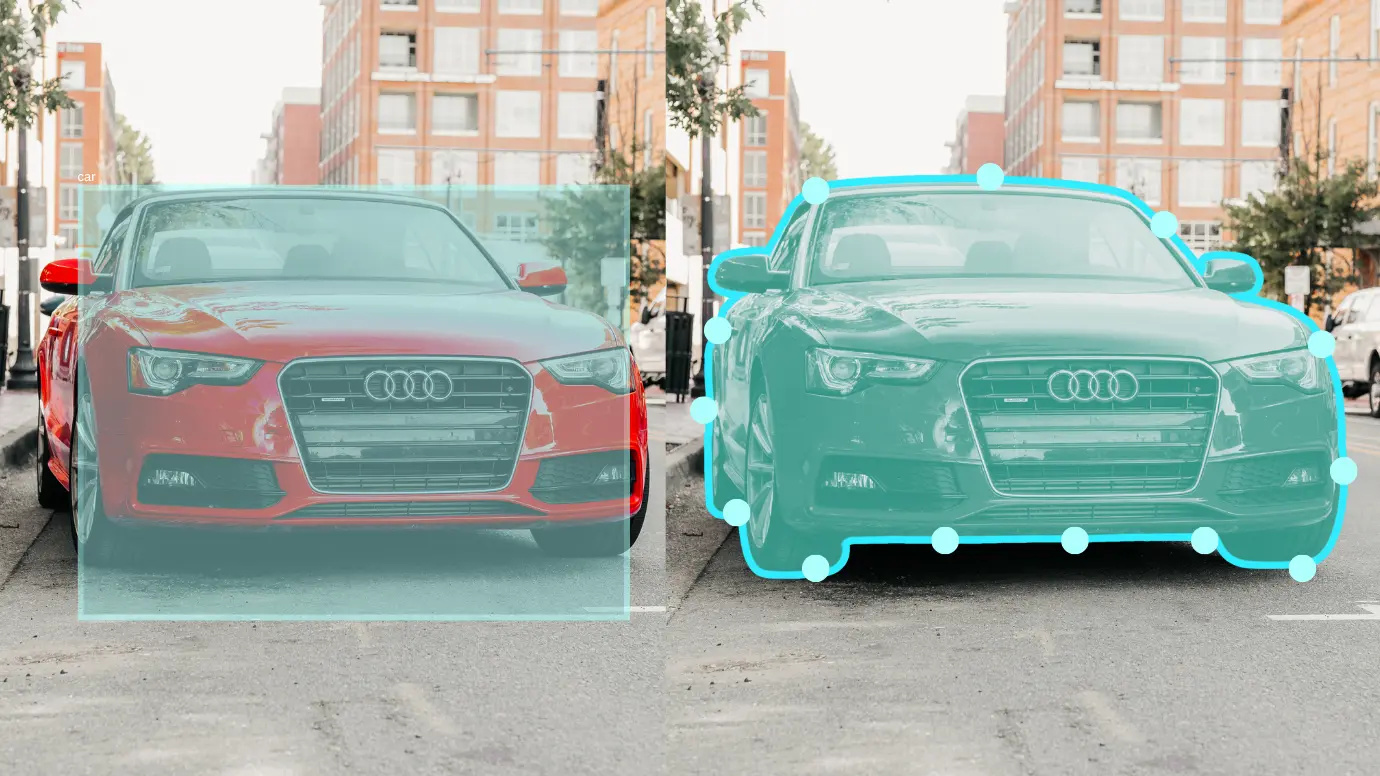
There are many variants of polygon annotation in computer vision, but one of the most accurate and popular is polygonal annotation. In simple terms, polygon annotation is a way to highlight an object in an image, in which the annotation is created not using a rectangle or circle, but by connecting many points along its real contour. This technique allows you to literally “outline” an object, repeating its shape with high accuracy — down to every bend, dent or corner.
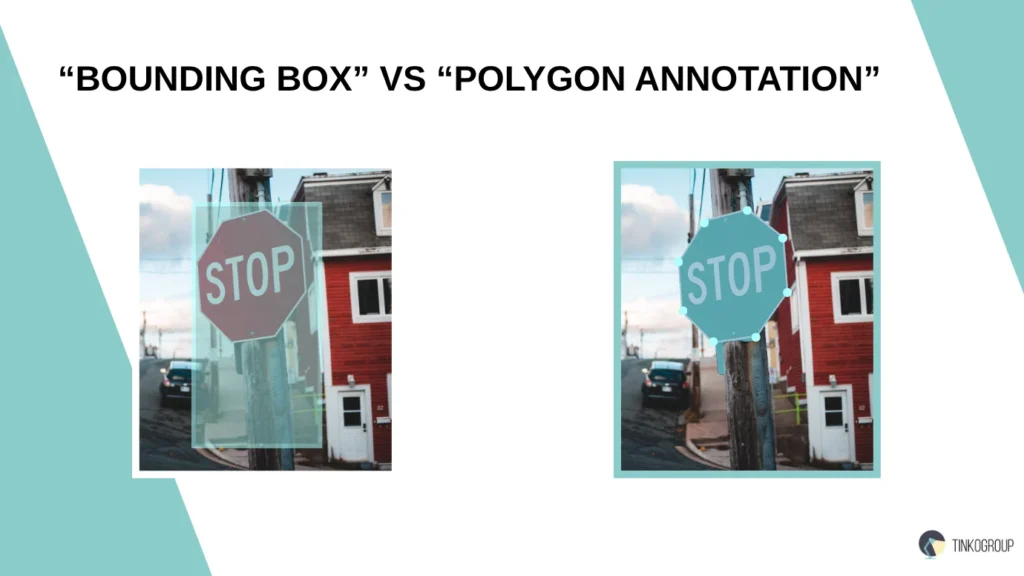
The peculiarity of this method is that it is suitable for objects that do not fit into regular geometric shapes. For example, leaves with uneven edges, curving bodies of animals, road signs at an angle, tumors in medical images or buildings in satellite photographs. In all these cases, standard bounding boxes capture too much of the background and create false ideas about the shape and size of objects. Polygonal annotation solves this problem, allowing you to limit the model strictly to the area that actually corresponds to the desired object. As data quality requirements in computer vision grow, polygon annotation is becoming increasingly needed. It is used to prepare datasets for object detection, semantic segmentation, and instance labeling — especially when pixel-level accuracy is required.
In systems where every detail is critical — for example, in medical diagnostics or autonomous driving — this type of markup provides the most reliable results. It allows models to learn more accurately, confidently distinguish between complex-shaped objects, and minimize errors associated with backgrounds or occlusions. Thus, polygon annotation is not just a technical alternative to a rectangle. It is a tool that provides a high level of detail, improves model quality, and makes it possible to work with visual data at a level previously inaccessible to automatic systems.
What is Polygon Annotation?
Polygon annotation is an image annotation method in which objects are marked by sequentially connecting several control points (vertices) to form a closed figure, or polygon. Unlike standard bounding boxes, which frame an object with a simple rectangle, this approach allows you to recreate the shape of an object with maximum accuracy, repeating its contours and excluding unnecessary background.
The marking process begins with defining key points along the boundaries of the object. The annotator manually (or using intelligent tools) places these points, connects them in the right order, and thus forms a polygon that covers only the desired area. This method is especially effective when working with objects that do not have symmetry or clear boundaries — for example, with curved shapes, protrusions, depressions, or details that are at an angle to the camera.
When to use polygon vs bounding box?Compared to rectangular annotation, polygon annotation offers a much higher level of accuracy. The bounding box fixes the object within the rectangle, thereby capturing the excess part of the background or adjacent elements. This can reduce the accuracy of models, especially in conditions where objects are close to each other or partially overlap. A polygon, on the other hand, allows you to accurately separate an object from the background, highlighting only the relevant information for training.
In the context of machine learning, polygon annotation plays a key role in training models on irregular and non-standard shapes. When it comes to complex scenarios such as recognizing objects in an urban environment, segmenting organs in medical images, or identifying objects in satellite images, it is polygonal annotation that becomes the basis for obtaining reliable and reproducible results. Models trained on such precise masks demonstrate significantly higher generalization ability, cope better with the background, and work more reliably in real-world conditions.
Comparison of bounding box and polygon annotation
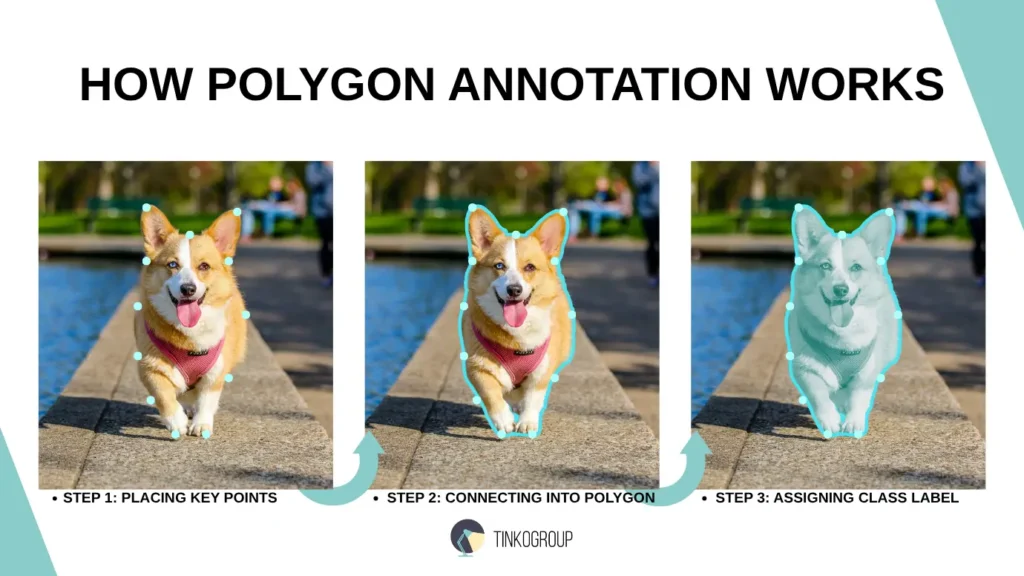
How Polygon Annotation Works
Polygon annotation is based on a simple but precise principle: an object is outlined using a set of key points that are connected to form a closed shape. This process may seem labor-intensive, but it is what allows you to obtain pixel-precise markup, which is critical for semantic segmentation polygon tasks and training complex computer vision models.
Placing Key Points (Vertices). Annotation begins with setting control points along the visible contour of the object. These points are called vertices, and their number depends on the shape of the object and the required level of detail. The more complex the shape, the more points are required to accurately describe it. At this stage, it is needed for the annotator to place the vertices evenly and strictly along the boundary to avoid distortions.
Connecting Them in Sequence. After the points are placed, they are connected in order, forming a closed polygon. In most tools, this process is automated: it is enough to place the vertices, and the program itself will close the contour, connecting the last point with the first. The main condition is the correct order of connections, especially when it comes to keypoint-based polygon annotation, where the semantics of each vertex is needed (for example, a nose, an ear, a tail in the marking of an animal).
Labeling the Enclosed Region. When the polygon is ready, the annotator assigns it a label corresponding to the class of the object. This can be either a simple category (e.g., “dog,” “car”) or a composite one (e.g., “left lung” or “overripe berry”). The labels must correspond to a pre-agreed vocabulary of classes to avoid ambiguities in subsequent processing.
Mention Manual vs Assisted Methods. There are two main ways to create polygonal markup: manual and semi-automatic. In manual mode, the annotator places the dots and connects them completely by himself, which ensures maximum accuracy, but requires time and experience. In semi-automatic methods, modern polygon annotation tools offer hint algorithms: they can automatically suggest a polygon shape based on neural networks or segmentation and only allow the user to adjust the suggested shape. This significantly speeds up the process while maintaining quality, especially in projects with large amounts of data.
Visual Comprasion. Imagine that you are trying to annotate a dog’s ear in a photo. The bounding box will cover the entire rectangle, including the ear, part of the head, and the background. And polygon annotation will allow you to carefully outline only the ear — repeating the curves and not capturing anything unnecessary. For the model, this means that it will be trained not on an abstract area, but on the exact shape of the target object, which radically improves the quality of recognition.
How polygon annotation works step by step
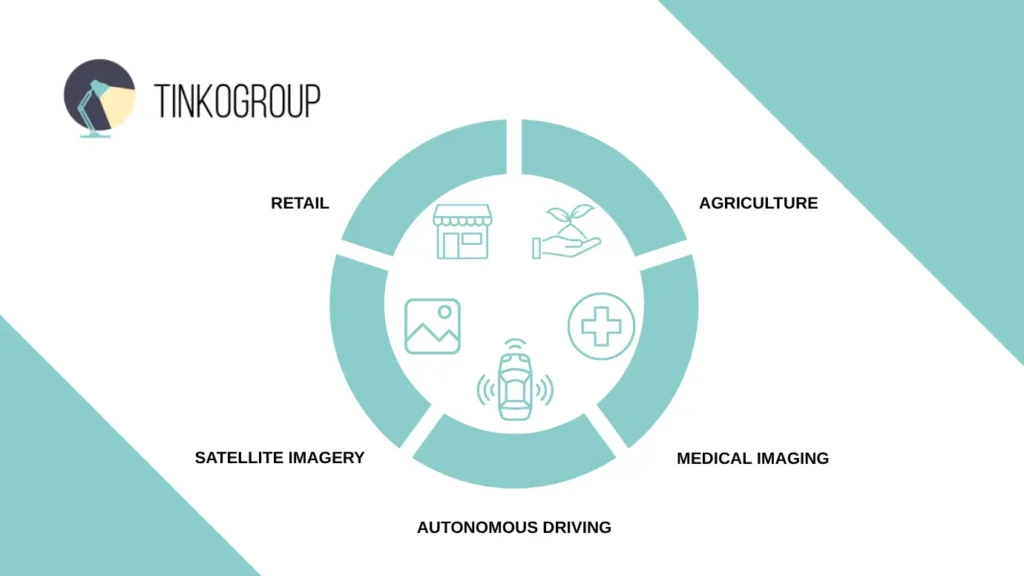
Key Use Cases
Accurate data is the foundation of effective computer vision systems. When objects in images take on the most unexpected shapes and textures, standard labeling methods are often not accurate enough. This is where polygon annotation comes to the rescue, allowing models to see details that are difficult to capture otherwise. Let’s consider where exactly this technology reveals its full potential and why no serious task in various industries can do without it today — from complex city streets to microscopic structures of the human body. So, here are the polygon annotation use cases.
Autonomous Driving. In autonomous driving, polygonal annotation is used to accurately highlight road signs, pedestrians, curbs, and other elements of the urban environment. Strict segmentation helps systems understand complex objects in a dynamic environment, where it is needed not only to recognize an object, but also to correctly determine its boundaries for safe decision-making.
Medical Imaging. In medical images such as MRI or CT, objects have irregular shapes — tumors, organs, vessels. Using polygon annotation allows you to highlight pathological zones with maximum accuracy, which is critical for diagnostics and treatment planning. Accurate marking ensures high-quality training of models for automatic image analysis.
Retail. In retail, accurate selection of logos, product shapes, and packaging on shelves helps automate the accounting and control of product display. Polygonal marking excludes the background and neighboring objects, which increases the accuracy of product recognition and optimizes merchandising processes.
Agriculture. In agriculture, polygonal annotation is used to outline leaves, fruits, and disease zones on plants. This approach helps create models that can accurately assess crop health, identify pests and diseases, and predict crop yields.
Satellite imagery. Accurate marking of buildings, roads, land plots, and natural features is needed for analyzing satellite images. Polygonal annotation allows you to highlight the boundaries of these objects with high accuracy, which is used in urban planning, natural resource monitoring, and land management.
Key use cases of polygon annotation
Benefits of Polygon Annotation
Polygon annotation provides a level of detail that is unavailable for simpler methods. In projects where edge accuracy is critical and every pixel matters, it becomes not just the preferred solution, but the only possible one. Below are the key benefits of polygon annotation that make it indispensable in complex computer vision tasks.
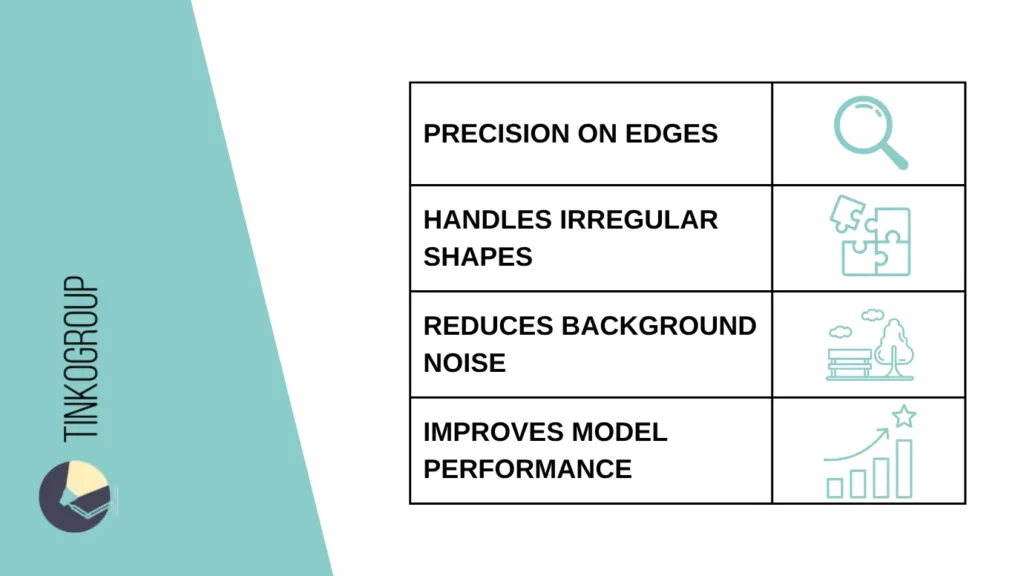
High Precision Around Edges. The main advantage of polygon annotation is the ability to accurately follow the edge of an object. Unlike rectangular or elliptical annotations, precisionimage annotationallows you to capture the real shape of an object without including unnecessary pixels. This precision image labeling is especially needed when working with narrow, curved or fragmented edges, where even a small distortion can distort the training results. An accurate edge means less “noise” in the data and a better understanding of where the model ends.
Handles Irregular and Rotated Objects. Not all objects are symmetrical or straight. In real-world conditions, a camera may shoot at an angle, and the shape of an object may be irregular, partially hidden or deformed. Polygon annotation handles these cases better than other methods, allowing it to adapt to any position and shape. This labeling irregular object shapes in computer vision is especially valuable in autonomous systems and medical diagnostics, where the geometry of objects is unstable.
Reduces Background Noise. Bounding boxes almost always capture not only the target object, but also part of the surrounding background. This can mislead the model, especially when the background contains visually similar elements. Polygon annotation minimizes this problem: it clearly limits the training data to only the relevant area, reducing the likelihood that the model will start “learning” from the background, not the object.
Improves Accuracy of Segmentation/Classification Models. The more accurate the annotation, the more likely the model is to learn to correctly interpret visual data. Polygon annotation creates a rich training environment for semantic segmentation, instance segmentation, and classification tasks. The result is cleaner masks, better generalization to test data, and less dependence on post-processing. In projects where not only accuracy but also explainability of model decisions is needed, this advantage becomes critical.
Key benefits of polygon annotation
Polygon vs Bounding Box: When to Use Each
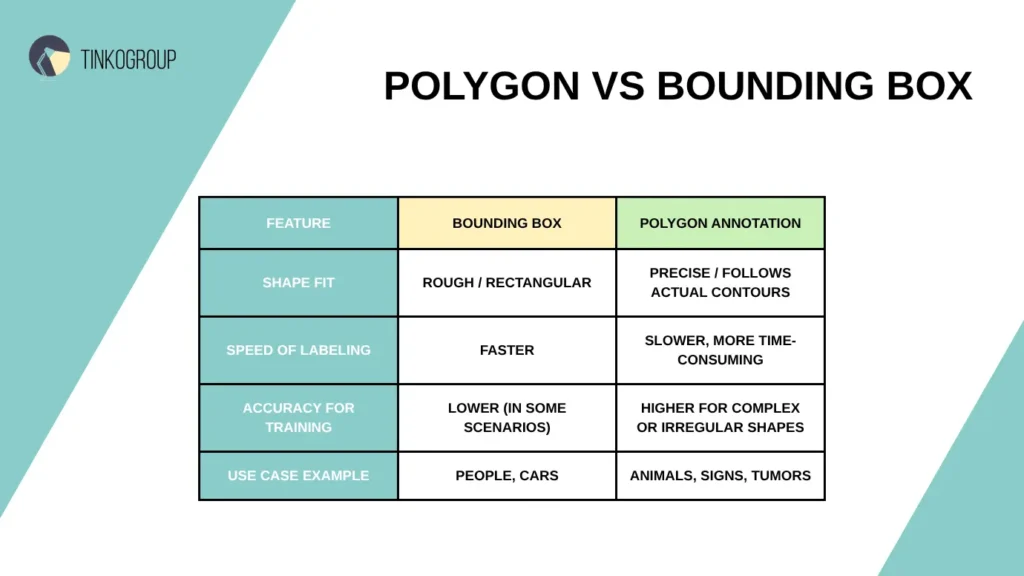
The choice between bounding box and polygonal layout depends on the project objectives, complexity of objects and accuracy requirements. In some cases, a rough outline is enough, in others, pixel detail is necessary. Below is a comparison table that will help you understand when to use each approach:
Polygon vs bounding box comparison
Bounding box is a good choice for objects with clear boundaries and standard geometry. It is suitable for rapid prototyping and tasks where high detail is not critical. While polygon image annotation is irreplaceable where shape plays a key role: from recognizing leaf bends to precise segmentation of medical images.
Tinkogroup expert tip: In real projects, a hybrid approach is often used: the initial annotation is done with bounding boxes, and when moving on to fine-tuning models and A/B testing quality, polygons are used. This method helps to balance speed and accuracy.
Best Practices for Polygon Annotation
The accuracy of polygon annotation depends not only on the tool you choose, but also on a well-thought-out annotation strategy. Even with the most advanced machine learning models, errors made during the data preparation stage can completely discredit the results and nullify the potential benefits of the architecture. Therefore, following proven practices when working with polygon annotation becomes a must, especially in projects where reliability and reproducibility are at stake. Below, we discuss the key aspects on which high-quality polygon annotation is built.
Clear Object Class Definitions. Before you start annotating, you need to create a comprehensive and unambiguous dictionary of classes. Each class should have a clear definition that is consistent and understandable across the team. This is especially needed in situations where multiple teams are working on the project in parallel or where scaling is expected. Even small differences in the interpretation of labels can lead to cascading errors in training. For example, if one annotator includes everything that is shaped like a circle in the “sign” class, while another annotator only considers objects with symbols as signs, the result will be a noisy and inconsistent dataset.
Tinkogroup expert tip: A good practice is to accompany each class not only with a definition, but also with examples, including edge cases. It is especially needed to explain what to do in ambiguous situations, when an object may belong to several categories or does not quite match the description. This reduces variability in decision making and simplifies verification.
Consistency in Polygon Vertex Placement. The order and logic of vertex placement in polygons is of great importance, especially if the model involves keypoint-based polygon annotation or requires interpretable masks. Even if the annotation is performed by different people, the placement of points should be consistent and repeatable: the same areas of the object are marked in the same way, and the movement along the contour is carried out in the same direction (clockwise or counterclockwise). This approach not only simplifies validation, but also reduces the likelihood of errors during training, especially in systems where symmetry or feature order is needed. In complex projects, the Tinkogroup team uses point placement templates and built-in hints within annotation platforms. This helps to maintain a single standard, even if several annotators work on the same class at once.
Managing Overlapping Objects. In images with a high density of objects (for example, on city streets or in medical images), it is needed to be able to correctly work with intersecting or partially hidden shapes. Polygon annotation allows you to separate these objects with high accuracy, but requires attention: each polygon must belong to only one entity and maintain priority in the scene. For example, if one part of an object overlaps another, it is necessary to follow the logic and structure — which of the objects should be visually “in the foreground”, and which — under it.
Tinkogroup expert tip: It is unacceptable to allow intersections without a clear justification, as this violates the internal logic of the mask and can lead to confusion at the instance segmentation stage. A clear boundary between objects helps not only the model, but also QA engineers who check the markup.
Avoiding Unnecessary Complexity. There is a common misconception that the more points in a polygon, the higher its accuracy. In practice, an excessive number of vertices most often leads to negative consequences: the model is overtrained for unnecessary details, the validation process slows down, and the cost of verification increases.
The markup is considered effective if the minimum number of points is sufficient to preserve the shape of the object. Modern polygon annotation services allow you to automatically simplify the shape without losing geometric accuracy — this is useful not only for reducing the load on the annotator, but also for increasing the homogeneity of masks.
Tinkogroup expert tip: In complex projects, Tinkogroup uses a combined approach: first, the system automatically adds key points based on basic segmentation, and then a specialist manually refines the contour and optimizes it. This approach allows you to reduce the overall annotation time for complex shapes by 30-40%, while the IoU accuracy remains stable at 95% and above.
Reliable Data Services Delivered By Experts
We help you scale faster by doing the data work right - the first
time
QA Loops with Consensus Scoring. Annotation quality check should not be episodic, but systematic. One reliable approach is multi-level validation, including primary annotation, secondary verification, and consensus scoring. For example, Tinkogroup has implemented the following process on large projects: first, one specialist creates an annotation, then the second independently checks it. If the difference between two polygons exceeds the permissible threshold (for example, 5% by area), the area is returned for revision. This mechanism minimizes human errors and allows you to create the most consistent and accurate dataset. Additionally, visual quality control tools are used, allowing you to superimpose different versions of masks on top of each other, as well as automatic metrics, such as IoU between annotations from different performers. This provides quick feedback, helps to quickly identify discrepancies and train the team on specific examples.
Tools for Polygon Annotation
Choosing a polygon annotation tool is not just a technical decision, but a strategic choice that affects the entire data preparation cycle: from initial marking to quality control and final model training. A good polygon annotation tool should combine accuracy, user-friendly interface, support for complex formats and scalability. At the same time, different industries have their own requirements: medicine needs pixel accuracy, the automotive industry needs high speed and support for complex scenes, and the agricultural sector needs to work with a large number of similar objects. Below are the best tools for polygon annotation, tested in practice, that allow you to effectively solve the problems of marking objects with complex geometry and vary the depth of detail for a specific project.
CVAT (Computer Vision Annotation Tool). CVAT (Computer Vision Annotation Tool is a powerful open-source tool developed by Intel specifically for annotating data in computer vision tasks. With support for polygonal markup, polylines, tracking, and other advanced features, CVAT has become the de facto standard in research, pilot projects, and custom pipelines. It is especially popular among technically savvy teams that value flexibility, customization, and full control over data at all stages of annotation.
Pros:
support for complex polygonal and polylinear markup;
flexible editing tools and hotkeys;
possibility of local or server deployment.
Cons:
requires technical setup and support;
the interface can be complex for beginners.
Labelbox. Labelbox is a cloud-based data annotation platform built with scalability, team collaboration, and machine learning integration in mind. With an intuitive interface and powerful management tools, Labelbox enables efficient polygon labeling, even with large data sets and distributed teams. The ability to use ML modules for preliminary annotation makes it especially attractive for projects where the balance between speed and accuracy is needed.
Pros:
intuitive UI;
integration with ML modules for semi-automatic markup;
flexible QA and team management tools
Cons:
paid functionality with large amounts of data;
less customization options compared to open-source solutions.
V7. V7 is an advanced image annotation tool designed for medical, scientific and other high-precision tasks. Unlike general-purpose platforms, V7 offers functionality tailored to complex geometry, multi-layer structures and specialized formats such as DICOM. This makes it especially useful for projects where pixel accuracy, complex polygonal shapes and advanced collaboration features are critical.
Pros:
support for 3D annotations and complex shapes;
intelligent pre-labeling and tracking tools;
advanced features for medical images (e.g. DICOM).
Cons:
high license cost;
overkill for simple projects.
Tinkogroup expert tip: Each tool is suitable for specific tasks. If flexibility and control are a priority, CVAT is suitable. For quick setup and work with a distributed team, Labelbox is suitable. In cases where maximum accuracy is required when working with complex or sensitive images, V7 remains one of the leaders. In practice, we use a combined stack: CVAT for pilot projects with custom pipeline settings, Labelbox for quick validation and scaling, and V7 for medical and biotech tasks where annotation depth and compatibility with DICOM data are critical.
Challenges in Polygon Annotation
Even with all the obvious advantages, polygon annotation remains one of the most resource-intensive and complex forms of markup. High accuracy requires serious training of annotators, well-thought-out organization of processes, and the right choice of tools. In practice, teams face a number of typical problems — from the human factor and data overload to technical limitations of platforms. Below are the key challenges that have to be dealt with when working with polygon annotation, and why ignoring these nuances can result in costly mistakes at the stage of model training.
Time-Consuming. Creating an accurate polygon is a process that takes more time than, for example, simply drawing a bounding box. The more complex the object, the more points are required to describe its shape. In large datasets, this can increase the data preparation cycle by weeks. Automation partially solves the problem, but requires additional validation stages.
Annotator Skill Gap. Working with polygons requires training: you need to understand the principles of geometry, correctly place points, and maintain consistency with other annotators. In projects with a large annotation team, differences in experience and attentiveness can lead to inconsistent results, especially in the absence of clear guidelines.
In our practice, we conduct preliminary training of annotators on special simulators, including tasks of “repairing” other people’s polygons. This helps to equalize the level of participants and reduce errors in production.
Inconsistent Shapes. Even with instructions and templates, different specialists can interpret the same shape differently. This leads to variability in the boundaries of objects, which reduces the stability of training data. This problem is especially critical in instance segmentation, where every pixel matters.
Overfitting Due to Overprecision. Paradoxically, too precise annotation can lead to overfitting of the model. If polygons cover the smallest details that are unneeded for the task, the model can begin to remember artifacts or “noise”, worsening its ability to generalize. Finding a balance between accuracy and significance is one of the main tasks of the data science team.
Tool Limitations for Complex Scenes. Not all annotation platforms can handle multi-level or overloaded scenes. Some tools have a limit on the number of polygons that can be placed in a single image, or lack support for multi-contour objects (e.g. a cavity inside a shape). This limits flexibility and requires workarounds. For complex scenes with dozens of objects, we use custom templates and automatic layers, and connect internal plugins to CVAT to support nested structures. This allows us to avoid platform limitations without losing quality.
Conclusion
Polygon annotation is more than just another way to annotate images. It is a fundamental tool for building accurate, robust, and interpretable computer vision models, especially when objects have complex, irregular shapes. With the ability to accurately follow edges, exclude background, and focus on relevant pixels, polygon annotation improves segmentation accuracy, reduces errors, and allows you to train models that actually understand what they “see.” In projects where quality is at the forefront, rather than volume, polygon annotation is becoming more than just a preference, it’s a necessity. This is especially true in industries such as medicine, drone technology, agricultural analysis, and satellite analytics, where every mistake can have real consequences. Tinkogroup offers a full cycle of polygonal annotation work, including:
creation of complex polygonal markings for objects of any shape;
high-precision manual and ML-assisted marking;
launch of pilot projects to assess quality and business effect.
What is the main advantage of polygonal annotation over rectangular annotation?
Polygonal annotation allows you to precisely outline objects with irregular shapes, unlike a bounding box, which encloses the object with a rough rectangle. The annotation for irregular objects is especially needed when high accuracy is required, such as segmenting tumors in medical images or highlighting objects in satellite images.
Is polygonal annotation always better? Are there cases when it is better to use a bounding box?
No, polygonal annotation is not always preferable. It requires more time and effort, so for simple objects with clear geometry — people, cars, road signs — a bounding box is enough. Polygonal annotation is used where detail is needed: complex shapes, overlaps, asymmetrical objects.
What tools are best suited for polygonal annotation?
Popular tools include: CVAT (open and flexible), V7 (optimal for medical and scientific tasks), Labelbox (combines a user-friendly interface and ML assistants). The choice depends on the volume of data, automation requirements and the specifics of the project. It is needed that the tool supports polygon masks, quality control and collaboration.