


What This Data Annotation Guide Covers
This data annotation guide for beginners explains what data annotation is, which types exist, and how to annotate data step by step, from preparing raw files to exporting labels for model training. It’s written for people organizing annotation for the first time: ML engineers, product managers, and founders of AI projects.
Every AI model learns from examples, and someone has to label those examples first. That might mean outlining cars in road photos or tagging customer reviews as positive or negative. If the labels are wrong or inconsistent, the model learns the wrong thing. A better architecture won’t fix that.
This data annotation guide focuses on your first project. If you already know the basics and need to design a production workflow for a larger team, see our guide to building a data annotation pipeline.
The essence of data annotation
Data annotation means adding labels to raw data so a machine learning model can learn from it. A label can be a box around a pedestrian, a tag on a sentence, or a timestamp where one speaker stops and another starts. The model sees thousands of these examples and learns to repeat the pattern on data it hasn’t seen.
The catch is that small inconsistencies don’t stay small. If one annotator labels a half-hidden car and another skips it, the model gets mixed signals. That’s why so many teams run into data labeling mistakes that hurt machine learning model performance.
The market is growing fast. According to IMARC Group, the global data annotation tools market reached $2.1 billion in 2024 and is projected to reach $12.5 billion by 2033, a growth rate of about 21% a year. Other research firms give different numbers, but they agree on the direction: the more companies build AI products, the more labeled data they need.
Annotation matters most in supervised learning, where models learn from labeled examples. There, it does four jobs.
Training. Supervised models learn from input–output pairs. A person supplies the output, the label, and the model learns to predict it.
Validation and testing. You also need labeled data the model never trained on. The validation set helps you tune it. The test set shows how it’ll behave on real data.
Domain-specific work. A self-driving model needs lanes, signs, and pedestrians labeled. A medical model needs organs and tumors outlined, usually by someone with clinical training. Generic labels won’t do here.
Bias. A model only knows what’s in its training data. Train it mostly on daytime photos and it’ll struggle at night. Checking what’s labeled and what isn’t is one of the few practical ways to catch this early.
Main types of data annotations
The right type depends on your data and on what the model has to do. Here are the main ones. Each has a dedicated guide on our blog, linked in its section.
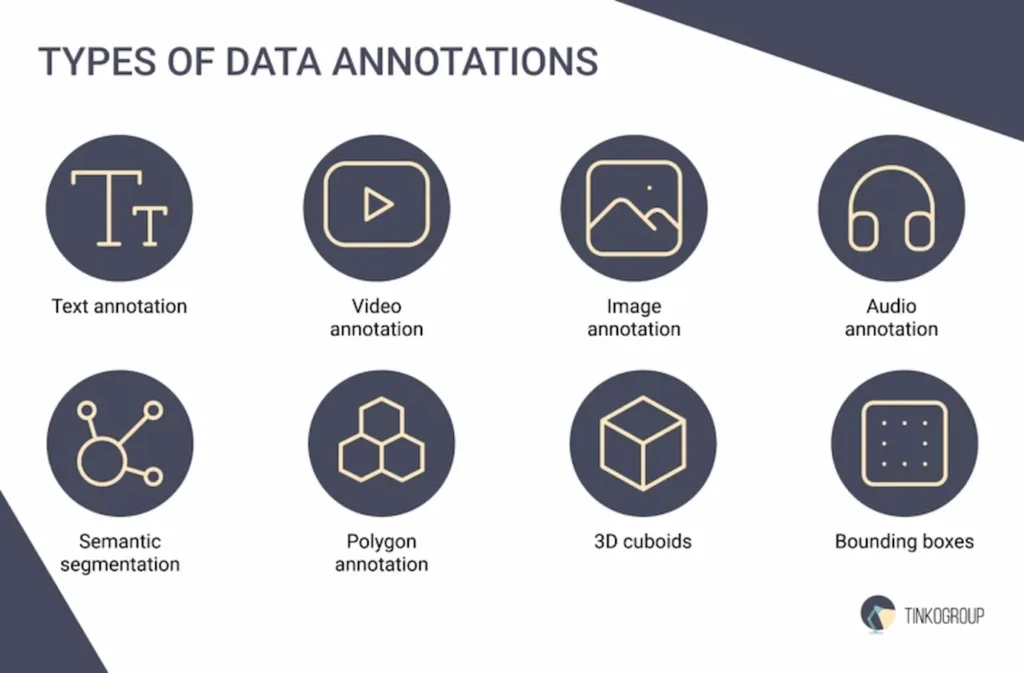
Text annotation
Text annotation adds tags to words, phrases, or whole documents so NLP models can make sense of language. Common tasks:
- Named entity recognition (NER): Finds names of people, companies, places, and dates in text.
- Part-of-speech tagging: Marks each word as a noun, verb, adjective, and so on.
- Sentiment analysis: Labels a sentence or review as positive, negative, or neutral.
- Intent detection: Shows what a user wants, for example, “cancel my order” vs. “where’s my order.” Chatbots depend on it.
- Entity linking: Connects a name in the text to the right entry in a knowledge base, so Apple, the company, isn’t confused with the fruit.
Video annotation
Video annotation labels objects, actions, and events across frames. You’ll see it in self-driving, video surveillance, and sports analytics.
- Frame-by-frame annotation: Each frame is labeled on its own. It’s slow but precise.
- Object tracking: One object keeps the same ID as it moves from frame to frame.
- Action annotation: Marks what people do: running, jumping, waving.
- Event annotation: Marks moments that matter, like a goal in a match or a near-miss on the road.
Image annotation
Image annotation is the base of most computer vision projects. The simplest form is classification: one label for the whole image, such as “cat,” “invoice,” or “damaged car.” For object-level work, you’ll use bounding boxes, polygons, 3D cuboids, or segmentation masks. Each is covered below.
One more method is worth knowing: landmark (keypoint) annotation. Annotators place points on specific spots, such as the corners of the eyes or the joints of a hand. It’s used for face recognition and pose estimation.
Audio annotation
Labeling audio data helps models understand speech and other sounds.
- Speech transcription: Spoken words are written down as text. This is how speech recognition systems are trained.
- Speaker identification: Each part of a recording is tagged with who’s speaking. Call center analytics relies on it.
- Acoustic event detection: Non-speech sounds, such as alarms, doorbells, or breaking glass, get their own labels.
- Emotion annotation: A clip is tagged as calm, angry, happy, and so on.
Semantic segmentation
Semantic segmentation assigns a class to every pixel in an image. It takes more time than boxes, but it gives the model an exact picture of the scene.
- Scene understanding: Every pixel gets a class: road, sidewalk, sky, car.
- Medical imaging: Tissues and organs are separated from each other, which helps with diagnosis and treatment planning.
- Urban planning: Land is split into fields, forests, buildings, and water for urban planning and environmental monitoring.
Polygon annotation
Polygon annotation outlines an object with points joined by straight lines. It follows the real shape much more closely than a box, so it suits irregular objects like clothing, animals, or dents on a car.
Polygons are also a common first step in segmentation. The annotator draws the outline, and every pixel inside it gets the class.
3D cuboids
3D cuboids annotation draws a 3D box around an object to capture its size, depth, and direction. Self-driving cars use these labels to judge how far away an obstacle is. Robots use them to grab and move objects.
If you need lane geometry tracked across moving scenes, annotating road lanes in video gives lane detection and lane-keeping systems the training data they need.
Bounding boxes
Bounding boxes are the most common annotation type. An annotator draws a rectangle around each object. It’s quick, cheap, and good enough for many tasks.
- Object detection: The model learns where objects are, whether on store shelves, in security footage, or in traffic.
- Image classification: Boxes help sort images by what’s in them, which makes large photo libraries searchable.
- Face detection: The model finds faces in a frame. Recognition comes after that.
Why data annotation matters
Your labels set a ceiling on how well the model can perform. Here’s what good annotation gives you in practice.
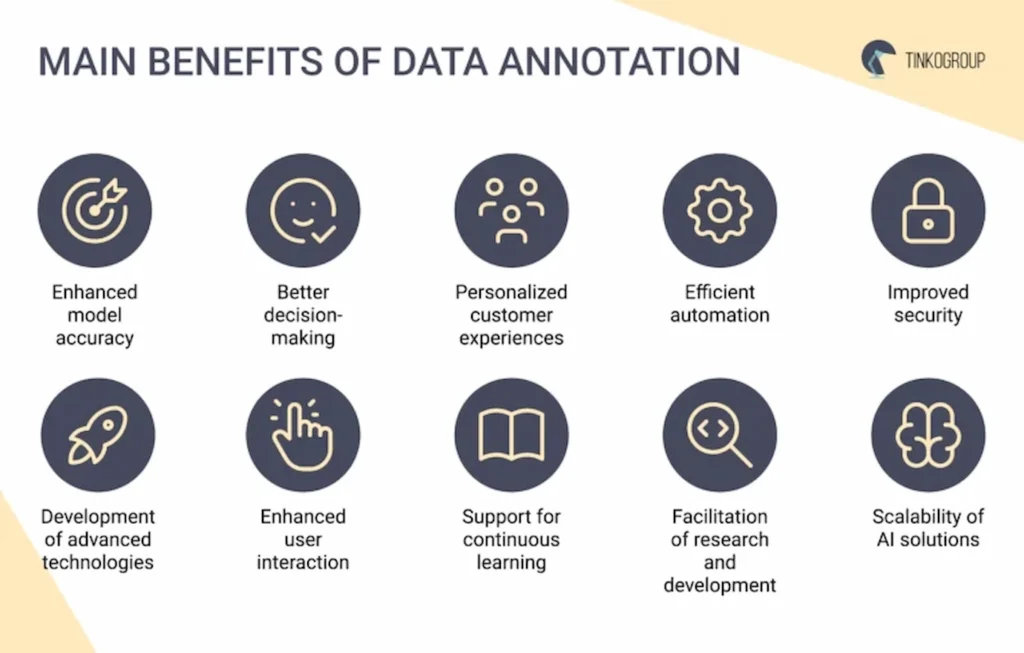
More accurate models. A model trained on clean, consistent labels recognizes objects, faces, and intent more reliably. In natural language processing, that means fewer misread requests and better answers.
Decisions you can trust. In healthcare, well-labeled scans help AI spot disease earlier. In finance, labeled transactions help models assess risk. Bad labels put wrong answers in front of people who act on them.
Automation that holds up. Chatbots, document parsers, and warehouse robots all run on labeled data. When the labels are right, people can hand off routine work and spend their time on harder cases.
New products. Self-driving cars, face ID, and voice assistants wouldn’t exist without large labeled datasets. A self-driving car, for example, learns from camera and LiDAR data where every object has been labeled.

Reliable Data Services Delivered By Experts
We help you scale faster by doing the data work right - the first time

The same goes for recommendations, fraud detection, and models that keep learning as new data comes in. Each one depends on labels that are accurate and consistent.
How to Do Data Annotation: Step-by-Step Tutorial
Most annotation projects go through four stages. Here they are in the order you’ll meet them.
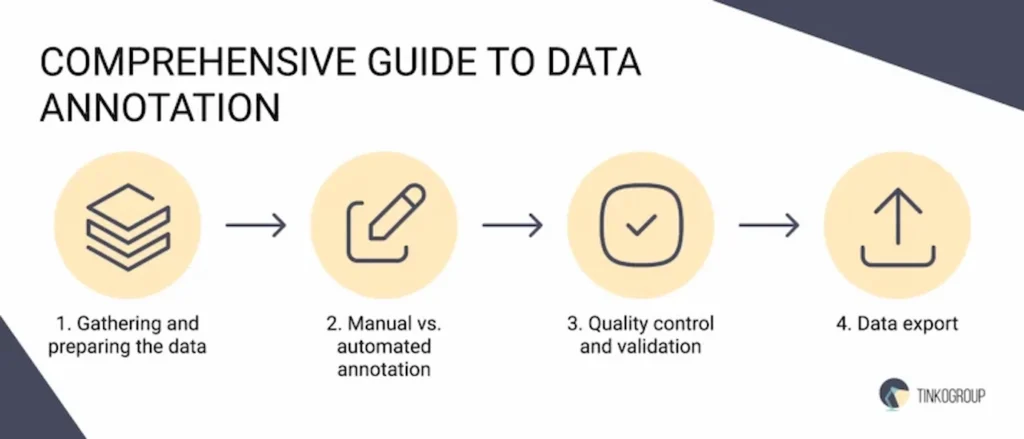
1. Gathering and preparing the data
Start with the raw data and get it into shape before anyone labels a single file.
Data collection:
- Find your sources. Your own databases, public datasets, sensors, surveys, or web scraping.
- Collect raw files. Use the same kind of data the model will see in real use, whether that’s text, images, video, or audio.
- Data privacy and security. Check that collecting and storing the data follows privacy laws. This matters most for personal and medical data.
Data preparation:
- Cleaning data: Remove duplicates, broken files, and anything irrelevant. Correct obvious errors and stick to one format.
- Format it for annotation: Split long texts into sentences or paragraphs. Resize or crop images. Trim audio.
- Sample if needed: With a huge dataset, label a smaller subset first. Make sure it covers the cases the model will actually face.
2. Manual vs. automated annotation
You can label data by hand, let a model do it, or combine the two.
Manual annotation
People understand context, sarcasm, and odd edge cases far better than models. That makes manual work the most accurate option for complex or ambiguous data.
The downside is time and money. Hiring and training annotators is expensive, and growing a manual team to handle millions of items is hard.
Automated annotation
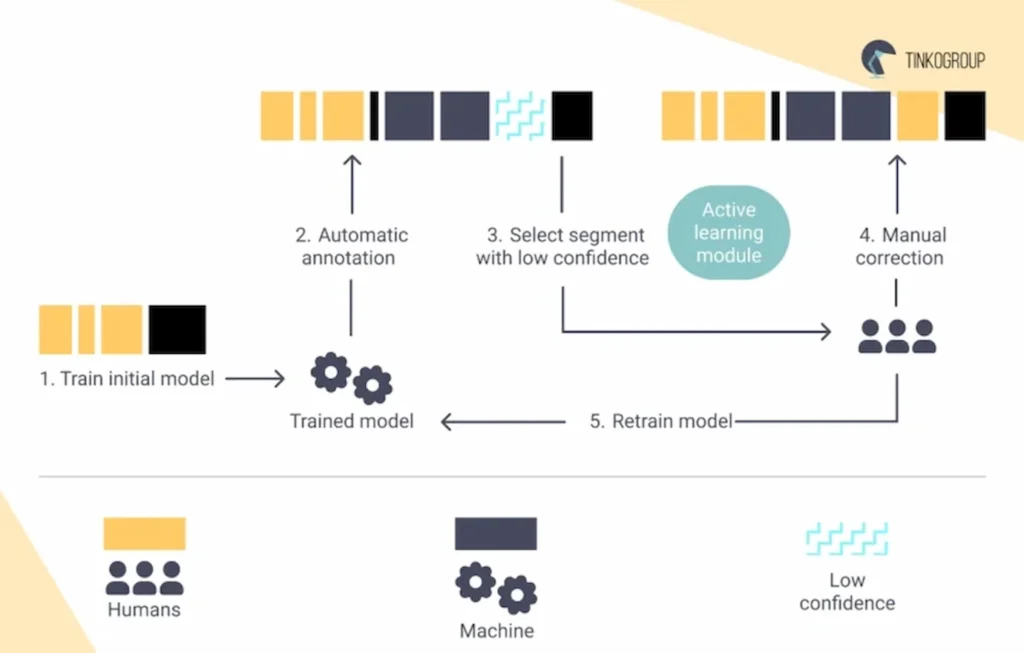
A model can label large volumes quickly and cheaply. But it struggles with unusual items, and it makes mistakes with full confidence. It also takes real effort to set up and tune before it’s useful.
Hybrid approach
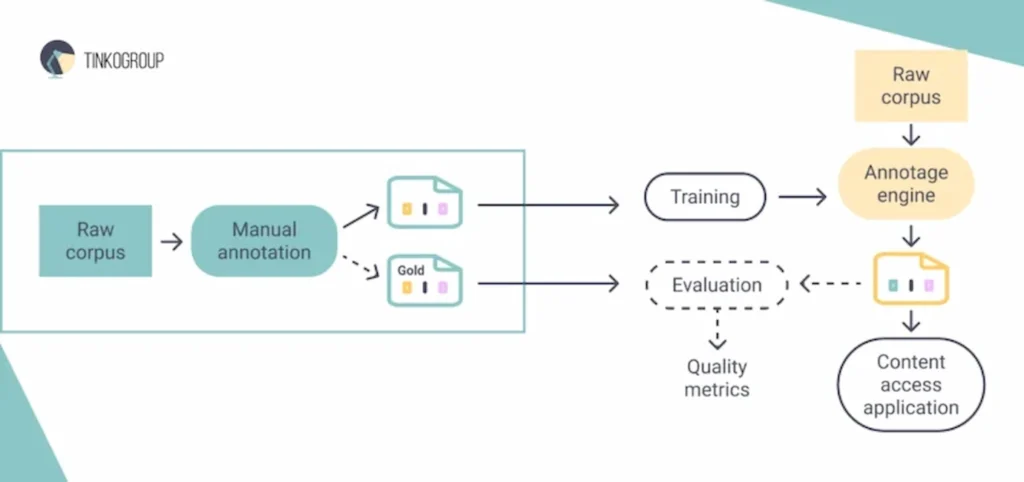
Most teams combine both. A model pre-labels the data, and people review and fix it. With active learning, the model picks the items it’s least sure about and sends those to humans first. You need fewer labeled examples to reach the same accuracy, and reviewers spend their time on quality instead of routine clicks.
In 2026, the hybrid approach is the default for most teams. Foundation models now draw the first version of many labels: SAM 3, released by Meta in November 2025, can find and outline every object that matches a short text prompt, such as “yellow school bus.” In a 2025 industry report, Kognic found that model-assisted labeling cut annotation time by up to 68% compared with fully manual work. Human review still decides quality: models are fast, but they make confident mistakes on rare and ambiguous cases.
3. Quality control and validation
Annotation errors are cheap to catch early and expensive to find after training. For a deeper look at review loops and metrics, see our guide to the annotation QA process.
Quality control:
- Multi-tier review: A senior annotator or domain expert checks the first pass.
- Inter-annotator agreement: Give the same items to two people and measure how often they agree. Low agreement usually means the guideline is unclear.
- Spot checks: Review a random sample of every batch.
Validation:
- Consensus: For hard items, several annotators label the same data, and the majority or an expert decides.
- Gold standard: Mix in items with known correct answers and see who gets them right.
- Model checks: Train a quick model and look at where its predictions disagree with human labels. Those spots often hide errors.
Feedback loop:
- Ongoing training: Show annotators their mistakes and explain the right answer.
- Error analysis: Look for repeated errors. If many people make the same mistake, fix the guideline, not the people.
To spot weak points early without slowing the project down, many teams also track annotator performance benchmarks.
4. Data export
The last step is getting the labels out in a form your training pipeline can use.
Exporting data:
- Choose a format: Common ones are JSON, CSV, and XML. For images, COCO is a standard choice.
- Keep labels linked to data: Every label has to point to the right file, frame, or text span.
- Add metadata: Timestamps, annotator IDs, and notes help when you debug the model later.
Data management:
- Version control: Give each dataset release a version number so you can roll back.
- Backup: Store annotated data securely and keep a copy. Losing weeks of labeling hurts.
Integration with machine learning pipelines:
- API integration: Connect the dataset straight to your training pipeline through an API.
- Continuous updates: New data keeps coming. Plan how it’ll be labeled and added so the model doesn’t go stale.
Worked example: your first annotation project
To make this data annotation guide concrete, here is what the four steps look like in practice. Imagine you need to train a model that detects three types of products on store shelves: bottles, cans, and boxes.
- Prepare. Collect 500 shelf photos, remove blurry and duplicate images, and keep a mix of lighting conditions and store layouts.
- Write a one-page guideline. Define the three classes with example images, and decide the edge cases in advance: label a can that is half hidden by another product? Draw the box around the visible part only?
- Run a pilot. Label 50 images with two people in a free tool such as Label Studio or CVAT. Compare their boxes, discuss every disagreement, and update the guideline.
- Label the rest. Annotate the remaining 450 images, using model pre-labels if your tool supports them, and review a random 10–15% of each batch.
- Export. Export the labels in COCO format with a version number, and keep the guideline version alongside the dataset.
For a deeper guide to the pilot stage, see our annotation pilot project best practices.
Data annotation in various scenarios
Here’s how annotation is used in a few industries.
Healthcare
Medical imaging. Annotators mark organs, fractures, and tumors on X-rays, MRIs, and CT scans. Models trained on these labels can flag suspicious areas so a radiologist checks them first. This work needs people with medical training, and a second reviewer is standard.
Electronic health records (EHR). Symptoms, diagnoses, and treatments are tagged in doctors’ notes. NLP models can then pull this information out of free text, so clinicians spend less time digging through records.
Autonomous vehicles
Object detection. Pedestrians, cars, traffic signs, and obstacles are labeled in camera and sensor data. A self-driving system can’t react to something it hasn’t learned to see, so label quality here is a safety issue.
Lane detection. Road lanes are marked in images and video, so the car can keep its lane and change lanes safely.
Retail and e-commerce
Product categorization. Product photos and descriptions get the right category tags. Shoppers find things faster, and recommendations get better.
Sentiment analysis. Customer reviews are labeled positive, negative, or neutral. Retailers use this to see what people like and what needs fixing.
Finance
Fraud detection. Transactions are labeled as legitimate or fraudulent, so models can flag suspicious ones in real time.
Document processing. Totals, dates, and vendor names are marked on invoices and receipts. The model then pulls the same fields from new documents, and nobody has to type them in.
Best practices for data annotation
These practices show up on almost every annotation project that goes well. Start with the first three. The rest matter more as the project grows.
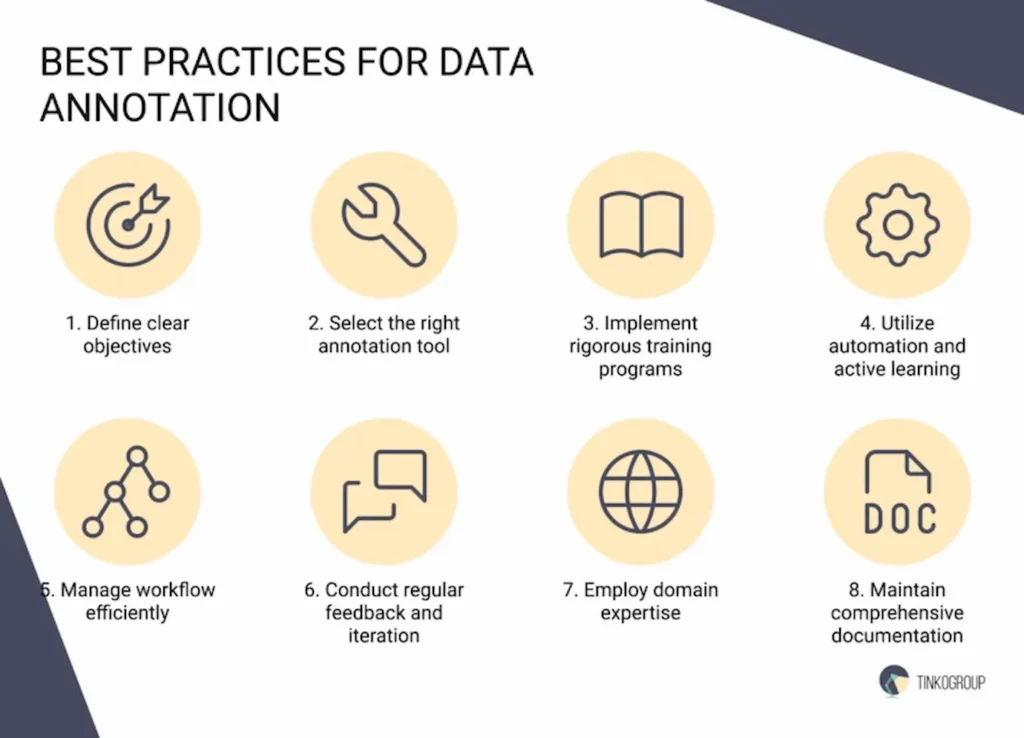
1. Define the task and write clear guidelines
Decide what the model has to do before anyone labels anything: detect objects, classify reviews, or transcribe calls. Then write a guideline that shows what to label, how to label it, and what to do with tricky cases. Use real examples of both correct and incorrect labels. Our guide on how to draft effective annotation guidelines includes a template.
2. Train annotators and start with a pilot
Walk new annotators through the guideline and the tool. Then give them a practice batch and feedback before real work starts. Keep one place for questions, like a shared FAQ or a team chat. If the same question keeps coming up, the guideline has a gap.
3. Involve domain experts
Medical scans, legal contracts, and financial documents need people who understand the subject. Bring experts in to help write the guideline and review the hardest cases. Annotators who work on technical data need extra training, too.
4. Choose a tool your team can actually use
The tool has to support the annotation types you need, whether that’s boxes, polygons, or text labels. It should be easy to pick up, handle your data volume, and connect to your ML pipeline. For team projects, look for task assignment, progress tracking, and comments. Annotators should be able to flag an unclear item instead of guessing.
5. Combine automation with human review
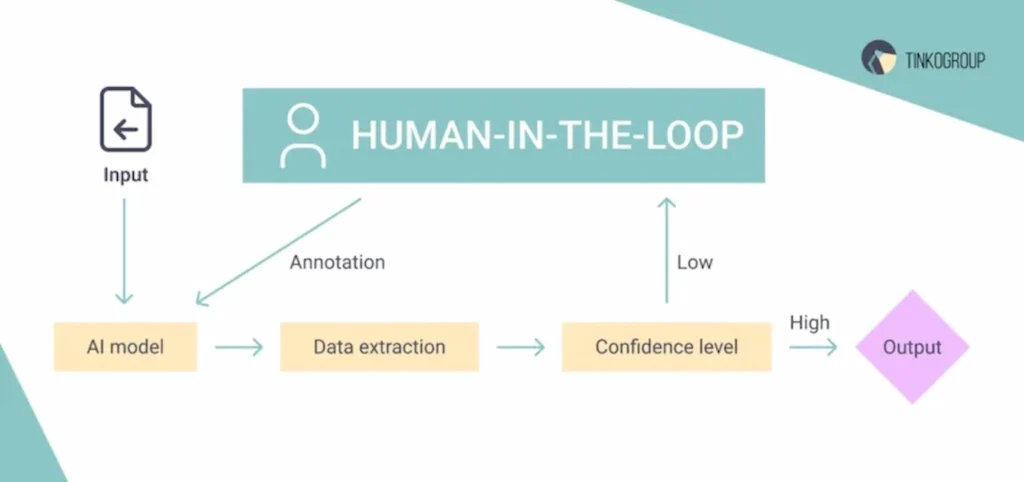
Let a model pre-label the data and have people check it. With active learning, humans spend their time on the items the model isn’t sure about. Feed their corrections back into the model, and the pre-labels get better over time.
Below is an example of human-in-the-loop annotation.
6. Plan for scale
Workloads rarely stay flat. Cloud-based tools let remote annotators work on large datasets, and batch processing gets more done per day. Many teams keep a small in-house core and bring in outsourced annotators when volume spikes.
7. Protect sensitive data
Healthcare and finance data needs extra care. Encrypt data in storage and in transit. Give access only to the people who need it. Follow the rules that apply to you, such as GDPR or HIPAA. Our guide to data annotation security explains these controls in more detail.
For highly sensitive or restricted datasets, standard controls may not be enough. In that case, look at secure annotation workflows built around restricted data access.
8. Track the work and document everything
Watch progress and time per task to spot bottlenecks early. Keep the guideline, tool settings, and QA steps written down and up to date. Version both the guideline and the dataset, so you always know which rules produced which labels.
Data annotation tools for beginners
Data annotation tools range from free open-source apps to enterprise platforms. For a first project, a free tool is usually enough. Here are five well-known options. The link above leads to our full comparison of 20 platforms.
- Label Studio. Open-source, web-based, and flexible: one tool for images, text, audio, and video, with templates for the most common tasks.
- CVAT. An open-source platform for image and video annotation, strong in bounding boxes, polygons, and object tracking across frames.
- Doccano. An open-source tool for text annotation: named entities, text classification, and sequence labeling.
- VGG Image Annotator (VIA). A lightweight tool from the University of Oxford that runs in a browser without installation; good for small image projects.
- Scale AI. A commercial platform combined with a managed labeling workforce, built for large enterprise projects rather than first experiments.
Common challenges in data annotation
Even well-planned projects run into the same few problems. Here’s what they look like and what helps.
- Quality and consistency
Two annotators can look at the same image and disagree. Is that a sedan or a hatchback? Is “great, another delay” positive or negative? In specialized fields like medicine or law, missing domain knowledge makes this worse. Disagreements are normal. The trouble starts when nobody notices them.
What helps: a guideline with real examples of tricky cases, training before production, and a second person checking a sample of every batch.
- Scalability
Manual labeling is slow, and hiring a big team costs a lot. Data volume often grows faster than the team can.
What helps: let models handle simple, repetitive items and keep people on the hard ones. Crowdsourcing adds capacity quickly, but use it for non-sensitive data only.
- Tool limitations
A clumsy interface slows people down and causes errors. Some tools don’t support the type you need, like 3D cuboids or segmentation. Others freeze on large, high-resolution files.
What helps: test a tool on your real data before you commit. Pick one you can customize and connect to your ML pipeline.
- Cost management
Labor is the biggest cost, followed by tool licenses and QA time. Cutting QA to save money usually costs more later. For a clearer picture of real-world pricing, check out our guide to the actual cost per 10K labels and how to optimize without compromising quality.
What helps: compare options before you start, use pre-labeling where it works well, and consider outsourcing to a specialized provider.
- Complexity of data types
Text, images, video, and audio each need different skills and often different tools. Someone who’s great at NER may be lost with LiDAR point clouds.
What helps: train people for the data they’ll actually work with, pick tools that handle several data types, and build teams with mixed expertise.
Our data annotation services
If you’d rather not build an annotation team from scratch, we can take the work on. Tinkogroup labels images, video, text, and audio for AI teams in different industries. We help write the guidelines, run quality control, and deliver labels in the format your pipeline needs. Here’s how we work on image categorization:
Every project starts with a look at your data and goals. From there, we agree on guidelines, data formats, and version control, and connect delivery to your pipeline through an API if you need it. As new data arrives, we keep labeling it.
Take our text annotation case study. The client wanted to find and classify names, organizations, and locations in text faster and more accurately. Our team set up entity labeling, added sentiment labels to capture the tone of each text, and described and labeled image elements, too. The client ended up with one consistent system for analyzing and managing their data.
Final thoughts
Data annotation turns raw files into examples a model can learn from. If you’re just starting, it helps to understand how it differs from data labeling and to go through the steps in order.
As you move from this data annotation guide to real projects, remember that annotation isn’t complicated, but it’s easy to rush. Start small and write your rules down. Check a sample of every batch, and update the guideline whenever annotators disagree. Do that, and your model will have something solid to work with.
Are you ready to take your data annotation to the next level? Our annotation team can label your first batch, set up guidelines and QA, and scale with you as the project grows. Start your first annotation project with a free pilot.
What is data annotation?
Data annotation is labeling or tagging data to make it understandable and usable for machine learning algorithms. This involves adding metadata to various data types, such as images, videos, audio, and text, to help AI models learn and make predictions.
What is the difference between data annotation and data labeling?
Data labeling typically refers to assigning predefined categories or tags to data points. It is a subset of data annotation focused on categorization. Data annotation is a broader term that contains data labeling and adds more detailed metadata.
How to do data annotation?
Start by defining the task and the label classes, then prepare and clean your data, write a short guideline with examples and edge cases, run a pilot on a small batch, annotate the full dataset with regular review, and export the labels in a format your model can use. The step-by-step tutorial above walks through each stage with an example.
What is an example of data annotation?
A common example is drawing bounding boxes around cars, pedestrians, and traffic signs in road photos so a self-driving model can learn to detect them. Other examples include tagging customer reviews as positive or negative, marking names and dates in contracts, and transcribing call recordings with speaker labels.
What tools can beginners use for data annotation?
Free open-source tools are enough to start: Label Studio for most data types, CVAT for images and video, Doccano for text, and VGG Image Annotator for small image projects. Commercial platforms make sense once you have large volumes or need a managed workforce.
How can a beginner learn data annotation?
Pick a small public dataset, install a free tool, and label a few hundred examples following a written guideline. Then compare your labels with a colleague’s, look at every disagreement, and refine the rules. Learning to write clear guidelines and measure agreement teaches more than any amount of reading.


