

In the world of artificial intelligence and machine learning, there’s a simple rule: data quality directly determines model quality. You can invest millions of dollars in computing power and neural network architectures, but if annotations are collected hastily and without a well-thought-out process, the results will be mediocre.
For this reason, more and more companies are beginning to view custom annotation workflows as a strategic tool rather than just an operational task. This approach allows for project-specific annotation pipeline design, reducing errors, and achieving high AI model reliability.
Below, we’ll explore in detail why standard annotation processes are no longer adequate, what elements make a workflow “custom,” and how to overcome annotation scalability challenges as a team grows.
Standard Annotation Workflows — Strengths and Weaknesses
Most AI projects rely on a basic data management framework. It’s time-tested and seems intuitive: collect data, label it, validate it, and feed it into a training set for the model. This annotation pipeline design often becomes the starting point, especially when a project is just getting started or the team hasn’t yet encountered large volumes of data.
Typical Pipeline: Annotate → Review → Train
The classic framework is extremely simple. First, annotators create labels based on prepared instructions. Then, the results are selectively or fully verified by validators. Afterwards, the data is fed into a training set, where it is used to train the model. For small problems and relatively simple scenarios, this process produces workable results and allows for quick hypothesis testing.
Benefits: Simplicity, Speed, Cost
The main advantage of standard approaches is their straightforwardness. Such a process can be set up literally from scratch without expensive tools or complex integration. It provides:
- speed to start — the team can quickly begin annotation and obtain the first training set within a few days;
- minimal costs — a small number of annotators and simple tools such as spreadsheets or basic software are sufficient;
- transparency — the pipeline is easy to explain and reproduce, which is especially useful for pilot projects and proof of concept.
With limited resources, this model allows for initial results and validation of the project’s viability.
Limitations: Poor handling of edge cases, no flexibility for niche domains
However, this simplified process also has serious limitations. Firstly, it provides virtually no annotation review loops, so errors can accumulate unnoticed. Secondly, it lacks mechanisms for in-depth verification and approval of the annotation, leading to unpredictable results.
For complex domains such as medicine, bioinformatics, and autonomous vehicles, this approach is too rigid. These areas require domain-specific annotation and high AI workflow flexibility. For example, when working with medical images, it’s important to consider the opinions of specialists capable of distinguishing rare pathologies. Building autopilot systems requires flexibility in accounting for a large number of edge cases that can’t be covered by standard instructions.
As a result, basic workflows perform well for simple tasks but become a bottleneck when scaling or working in niche domains. These weaknesses are precisely what drive teams to switch to custom annotation workflows, where flexibility and accuracy are paramount.
What Makes a Workflow “Custom”
Not every annotation scheme deserves the name “custom.” Unlike standard pipelines, which are built using a single template, custom annotation workflows are focused on specific project goals and take into account its specifics. Here, not only the sequence of steps is important, but also the depth of control, the presence of specialized checks, and the ability to quickly adapt the process to new requirements.
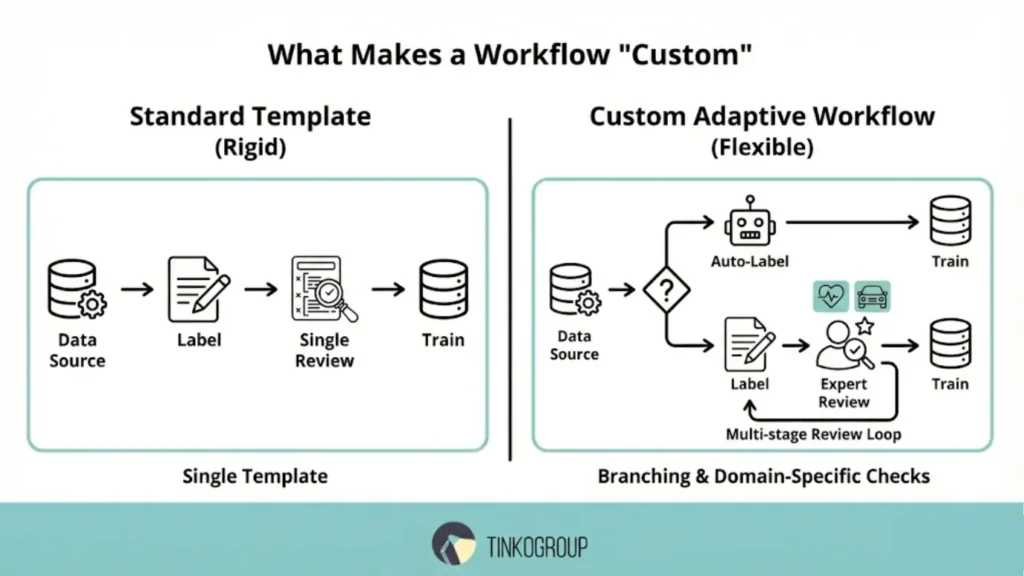
These workflows allow you to implement annotation review loops, add expert roles, and build branching for complex datasets. They strike a balance between speed and accuracy, which is especially critical for domains where errors can be costly—from medicine to autonomous systems.
Adaptation to Project Requirements
Each project has unique needs: for some, model output speed is important, for others, strict workflow auditability, and for others, the flexibility of integration with existing systems. Customization allows you to address these priorities.
Multi-stage Review Loops
Instead of a single level of review, several are used: automatic, peer, and expert. Such annotation review loops help catch subtle errors, reducing the risk of annotation drift prevention.
Domain-Specific Checks
In healthcare applications, the annotation process should include expert doctors. In autonomous vehicle projects, it should include engineers familiar with road conditions. This is what is called domain-specific annotation.
Workflow Branching for Complex Datasets
In large projects, it is useful to build branching schemes. For example, simple images are immediately sent to automatic labeling, while questionable ones are sent to experts. This flexibility provides AI workflow flexibility and helps teams work faster.
Building Blocks of a Custom Annotation Workflow
To ensure that the labeling process is not only fast but also sustainable over the long term, it is essential to clearly understand its core components. No element is unimportant — skipping any step will lead to errors and a drop in model quality.
Task Design and Instructions
Properly designed tasks and instructions are the foundation. Clear rules reduce uncertainty and enable consistent workflows among annotators. A well-written guide should include:
- examples of “correct” and “incorrect” labeling;
- descriptions of common edge cases;
- format requirements (bounding boxes, keypoints, segmentation).
In complex subject areas, such as medicine, instructions are updated as new data becomes available. This approach makes the process part of iterative labeling workflows, where the team learns along with the model.
Role Assignments
Assigning roles is key to workflow auditability. The same task must pass through several levels of responsibility:
- annotators create the initial markup;
- validators check for accuracy;
- subject matter experts (SMEs) add domain expertise;
- auditors monitor compliance with standards and record quality metrics.
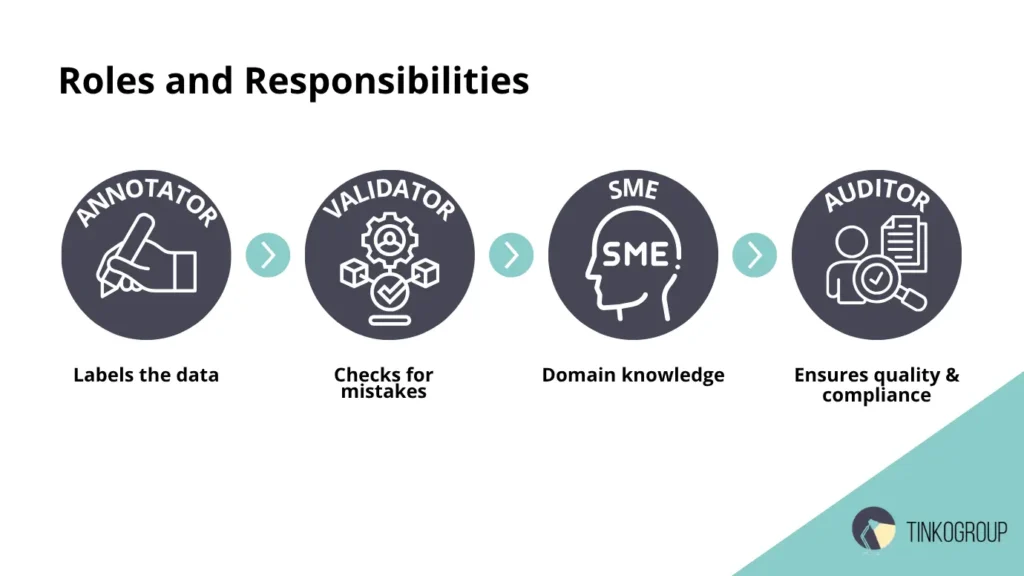
A clear structure eliminates confusion and improves data reproducibility. In large projects, this also reduces the risk of annotation scalability challenges: even as the team grows, everyone understands their role.
Feedback Loops with Model-In-Training
Model-in-the-loop feedback has become an important element of modern processes. Here, the model not only learns but also suggests areas where errors are likely. This data is fed back into the markup loop, allowing the team to focus on difficult cases. This approach becomes especially critical in video-based projects, where frame-by-frame annotation for precise video AI requires continuous validation across sequential frames to maintain temporal consistency.
This approach accelerates training, reduces manual effort, and helps combat annotator fatigue. Moreover, it minimizes the risk of annotation drift prevention, as the system regularly compares new annotations with reference annotations. Automation hooks (auto-labeling, error detection)
Automation in custom workflows not only speeds up workflows but also helps standardize them. This includes:
- auto-labeling for simple objects;
- anomaly detection algorithms (empty bounding boxes, duplicates);
- automated format checks.
These tools relieve the team of some of the routine work and allow them to focus on complex scenarios. Automation is especially important when a project grows and thousands of new images or texts are added daily — without it, it’s impossible to cope with the task and avoid annotation drift prevention.
Challenges in Moving from Standard to Custom
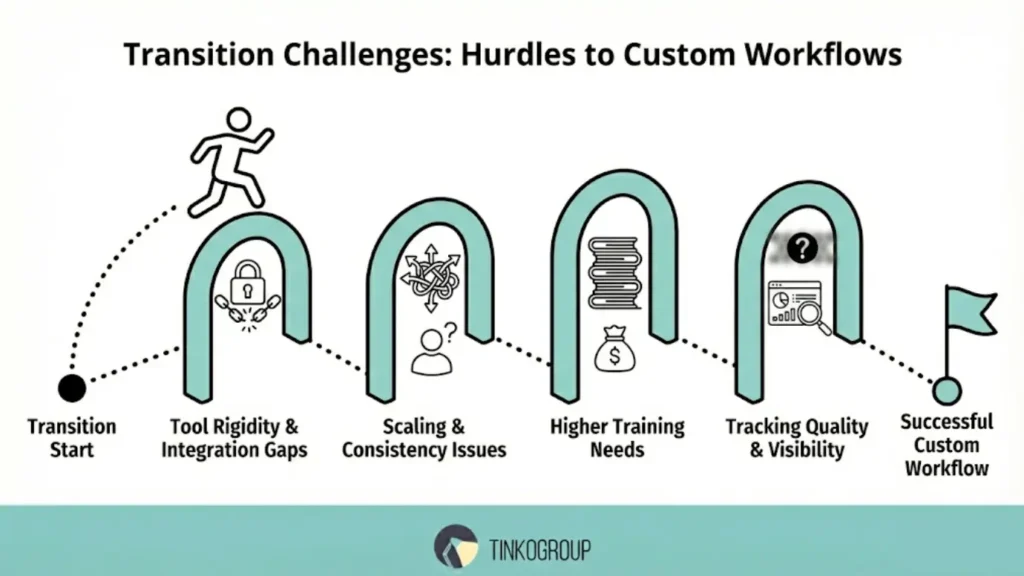
The transition from standard processes to custom annotation workflows brings significant benefits to companies, but is almost always accompanied by difficulties. These challenges relate not only to tools but also to people, organizational practices, and quality management.
Tool Rigidity and Lack of Integration
One of the main problems is the limitations of tools. Many annotation platforms were initially created for simple scenarios and do not scale well. A lack of API or weak integration with the ML pipeline forces teams to waste time on manual operations. As a result, innovation adoption slows and agility decreases.
Scaling Annotation without Losing Consistency
When data volume grows exponentially, an annotation scalability challenge arises: dozens of annotators may interpret instructions differently. Without uniform rules and control, consistency deteriorates. Even small deviations lead to annotation drift, which directly reduces the quality of the trained model. For deeper insights on managing growth, read our guide on scaling data annotation without losing quality.
Higher Training Needs for Annotators
Custom workflows almost always require more detailed training. New team members must not only learn basic instructions but also master complex edge cases. In high-risk areas (such as medical data or finance), training becomes even longer and more expensive.
Tracking Quality Across Complex Pipelines
Custom pipelines have more steps than standard ones: annotation, pre-QA, validation, audit. Without a metrics system and transparent dashboards, it’s easy to lose visibility into the process. A lack of analytics leads to the accumulation of errors that are discovered too late.
Best Practices for Designing Custom Workflows
To minimize complexity, companies rely on proven approaches.
Start with Workflow Mapping
Visualizing a process as a flowchart helps identify key nodes. It’s a simple way to identify bottlenecks and understand where automation hooks are appropriate.
Introduce Modular Stages
Gradually adding new stages makes the process more flexible. For example, you can initially limit yourself to annotation and validation, and later integrate pre-QA or SME review. This modularity reduces risks and allows the process to scale without drastic changes.
Use Human-in-the-Loop Validation Strategically
Automation is useful, but it cannot completely replace humans. Human-in-the-loop validation is effective precisely where algorithms produce a high error rate or expert review is required. This approach increases trust in the pipeline and improves the final quality.
Maintain Annotation guidelines that Evolve with Project Complexity
Rigid and static rules become ineffective over time. Annotation guidelines should be updated: new edge cases should be added, wording should be clarified, and they should be adapted to different languages and cultures. This reduces variability in the work of a large team.

Reliable Data Services Delivered By Experts
We help you scale faster by doing the data work right - the first time

Embed Compliance and Auditability in Workflow
In industries with regulatory restrictions (healthcare, finance, legal), transparency is especially important. Every step should be documented, and changes to data should be traceable. Ensuring data privacy in AI annotation is a critical compliance requirement that directly influences the choice of tools and processes.
Tools and Technologies That Enable Customization
The modern market offers solutions for teams of all sizes — from research labs to corporations.
Flexible Open-Source Tools
Open-source solutions offer a high level of flexibility and customization. They allow for experimentation, interface customization, and plugin integration. This is a good choice for startups and R&D projects where speed of experimentation is crucial.
Enterprise Solutions with APIs
Large companies often choose enterprise platforms. Their strengths include ready-made APIs, built-in analytics, and integration with cloud infrastructure. This reduces time-to-production and simplifies scaling.
When to Build In-House Workflow Tools
In-house tools are relevant when tasks are too specific. If the project is long-term and existing platforms don’t cover all needs, in-house development becomes justified. This approach is more expensive at the start, but in the long run it reduces dependence on external suppliers and provides complete control.
Case Study Snapshot
Every custom data annotation project is unique. To understand how theoretical approaches work in practice, it’s helpful to look at real-world examples. The Case Study Snapshot shows the key steps, challenges, and solutions that helped teams build an effective annotation workflow. This format allows for a quick understanding of the objectives, tools used, and results achieved.
Example
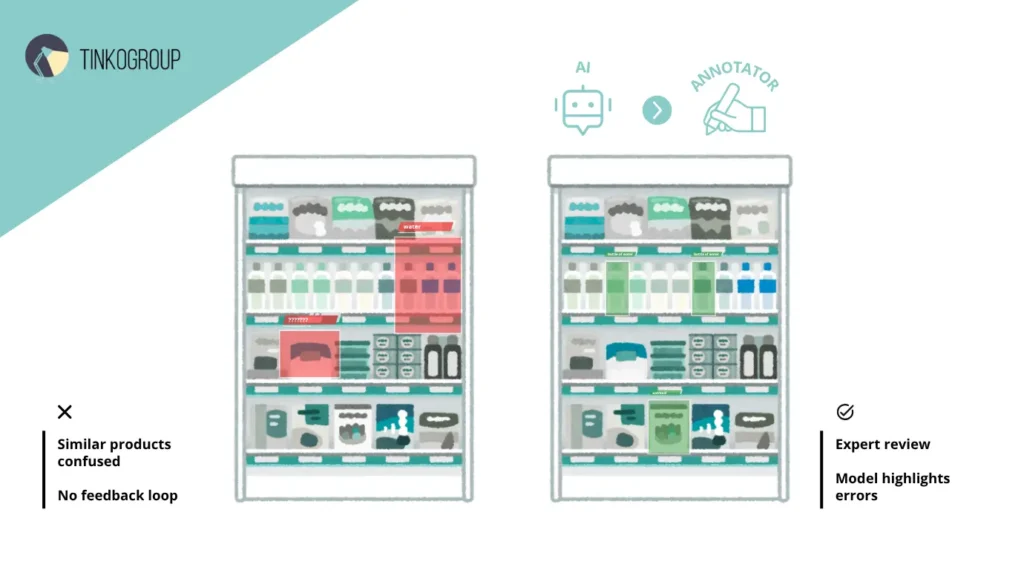
One retail company used a standard process. Initially, it worked: data was annotated quickly and inexpensively. But as the product range grew, problems arose. Annotators confused similar products, and annotation drift prevention didn’t work.
The company implemented custom annotation workflows with multi-level validation and iterative labeling workflows. The system also included model-in-the-loop feedback to highlight any issues.
Outcome
The results of switching to custom annotation workflows were noticeable already in the first iterations. The team was able to more quickly complete the entire “labeling → validation → training” cycle, significantly accelerating the delivery of updated models to production.
By implementing additional control stages and automated checks, the risk of annotation drift prevention was reduced — annotation quality became more consistent, even as the team scaled.
Furthermore, tight integration of processes with the model through model-in-the-loop feedback increased the AI model’s reliability: the system more quickly identified data inaccuracies and allowed them to be corrected even before training. The result was not only time savings but also increased final solution accuracy, which is critical for projects with high error costs.
Partner with Experts to Scale Your AI At Tinkogroup, we specialize in more than just labeling. We act as your strategic partner in designing flexible, scalable annotation pipelines tailored to your specific domain whether it’s retail, healthcare, or autonomous systems. We handle the complexity of workforce management, guideline iteration, and quality control so your engineers can focus on model architecture.
Don’t let rigid tools or inconsistent data hold your model back.
Explore our Data Annotation Service to discuss how we can build a custom workflow for your next AI project.
What is the main difference between a standard and a custom workflow?
A standard workflow follows a rigid linear template (Annotate → Review), while a custom workflow is flexible. It incorporates branching logic, multi-stage expert validation, and specific checks tailored to the unique requirements of your dataset and domain.
When should a project switch to a custom annotation pipeline?
You should switch when you notice that standard instructions no longer cover edge cases, when scaling the team leads to inconsistent data (“annotation drift”), or when your project requires deep domain expertise (e.g., in medical or autonomous driving AI).
How does Model-in-the-Loop feedback improve data quality?
It turns annotation into a cycle where the AI assists humans. The model pre-labels simple objects and highlights potential errors for review, allowing annotators to focus their efforts only on complex scenarios and ambiguous data, thereby reducing fatigue and increasing accuracy.