
Imagine you’ve crafted the perfect email campaign for your local business. You’ve spent hours on compelling copy, eye-catching visuals, and a strong call-to-action – and assumed your verified contact databases were ready to go. You email 5,000 local businesses from public directories, but soon your inbox floods with delivery failures and spam complaints. Worse, your domain reputation drops, causing future emails to go straight to the promotions or spam folder.
This is the “Email Deliverability” crisis: Cold email bounce rates average 7–8%, so nearly 8 in 100 local businesses never receive your message. Many local business emails go inactive due to owner changes, staff turnover, or neglect. Unverified lists also have typos and outdated addresses. Each hard bounce tells mailbox providers you’re a risky sender; too many, and your domain becomes flagged.
For local businesses, email is still one of the most effective marketing channels. But most marketers rush to create campaigns and overlook their contact databases. The ones who get strong results know the truth – if your data is bad, your campaign won’t work.
Verified contact databases stand behind each successful email campaign. These aren’t raw scrapes from the internet or generic directories. They are meticulously validated collections of emails, phone numbers, and decision-maker details.
The point is simple: For local service providers, the ROI of email marketing is determined by data hygiene long before the first “Send” button is clicked. Verified B2B contact databases, proper list-building, and regular updates let your emails reach the right people and turn into real sales and bookings. Bad data does the opposite – you waste money and miss opportunities.
Let’s explore why verification is a must. You will read how to build and segment effective local databases, do B2B contact research, and uncover strategies to combat data decay.
Email Marketing Foundations: Why Data Verification is Non-Negotiable
There’s a persistent misconception that email marketing is cheap enough and that data quality is a secondary problem. Moreover, marketers often choose a “volume-first” approach. They scrape local directories, export LinkedIn lists, and even government contact information and databases, hoping that the more they send, the more sticks they get. This philosophy doesn’t work, as the result is almost always a disaster.
What Affects Your Sender Reputation
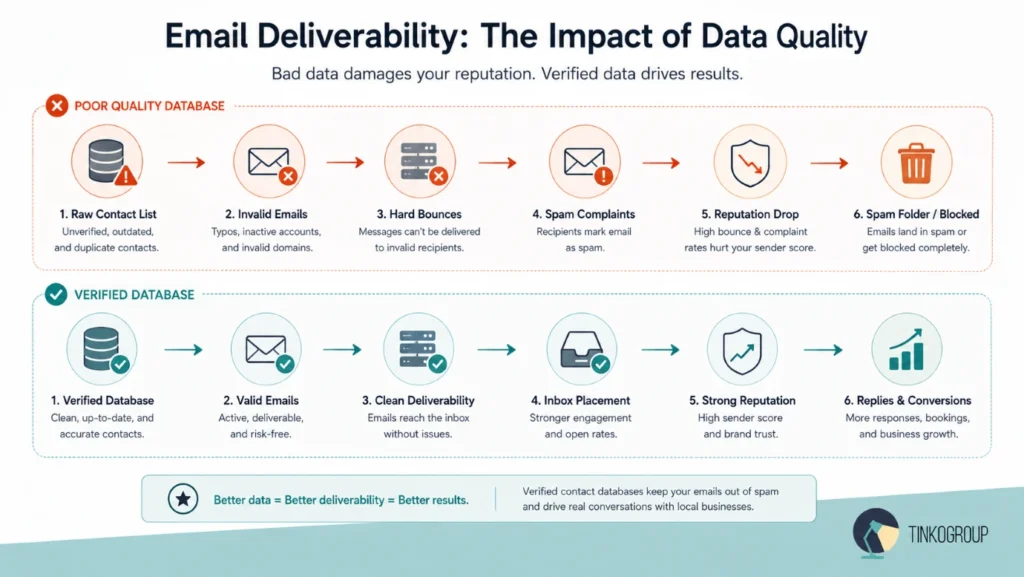
Major email providers like Gmail, Yahoo, and Microsoft enforce strict rules on authentication (SPF, DKIM, DMARC) and control who gets into the inbox. Your sender reputation is a decisive factor in whether your emails are delivered or blocked. This reputation is tied to your domain and your sending IP address. Every time you hit “send,” the receiving server looks at your history. If you have a history of sending to inactive local business emails, your “IP/domain score” drops. The score depends on actual bounce rates:
- A bounce rate above 2% is a warning sign.
- If it goes over 5%, your emails will likely start going to spam.
- If it reaches 10% or more, your email provider may block or suspend your account.
A rate of over 2% is already a hard bounce rate, which can hurt your deliverability. It’s very harmful and happens when you send emails to addresses that don’t exist or to inactive domains. It indicates that your business contact databases are outdated or low-quality.
This is especially risky for local business outreach. Local businesses frequently change their online presence. An email address that worked six months ago might now belong to a defunct domain. Without verification, you’re sending letters to nowhere.
The Hidden Danger of Spam Traps
Spam traps are even more dangerous than bounces. Organizations create these email addresses specifically to catch senders who don’t follow proper list hygiene. Spam traps come in a few types.
- Recycled traps are old email addresses that people once used but later abandoned. After a period of inactivity, internet providers reuse them as traps. If you send it to one, it signals that your list is outdated and poorly maintained.
- Pristine spam traps are even more strict. These addresses have never belonged to real users and exist only to detect spam. If your emails reach them, it usually means someone scraped your data from the web or purchased it from unreliable sources.
Local directories can be risky data sources. Pulling emails from public listings without verifying that they are real, active, and permission-based often results in spam traps and a low sender reputation.
These problems hurt your reputation and cost real money. Poor data quality costs businesses millions every year, and some studies show companies lose up to 15–25% of potential revenue because of wasted campaigns and poor deliverability.
Email list-building services play a critical role here. Reputable providers combine public records, business registries, and manual validation to create compliant and verified contact databases. For local service providers, this means lists built around specific niches rather than blanket “all businesses.”
Segmenting Local Databases for Better Personalization
A verified email address is only the starting point. Your message will reach the recipient, but there is no guarantee anyone will read it. If you want to convert local businesses, you need more than just something – you need context.
Today, the difference between a deleted email and a reply often comes down to how relevant your message feels in the first three seconds. And this relevance comes from data.
You Should Think Beyond an Email Address
A modern database needs what’s often called contextual data. This is everything that helps you understand not only who a business is but also how to talk to them. For local businesses, that usually includes the following things:
- Specific service type. Is this a fine dining Italian restaurant, a food truck, or a family-owned diner?
- Neighborhood or district. Targeting businesses in specific zip codes or commercial corridors.
- Recent business activity: New health inspection scores and recent Google reviews mentioning or social media posts about a new menu launch.
- Business size and stage. A single-location owner-operator or a multi-unit franchise group?
This extra layer of information turns a basic contact list into something far more powerful. It’s the difference between guessing and knowing. You don’t need generic lists of “local businesses”; you need structured data built around specific industries, locations, and business types. Data enrichment for sales means you get a mailing list with updated contact details and all minor mistakes fixed.
Hyper-Local Personalization That Works
Once you have verified and enriched data, personalization becomes a powerful tool. Consider the difference between the following:
“Dear restaurant owner, we offer marketing services for local food businesses.”
and
“Hi Mike, saw your pizza shop has great new reviews on Yelp. We helped three pizzerias near you boost dinner sales by 40%. Are you free for a 5-minute chat?”
You can guess which email will draw more attention. The second message includes verified, current, and contextual data. It references real information about a specific restaurant in a specific place.
Hyper-local personalization extends beyond the body of the email. Subject lines that mention a nearby landmark, reference a local food festival, or acknowledge neighborhood-specific challenges always outperform generic headlines. But none of this works without verified contact databases that include location, cuisine type, and recent engagement signals.
Niche lead databases provide the granularity needed for this approach. In the case above, you use a curated list of contacts focused on specific food-service verticals or geographies. A generic national database gives you an email address. A niche local restaurant database tells you who the decision-maker is (owner, GM, head chef), what their actual cuisine is, how many locations they run, and how to start a relevant conversation. This segmentation turns email from noise into communication.
The Technical Verification Process for Email Marketers
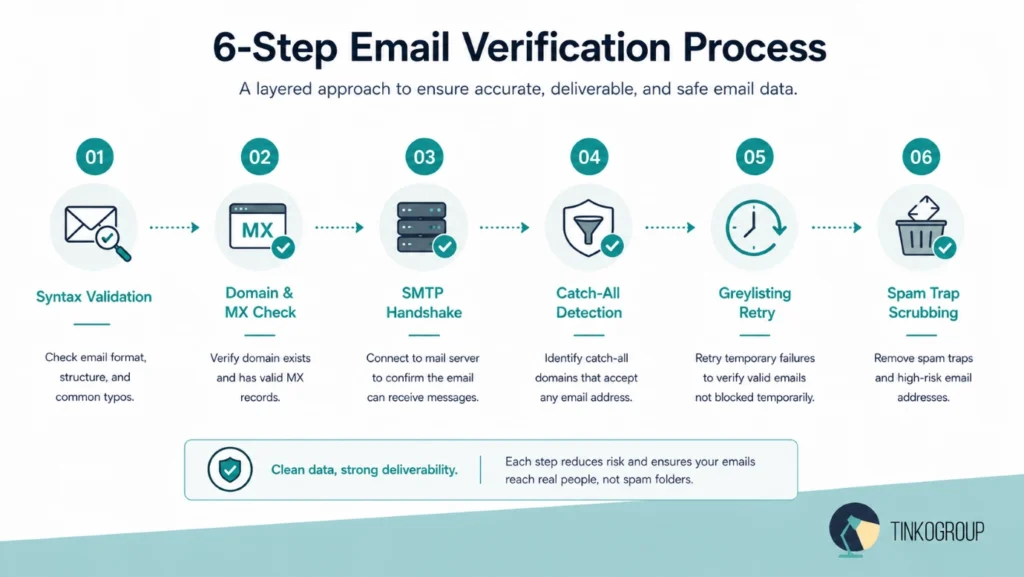
An email address looks like a line of characters to most people. But for a data expert, it’s a checkpoint that determines whether your message will reach a real person. They filter the email address to ensure it is real, active, and actually reachable. For this, they remove bad or risky data before you ever send a campaign. And it’s not enough to check whether an email contains an “@” symbol. An email verification process is a multi-step system that runs through several sequential layers:
Syntax and Regex Validation: The First Line of Defense
The process begins with an automated sweep. This stage catches the most obvious data entry errors. It identifies illegal characters, misplaced periods, or missing top-level domains (TLDs).
- Example: A manual entry error like j.smith@gmail..com (double period) or contact#company.com (invalid symbol) gets flagged and removed instantly. This step is basic, but it keeps your contact management databases free from obvious “junk” that would bounce right away.
Domain and MX Record Authentication
When the syntax is confirmed, the system looks at the domain, the part after the “@” symbol. It performs a DNS (Domain Name System) lookup to verify that the domain is actually registered. Plus, it checks if it has active MX (Mail Exchange) records.
- Technical Fact. If a local business closes or forgets to renew its domain, the MX records will vanish. When you send an email to such a domain, you signal to ESPs that your list is unmanaged. Verified MX records confirm the recipient’s digital address is still standing.
SMTP Validation: The Invisible Handshake
This is the most technically complex stage of the email verification process. The verification engine initiates an SMTP (Simple Mail Transfer Protocol) conversation with the recipient’s mail server.
- The Process. The system sends a “Hello” (EHLO) command to the server, followed by a “Mail From” command. It then issues the RCPT TO command and asks: “Do you have a mailbox for ‘marketing.director@targetbiz.com’?”
- The Result. The recipient’s server will respond with a status code. A 250 OK code confirms the mailbox is live and ready. A 550 User Unknown or 551 User Not Local code tells us the person has left the company or the address never existed. The beauty of this “ping” is that it happens behind the scenes. The recipient never receives an email, and your domain stays invisible, yet you gain 100% certainty of the address’s validity.
Catch-All (Accept-All) Configuration Detection
Many small- to medium-sized businesses (SMBs) use “Catch-All” server settings. This means the server is configured to accept any email sent to their domain, regardless of whether the specific prefix exists.
- The Risk. If you send to fake-name@catchall-company.com, the server initially says “Yes,” but it may bounce later.
- The Solution. Advanced email list building services flag these “Accept-All” domains. For local service providers, these are “gray-area” leads. We categorize them separately, allowing you to decide whether to use manual data collection to find a verified individual or to proceed with caution to protect your sender score.
Greylisting and Temporary Failure Handling
Some high-security mail servers use “Greylisting” as an anti-spam measure. They temporarily “fail” the first delivery attempt from an unknown IP and expect a legitimate sender to try again.
- Technical Handling. A basic scraper will mark these as “Bad.” A sophisticated verification tool understands the 451 Internal Error or “Try again later” code. It will pause, wait for the required interval, and re-attempt the handshake. You don’t lose high-value local leads simply because their server has a strict “gatekeeper” protocol.
Spam Trap and Scrubbing against Global “Black-Hole” Lists
The final technical layer is cross-referencing your business contact databases against known “Spam Traps” and “Honeypots.” These are email addresses created by organizations like Spamhaus to catch unscrupulous marketers. They never opt-in to lists.
- The Danger. Hitting a single honeypot can get your IP blacklisted globally within hours.
- The Defense. We use proprietary databases of known “dead” addresses and “high-risk” domains (like temporary email providers) to scrub your list.
By the time a contact passes through these six technical gates, it turns into a verified contact. For a local business, this level of care can make a big difference between a campaign that gets strong open rates and one that hurts your domain and email reach. In B2B outreach, success means you carefully protect your setup before you send anything.
Maintaining Database Health: Combating “Data Decay”
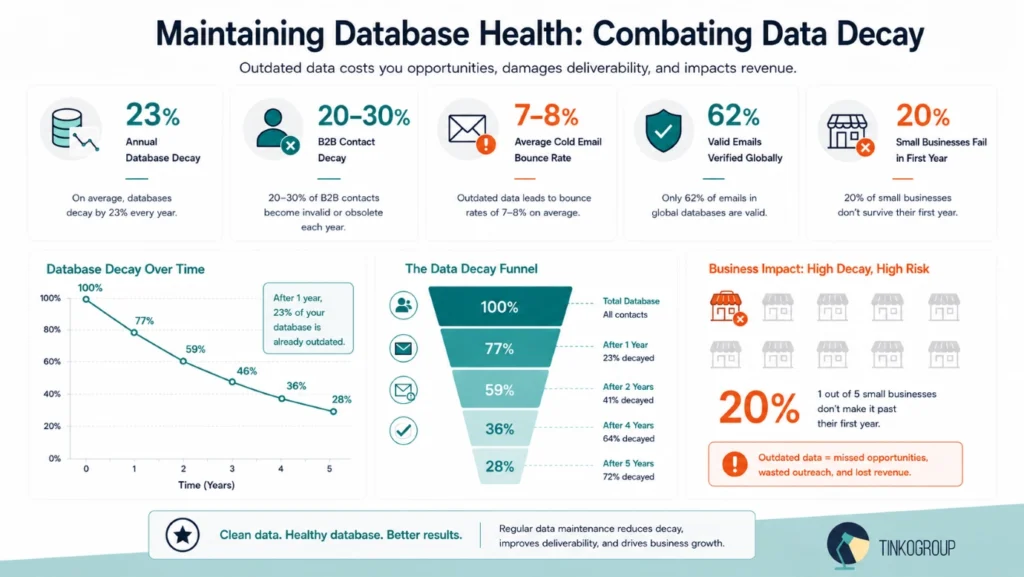
Your contact database is like a live organism. Local business data changes all the time. Owners retire, employees move on, and businesses simply relocate or shut down. B2B contact data becomes outdated by about 2% each month, and that’s roughly 20-30% per year. In more unstable periods, it is even 3–4% monthly. Email data can go inactive even faster as people switch jobs more often or work remotely. Marketers call this “Data Decay,” and it is the silent killer of even the most promising marketing campaigns.
The Scale of the Problem
According to the ZeroBounce Email List Decay Report, email databases are degrading at a rate of at least 23% per year, and that trend is accelerating. In 2021, the decay rate was around 23%. By 2025, it had jumped significantly. In fact, out of all the email addresses verified globally in 2024, only about 62% proved to be truly safe and valid for sending.
For B2B contact databases, the situation is even more pressing. Annual decay rates typically range from 22.5% to 30%. Within just 12 months, nearly a third of your outbound list can become dead. It means hard bounces, spam traps, and a shrunk sales pipeline. The main reason for data decay is invalid email addresses. But other reasons include inactive phone numbers, changes in job titles, and usual employee turnover, which leave a lot of “ghost” contacts.
Why Local Business Data Decays Faster
If you are targeting local service providers, the decay happens even faster. Small businesses are the heartbeat of the economy, but they are also incredibly volatile. A sole proprietor might close their shop without any warning. A family-owned hardware store might sell to a new owner who immediately changes the business name and the email domain.
There are four main reasons why local data is so fragile:
- Business closures. The US Bureau of Labor Statistics shows that 20% of small businesses fail within their first year, and nearly 50% are gone within five. Every closure wipes out every contact associated with that business.
- Frequent job changes. In the local service sector, employees actively move between companies. The office manager you spoke with last month may now be working for a competitor across town.
- Technology shifts. Small businesses frequently switch email providers or rebrand (shifting from @oldname.com to @newname.com) without updating old directories.
- Inconsistent data entry. One source lists a lead as “Joe’s Plumbing,” and another says “Joseph’s Plumbing LLC.” This creates fragmented, duplicate records that clutter your contact management databases.
So, imagine you have 5,000 local business contacts today – roughly 1,400 of them may be invalid by next year
Strategies for Your Email Database Health
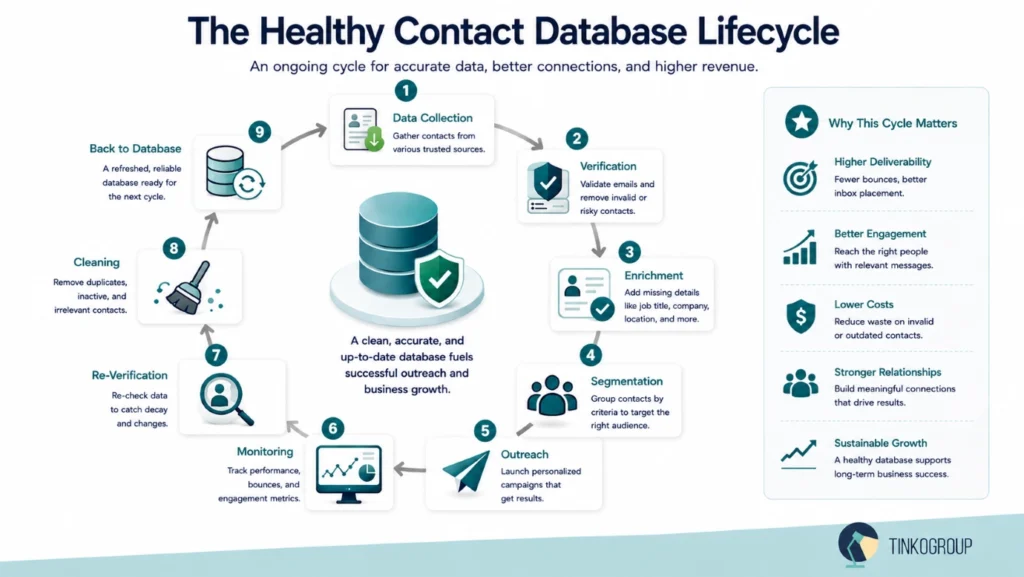
Nobody enjoys the housekeeping part of marketing. It’s always more exciting to create a campaign than to clean up a contact list. But your results depend on your data, which needs regular updates and cleanup. So many businesses rely on database cleaning services to keep their data accurate as their audience changes.
Give your list a regular checkup. Don’t wait for problems to blow up. Every couple of months, let’s say, every 60 to 90 days, run your contacts through a re-verification process. Better yet, let automated tools keep an eye on things in the background and flag junk addresses before they ever cause a problem.
Treat bounces like a fire alarm. Hard bounces are very annoying, but they are excellent warning signs. Attentive people remove or quarantine those bad addresses immediately. It matters. Because hammering invalid inboxes over and over is a fast track to the spam folder.
Stop chasing ghosts. Separate contacts who haven’t opened a single email in months. They’re dead weight and can even hurt your overall performance. Set a reasonable threshold (3 to 6 months of silence). Then let them go.
Keep things fresh. A clean list is good, but a rich list is even better. Smart marketers enrich their data regularly. They pull updates from reliable sources like business registries or LinkedIn. That way, your records stay accurate, complete, and actually helpful when you’re trying to segment or personalize your outreach.
The Role of AI in Decay Prevention
Today, the AI role in updating contact databases has moved from reactive to proactive. AI-powered tools can:
- Track job changes across LinkedIn and company websites.
- Monitor press releases and business registration updates.
- Automatically flag when a domain’s MX records change.
- Predict which contacts are most likely to go stale based on historical decay patterns.
Ignoring data decay is expensive. Every bounce damages your domain’s credit score. Every outdated phone number wastes your sales team’s time. Every email sent to a spam trap risks getting your business blacklisted. Make data cleaning a regular part of your business habits. Put it on the calendar, set aside a small budget, and use tools to run it on autopilot.
Human-in-the-Loop vs. Automated Verification
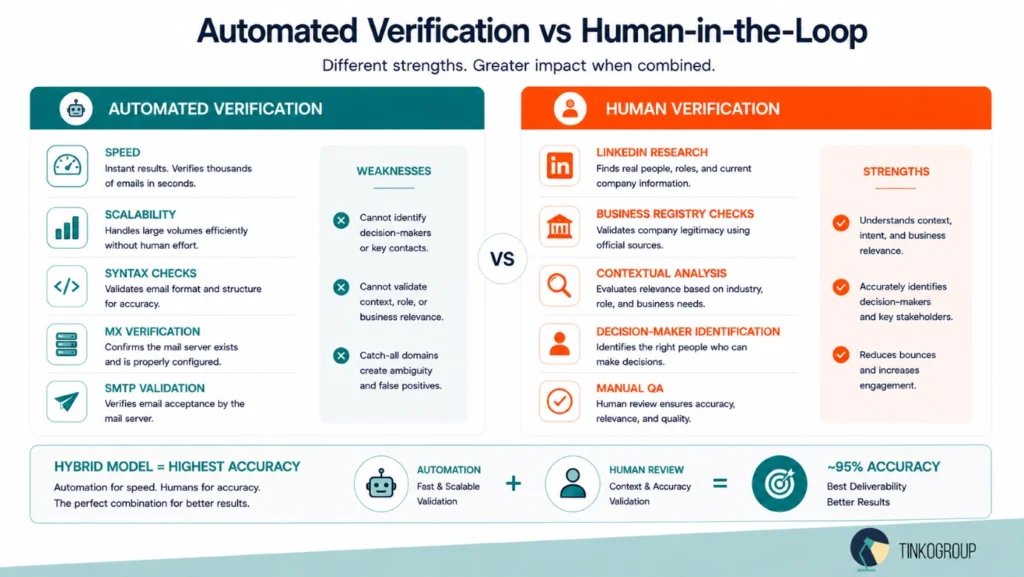
Automated verification tools are great for large databases. They are fast, scalable, and cost‑effective. But they have real blind spots when you’re dealing with local B2B markets.
What Automation Verifies – and What It Misses
The biggest limitation is that AI can verify deliverability but not identity. A verification tool can reliably tell you that an email address is valid and will accept mail. But it cannot tell you whether that email belongs to:
- The owner of a small business who makes purchasing decisions.
- A part‑time receptionist who has no authority over service contracts.
- A personal Gmail account that a sole trader uses for everything from client invoices to fantasy football.
For local service provider outreach, this distinction is critical. If your goal is to sell software, marketing services, equipment financing, or any B2B offering to local businesses, you need to reach the actual decision‑maker. An automated verification system has no way to make this distinction.
Automated tools also struggle with:
Personal vs. professional addresses – Many small business owners use personal email domains (@gmail.com, @yahoo.com) for business. Automation cannot tell whether handymanservices@gmail.com reaches the owner or disappears into an unused inbox.
Role appropriateness – owner@mainstreethardware.com might go to the decision-maker, but info@mainstreethardware.com might go to a junior employee with no purchasing authority.
Unconventional formats – small businesses often use hello@, contact@, support@, or the owner’s first name. Automation may flag these as risky when they are actually the primary contact.
Catch‑all ambiguity – automation identifies catch-all domains, but it cannot determine whether your email about accounting software or office supplies will ever be read by a human.

Reliable Data Services Delivered By Experts
We help you scale faster by doing the data work right - the first time

Where Manual Data Collection Becomes Irreplaceable
Manual data collection and human verification fill AI’s gaps. Humans cross-reference a contact against multiple sources:
- The company’s official website.
- Their LinkedIn presence (personal and company profiles).
- Their Google Business Profile.
- Local Chamber of Commerce listings.
- State or county business license databases.
- Industry-specific directories (contractor licenses, professional associations).
This cross-referencing does two things simultaneously. First, it confirms that the email address belongs to the right person at the right company. Second, it often surfaces better contact information that automated tools would never find.
What Human Researchers Find That AI Misses
Manual B2B contact research verifies data and also discovers better data. Consider the difference:
- An automated tool targeting a small business website will scrape the email address displayed in the contact footer.
- A human researcher will look at the website, cross‑reference the owner’s name from a state license database, check LinkedIn to find their direct professional email, and then verify that email against other sources before adding it to the database.
The final contact may be completely different from what the automated scrape surfaced.
Human researchers also catch contextual signals that AI cannot interpret:
- A company’s website has not been updated in three years.
- Their Google Business Profile says “permanently closed,” but their phone is still listed as active.
- Their LinkedIn profile shows that the owner has been working at a different company since last year.
- These are signals that a person reading the data can act on instantly. AI misses these signs.
Compliance and Hard‑to‑Find Contacts
There is also a compliance dimension to manual research. In the healthcare, financial, and legal industries, you must know whom to contact and what to say to them. A human researcher building verified contact databases for an outreach campaign targeting small medical offices needs to understand which contacts are appropriate targets for which types of communication. They flag records that may require additional compliance review. Automated tools do not make these judgments.
Manual data collection also surfaces contacts that automation misses entirely. A local contractor who has a thriving business may have a minimal web presence, for example, no LinkedIn, an outdated website, and only a Google Business Profile. Such contact is invisible to AI tools, but human experts will find it. These contacts usually face less competition, so they’re more likely to respond when your message reaches them.
Why the Hybrid Model Wins for Local Business Databases
Automation gives you speed and scale. Manual work gives you accuracy and context. The smartest approach is to combine both and create a layered system. Automated tools handle the part – they quickly remove obvious issues like invalid emails, dead domains, or risky addresses. This step cleans up the bulk of the list fast. Then, human teams focus on high-value contacts, flagged cases like catch-all emails, or situations where it’s not clear who the decision-maker is. This is where accuracy really improves.
Human-verified contact databases can reach accuracy levels of around 95%. Email-only verification typically is 90%, and fully automated lists without review can drop much lower.
Conclusion
Email marketing for local businesses and service providers isn’t dead. But verified contact databases are the only way to ensure your offers actually reach the inbox. High bounce rates and unclean lists waste your sends. Plus, they damage your sender reputation across Gmail, Yahoo, and Microsoft, making future campaigns less effective even when you fix your data.
What separates successful local business email campaigns from failed ones is rarely the offer or the creative. It’s the quality of the data powering the send.
A verified local business database means:
- Hard bounces kept under 1% instead of the 7–8% cold email average.
- Inbox placement rates above 85% instead of seeing 17% of your emails vanish.
- Sender reputation is free from spam complaints.
- Personalization that actually works because you have real, current information about who makes the decisions at each business.
Maintaining database health requires ongoing attention. It’s a continuous discipline. Regular cleaning cycles, bounce monitoring, and enrichment updates keep your list performing month after month, year after year.
Organizations that lack the internal resources to build and maintain verified contact databases for local businesses can partner with specialized email list-building and B2B contact research providers. The right partner guarantees multi‑layer verification, human quality assurance, and real‑time validation that automated systems alone cannot match.
At Tinkogroup, we specialize in internet research and custom email list-building services for businesses targeting local markets and service providers across the industry. We deliver verified contact databases with a 0% bounce rate guarantee.
Expect real results from your outreach? Stop shouting into the void. It’s time to bypass the filters and land directly in front of the owners, managers, and decision-makers who actually sign the checks. Let’s build a database that works as hard as you do.
What is a verified contact database?
A verified contact database is a collection of business contacts that someone has checked for email validity, deliverability, accuracy, and relevance. It typically includes active email addresses, company details, and decision-maker information to improve outreach performance and reduce bounce rates.
Why do local business email lists become outdated so quickly?
Local business data changes constantly due to staff turnover, business closures, rebranding, and domain changes. On average, B2B contact databases decay by 20–30% per year, which is why regular verification and database cleaning are essential.
Is automated email verification enough for B2B outreach?
Not completely. Automated tools are excellent for validating email deliverability and removing invalid addresses, but they cannot always identify the correct decision-maker or verify business relevance. The best results usually come from a hybrid approach that combines automation with human verification and manual research.