


Your finger pauses over the delete button. The subject line reads, “Urgent Update Regarding Your Account.” It feels suspicious. The wording is vague, and the sender’s address looks sketchy. You instinctively decide it’s spam and hit delete. Congratulations, you’ve just performed a flawless act of text classification. Your brain has spotted patterns and sorted info without you even thinking about it.
Every second, people create about 2.5 million gigabytes of text. These are emails, tweets, reviews, chats, news, and research. And the flow of information never stops. This unstructured data is a goldmine of insight, but in its raw form, it’s hardly usable. Unfortunately, humans cannot keep up with this volume. It’s where AI for text analytics steps in and quietly organizes this chaos.
So, what’s text classification? It’s a super-smart editor that can instantly read and understand the core topic of any document. The process is simple – we teach a computer to assign specific, predefined labels to text based purely on its content. Imagine an AI music critic that instantly analyzes thousands of new songs and correctly tags each one as rock, hip-hop, or classical. In the business world, this technique is often called text categorization. For all intents and purposes, it’s a synonym. If text classification is a science, text categorization is one of its most powerful business applications. It organizes text into meaningful, structured groups for action.
Why does text classification matter so much? Because it teaches AI to understand. Before a computer thinks and concludes like a human, it needs to sort text into clear categories. For example, it must clearly recognize what kind of message it is, what it’s about, or what emotion it carries. Machines can’t make sense of language on a large scale without classification.
How Text Classification Works
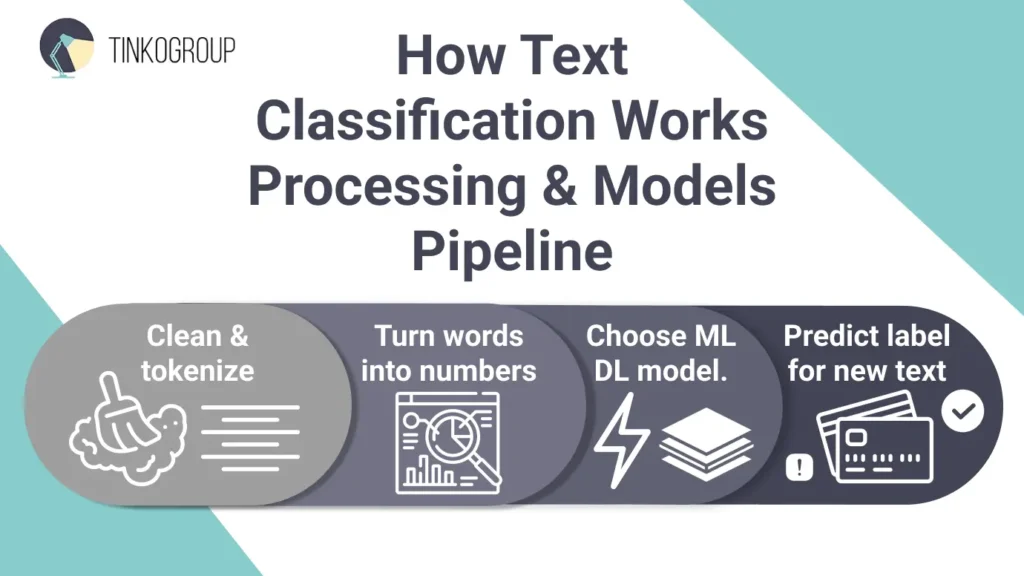
Machines don’t understand words; they understand numbers. So, the task of humans is to translate human language into a numerical format that the model can digest. Let’s break it down step by step.
Data Preprocessing
First, the data is to be cleaned. Raw text comes with typos, emojis, links, and random symbols that confuse machines. People must get rid of all this so the model can focus on what matters.
Cleaning. You should remove HTML tags from web-scraped content, special characters that add no meaning, extra whitespace, and sometimes even URLs or email addresses.
Tokenization breaks text into individual units or tokens (words or subwords). The sentence “I love this book” becomes [“I”, “love”, “this”, “book”].
Vectorization turns those words into numbers, because that’s the only language machines can understand. Here are a few ways to do this:
- Bag-of-Words (BoW) counts how often words appear.
- TF-IDF defines how important each word is in a piece of text and turn them into numbers.
- Word embeddings (like Word2Vec) capture deeper meaning, so similar words stay together in machine space.
Machines can easily get things wrong without proper preprocessing. You can compare it to cooking – if your ingredients are low quality, you will never get a tasty dish. Clean data means clean insights.
Choosing a Model
So, you have turned your words into points on a map. Now you need an algorithm to draw the borders between categories.
Classic machine learning text classification models include:
Naive Bayes. This model acts like an office worker who gets things done quickly without thinking too much. Naive Bayes looks at the words in a text and calculates the chances it belongs to a certain category, for example, spam or not spam. It’s fast, easy to use and great for simple jobs like filtering emails or sorting basic topics.
Support Vector Machines. SVM is for a more perfect outcome. It draws clean, accurate boundaries. For example, when you are using it for sorting positive and negative reviews, it finds the sharpest line that separates the two groups. This model is more difficult to use but it’s more accurate. SVM is recommended when you need reliable results for well-defined problems and want to be sure your categories don’t overlap.
These older models are simple, fast to train, and don’t need tons of data. For example, a small online store could use an SVM and a few thousand labeled products to build a solid system that sorts items into the right categories.
Deep learning models revolutionized text classification when they emerged in 2010, and Bert is one of the most effective ones.
BERT thinks deeper. It doesn’t look at separate words but reads the whole sentence to understand the meaning and context. It knows that one and the same word may have several different meanings. BERT is great for recognizing sarcasm, tone, and nuance. This is especially useful in Part-of-Speech Tagging for NLP, where the grammatical role of each word determines the overall meaning. If you want your AI to really read the language the way people do, use BERT.
This model is effective when context really matters. For example, in medical notes where “positive” could mean good or bad, or in legal documents where tiny wording makes a big difference. It’s also great for multilingual support as BERT understands over 100 languages. Big companies like Airbnb use it to sort tricky customer messages and understand intent accurately.
Training and Prediction
This is the stage where your models learn further. There are two approaches:
Supervised text classification is the most common way to teach an AI model. Let’s say you have to train a new support rep. You give them a pile of past customer tickets already sorted into groups like Billing Issue, Technical Support, and Feature Request.
The model does the same thing. It studies thousands of labeled examples and picks up on patterns. It learns that words like “invoice,” “refund,” or “charge” usually mean a billing problem, and“error,” “crash,” or “won’t load” signal a tech issue.
At first, it might get things wrong, so you correct it and train it further. After enough examples, it gets really good at sorting new tickets on its own, exactly like a trainee who’s finally ready to work without supervision.
Unsupervised learning is letting the model figure things out for itself. Let’s say you’ve got 10,000 customer emails, but no one’s labeled them. You give them to the model and say, “See what patterns you can find.”
It looks for words that often appear together and naturally forms groups. Maybe it finds:
- Cluster 1: “slow,” “freeze,” “bug,” “update” → Performance Issues
- Cluster 2: “expensive,” “subscription,” “cancel,” “cost” → Pricing Concerns
- Cluster 3: “how to,” “tutorial,” “can I,” “possible” → Documentation Gaps
The model doesn’t know what the categories mean, and you will need to label these later. But it reveals themes hidden in the data.
Text Categorization in Practice
Text classification is not simply training data annotation. It allows machines to make critical, real-time decisions. Today, many businesses use it for automation. For instance, financial institutions use models to categorize millions of regulatory reports and contracts. They can instantly see risky clauses. In e-commerce, classifiers read product descriptions and assign tags to simplify search and navigation across huge inventories. In healthcare, it transforms unstructured physician notes into structured data and speeds up crucial processes like ICD-10 coding and disease control. Social media platforms can scan large volumes of content and classify complex user text for hate speech detection.
Types of Text Classification
Not all text classification problems are the same. The kind of task you’re trying to solve affects the model you use, how you train it, and how you measure success. In general, there are three main types of text classification problems: binary, multi-class, and multi-label. Each one answers a slightly different kind of question.
Binary Classification: Yes or No
Binary classification is the simplest type. Each piece of text gets one of two labels – a YES or a NO.
The most common example is how machines filter spam. When Gmail receives a new email, it has to decide whether it’s spam or not. There’s no other option allowed. The model looks at signals like:
- Words in the subject line (“You’ve won!”, “Click here now!”)
- Reputation of the sender
- Links or attachments in the email
- Formatting quirks (all caps, multiple exclamation marks)
Each of these contributes to a “spam” decision. If the score passes a certain threshold, the email goes to the spam folder; otherwise, it goes to your inbox.
Because there are only two options, even basic models like Naive Bayes or Logistic Regression can perform very well. They output a single number, and it’s easy to adjust thresholds depending on how strict you want the classification to be.
Multi-class classification – Pick One Category
Multi-class classification is a step up. You no longer operate with only two choices. You need a text to be sorted into one category from many options. It’s like a sorting machine with multiple chutes, where each item can only go down one chute.
A common example is news article classification. Each article might belong to one main section: Politics, Business, Sports, Technology, or Entertainment. The system must pick exactly one category, even if the article naturally fits more than one.
For example, a headline like “Tesla Expands Battery Production in Europe” might get these scores from the model:
- Business – 0.62
- Technology – 0.28
- Politics – 0.05
The model chooses Business, the highest score. Technology is also related, but the system can only assign one main category.
Multi-class classification is tricky sometimes, because many texts combine a bit of every category. For example, an article about AI regulations can touch on Politics, Business, and Technology. The model must learn subtle patterns to understand what the text emphasizes more.
Multi-label classification
Sometimes a text belongs to more than one category at the same time. That’s multi-label classification. The model doesn’t have one label, but assigns as many tags as are relevant. It’s actually even more of tagging than sorting. Each tag is a yes/no decision.
For example, a jacket listing in an online store may need multiple tags:
- Category: Men’s Clothing, Outerwear, Jackets
- Features: Waterproof, Hooded, Insulated
- Style: Casual, Outdoor
- Material: Recycled
Each attribute is independent. One jacket may have all eight tags, another only five. Multi-label systems are more flexible, but they are also more complicated because the number of possible combinations grows quickly. With ten possible tags, there are over a thousand combinations; with twenty tags, over a million. The model can’t memorize all combinations, so it learns patterns from the text.
Practical Examples of Text Classification
It’s one thing to know what text classification is, but it’s really exciting to see it in action. You’ll be surprised to know how often you encounter it in your everyday life today. Let’s look at some real-world examples and see how it all works.
Email spam filters
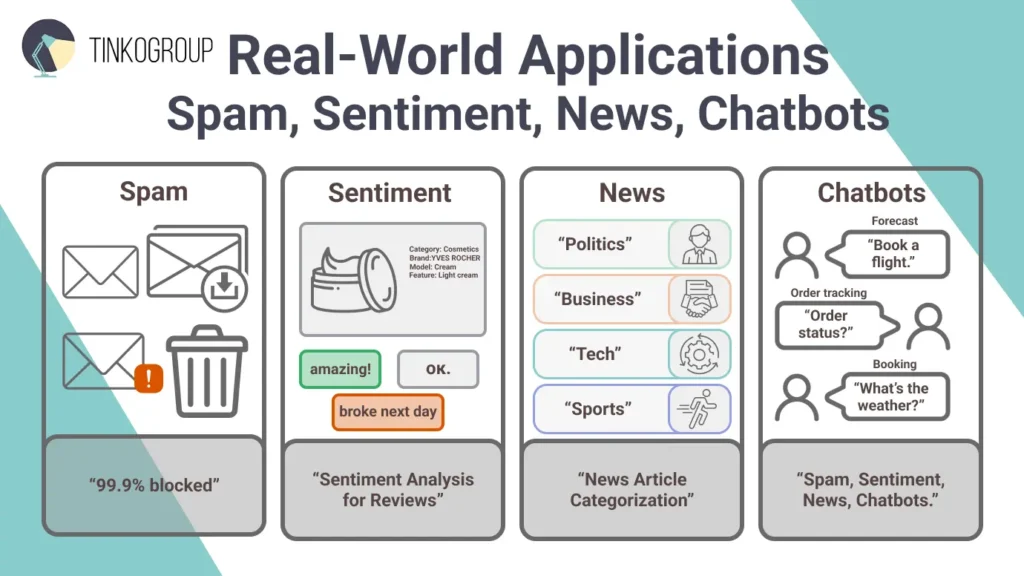
You have definitely received an email claiming you’ve won a fortune from a stranger. Spam filters use binary classification to quickly check the sender, subject, and message for signs of scam, and send it to junk when it’s not safe.
Gmail’s spam filter is a good text classification example. It has an impressive 99.9% accuracy rate, so only 0.1% of junk can slip through. This filter blocks 15 billion threats daily. It also uses machine learning to evolve with new scams. SpamLikely or Mailtrap are also strong solutions against spam. For businesses, this isn’t simple convenience but a serious cybersecurity lifeline. We live in a flood of phishing attacks, and spam filters save millions in productivity losses and protect sensitive data. Imagine a company like yours avoiding a costly breach because an AI caught a forged invoice – that’s the ROI in action.
Sentiment analysis for reviews
How does Amazon know what product is a hit? Sentiment analysis classifies reviews as positive, negative, or neutral. Using multi-class or even regression for scores, it processes phrases like “amazing quality” vs. “broke the next day.”
Nike uses sentiment analysis to see how people are talking about their brand on social media. During their 2025 Mamba Day campaign, they tracked reactions to the new Kobe 8 Protro sneaker. AI tools showed mostly positive feedback. So, the company could tweak their messaging to focus on what fans loved – authenticity, innovation, and emotional storytelling. As a result, they could skyrocket the sales.
Today, you can collect reviews with tools like Sprout Social – they spot sarcasm and tricky emotions in reviews, even understanding emojis that older systems couldn’t.
News article categorization
Millions of articles are published daily, and automated text categorization sorts them into topics like “politics” or “tech.” Multi-class classification scans headlines and content, enabling apps like Google News to personalize feeds.
Google News uses AI to organize content, trained on large datasets like the AG News corpus, which has over 120,000 articles, or the News Category Dataset with 42 categories, including popular ones like Politics and Wellness. The BBC uses similar AI to tag stories, increasing reader engagement by 15–20%. Researchers at MIT even create test examples to make sure the system handles tricky or unclear headlines accurately.
Chatbot intent recognition
Type “What’s the weather?” into Siri, and it immediately understands you want a forecast. Chatbots use intent recognition to figure out what users mean. They decode questions and provide relevant responses. Type “Order status?” and you’ll get tracking info, or “Book a flight” and it will start a reservation.
In banking, Springsapps’ chatbots handle tasks like opening accounts or answering loan questions, making services faster. E-commerce bots, like Tidio’s, help with product searches or order processing. By 2025, more than 70% of businesses will use this technology. IBM Watson and Graphlogic cut manual work in half and improve efficiency by up to 70%, especially in retail and healthcare.
Benefits of Text Classification
Every day, we create tons of data. Text classification helps turn that mess into clear, useful information. Businesses use it to save time, cut costs, get insights quickly, and work faster. Here are only a few payoffs when you invest in this tech.
Automates manual text sorting
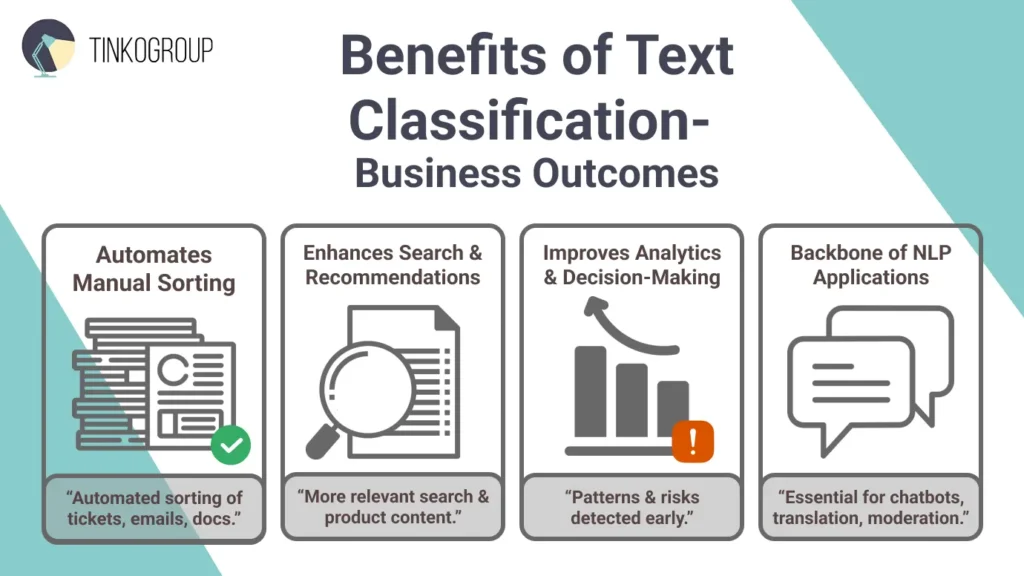
No one hand-tags documents today. Just imagine how much time you would waste if you had to sift through endless emails or customer tickets by yourself. Text classification automates this routine. Businesses can process reviews, emails, or legal docs at lightning speed. To achieve this level of automation, companies must first build a data annotation pipeline that can handle large volumes of unstructured text.
Take customer support. Companies like Zendesk use classification to auto-route tickets. The system labels them as “billing issue” or “tech glitch,” and response times reduce by up to 50%. In finance, banks classify transaction descriptions to flag anomalies. E-commerce uses it for inventory management and other stages of the sales process. The result is impressive. It’s less burnout for staff and more work done in hours, not weeks.
Enhances search and recommendations
Text categorization enables search engines and platforms to deliver precise, personalized results. In simple words, it keeps users hooked. They no longer need to guess – algorithms offer content based on their interests.
It’s enough to look at how Netflix does it. Their recommendation engine uses NLP text categorization to analyze show descriptions, tags, and user reviews. This personalization keeps viewers binge-watching. 80% of streams come from recommendations, and subscriber retention and revenue grow. Amazon classifies review sentiments to refine product suggestions and let customers find the right goods with no effort. News apps also sort articles into categories, making feeds more relevant and attracting more readers. And the biggest advantage is that text categorization easily scales when more data is added to these systems.
Improves analytics and decision-making
Data classification spots patterns that humans may miss. It reveals opportunities and risks well in advance.
Banks use text classification for fraud detection. In healthcare, NLP can catch up to 88% of fraudulent claims by reading and classifying text in bills and reports. This helps save billions, as only in the US, healthcare fraud costs about $300 billion a year. Hospitals also use text classification to sort patient feedback, like “good care” or “long wait times,” and use the result to improve patient experience. Marketers analyze social posts for sentiment trends to amend the campaigns and promote the goods that sell best.
A key step in many NLP applications
Text classification in NLP isn’t simply a handy tool. It’s the backbone of many advanced NLP systems. For example, question-answering apps first figure out the type of question to know how to respond. Translation tools sort text by domain, like medical or casual, to choose the right model. Social platforms flag risky content, and information extraction systems pick the right template based on the document type. Basically, every smart NLP system uses classification somewhere. It literally helps chatbots, translators, and summarizers work without mistakes.

Reliable Data Services Delivered By Experts
We help you scale faster by doing the data work right - the first time

Challenges and Best Practices
No tech is perfect, and text classification has its downsides, too. These are privacy concerns, high-dimensional data, and persistent ambiguities. But these problems are also chances to improve. Fixing issues like data bias or changing language trends can make models 20–30% more accurate in real use.
Handling ambiguous text
Language is tricky. People use sarcasm, slang, and words that mean totally different things depending on context. Think about the phrase “This is sick!” Are we talking about someone feeling awful, or an amazing concert? For a human, it’s obvious from tone or situation. For a computer, not so much.
These mix-ups happen all the time in text classification. Words can have multiple meanings, sentences can be unclear, and even pronouns can confuse things. Models guess wrong in 15–25% of cases without good context.
In healthcare, it can lead to serious mistakes. Luckily, newer models like BERT and its latest 2025 upgrades are a big help. Newer models look at text to understand meaning more like a human would. This transition From Data to Accuracy shows how correct annotations improve the training of even the most complex models. Diverse training examples also help a lot. Tools like Hugging Face’s Transformers make it easier than ever to fine-tune models like these – they can improve accuracy by 10–15% in tricky cases.
Dealing with imbalanced datasets
Imagine training a spam filter where 90% of emails are normal and only 10% are spam. The model quickly learns to assume everything’s safe and misses the few cases that aren’t. It’s data imbalance, and it happens when one category has far more examples than the others. It’s common in fraud detection, sentiment analysis, and medical text, where the rare but important cases are often ignored.
You can fix it. Oversample the minority class (duplicate the rare cases) or use SMOTE, which creates realistic new examples. On Reddit, removing some of the common posts (called undersampling) helped the system better recognize rare topics. The dataset got smaller, but accuracy on those rare topics improved by about 40%.
You can also adjust class weights in models and make the algorithm pay more attention to the smaller group of examples. This way, it doesn’t ignore the rare but important cases. In short, balancing your data helps your model make fairer, smarter decisions. Ignoring this often leads to Data Labeling Mistakes that significantly hurt your machine learning model performance.
Choosing the right features and model
Not every word in your text helps a model. Extra words can slow it down and cause mistakes, especially if you have thousands of numbers after vectorization. Feature selection keeps only the important words and speeds up models. For example, in sentiment analysis, cutting unnecessary words can halve training time without losing results.
Feature engineering matters too for text classification. Adding character n-grams for typos, capitalization patterns for spam, or word embeddings for meaning can improve performance. You can start with Naive Bayes to see how your data performs. Then test advanced features or models like SVM, LSTM, or BERT, but always compare results on the same test set.
Also, plan your categories carefully. Too many classes need lots of data, too few may not be useful. The right features, model, and categories make text classification accurate, fast, and practical.
Continuous model evaluation
You cannot set and forget an AI model. Language, trends, and business needs change and influence its performance. For example, a spam filter trained years ago may miss new tricks spammers use today.
You must watch your AI models closely. Track predictions, check metrics like accuracy or F1, and set alerts for sudden drops. Use A/B testing to see if a new model is better than the old one.
Retrain your model regularly, depending on how fast things change in your industry. Collect user corrections and unclear cases, and feed them back into the model. For tricky cases, let humans check first, then use those labels to improve the AI.
Also, make sure your categories are clear and practical. Even a great model struggles if labels overlap or don’t match real-world needs. Continuous monitoring keeps your AI smart and reliable.
Conclusion
Text classification has gone from a niche AI tool to something we use every day without even noticing. Every time you check your email, see product recommendations, read news, or chat with a bot, classification is at work, making things faster and smarter.
For businesses, it’s essential. You cannot handle millions of emails, reviews, and support tickets. Automated classification lets companies operate faster, cheaper and with better outcomes. Text categorization is where this technology really matters. It’s how e-commerce sites tag products for easy search, how news apps deliver personalized feeds, and how companies turn customer feedback into improvements or detect fraud before it spreads.
The future is even more exciting. Advanced AI can handle complex streams of data, from conversations to social media posts, enabling smarter chatbots and predictive analytics. Master text classification today and enjoy a head start in a data-driven world.
So, what can you do next? Start small – analyze your emails or social media for patterns, experiment with open-source tools like Hugging Face’s transformers, or integrate a simple classifier into your workflow. Share your experiences, follow for more AI insights, and start turning text into actionable intelligence. In the age of AI, smart text processing is your competitive edge.
At Tinkogroup, we provide the precision and scale you need to transform raw text into a competitive advantage. Our expert teams handle the complexity of data categorization so you can focus on building world-class AI models. Explore how our tailored solutions can accelerate your project.
What is the main difference between text classification and categorization?
For most business purposes, these terms are synonyms. While text classification is the scientific process of assigning predefined labels to text based on content, categorization is its powerful application used to organize data into structured, actionable groups.
Which AI model is best for understanding complex context and tone?
BERT (Bidirectional Encoder Representations from Transformers) is the most effective model for deep context. Unlike older models, it reads entire sentences to understand nuances like sarcasm, tone, and multiple word meanings, making it ideal for tricky human language.
How does text classification benefit customer support?
It automates the manual sorting of tickets by instantly labeling them into categories like “billing” or “tech issue”. This automation can reduce response times by up to 50%, allowing teams to handle large volumes of inquiries without burnout.