


Classical data labeling was simple – prepare your dataset, send it to an annotation vendor, and wait. That model worked in a world of megabytes where you operated with product photos, short audio clips, and neat spreadsheets. However, things changed in the era of autonomous systems, medical imaging, and geospatial intelligence.
Today, AI datasets are incredibly massive. A single autonomous driving program can generate hundreds of terabytes of video every week. Moving this amount of data can take weeks. Plus, it introduces risk at every step. Whether you ship data via cloud pipelines like Amazon Web Services or transfer it physically on hard drives, every movement creates a new attack surface. Failed transfers, corrupted files, and even data exposure are operational realities today.
For years, the industry accepted this tradeoff – ship the data to the labelers. But that logic no longer works. We are seeing a shift toward client-hosted annotation. It means that as datasets get bigger, they become harder and more expensive to move. So instead of moving data around, everything else – tools, workflows, and people – moves to where the data already lives. The logic flips – and the security implications are significant:
Bring talent to the data – don’t send data to the talent.
This shift is not optional for many organizations. And it’s not dictated by cost or speed. It’s often the only secure data labeling approach for those who operate under strict regulatory frameworks like GDPR or HIPAA. Sensitive data cannot leave controlled environments without creating compliance risks.
This reshapes the entire annotation model – you keep data locked inside your infrastructure and route skilled annotators into that environment. In a world where data is heavy, immovable, and valuable, this model is inevitable.
The Client-Hosted Annotation Model Explained
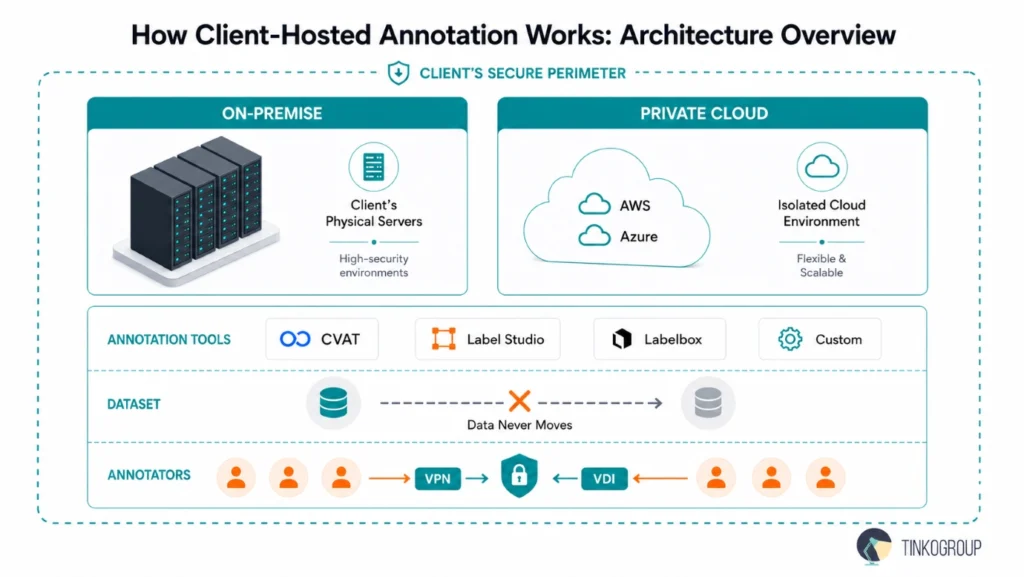
The client-hosted model is exactly what it sounds like – the entire annotation workflow lives inside the client’s environment. We keep the data where we create it, run the labeling tools there, and let annotators connect to do the work. We don’t move or copy anything. Companies don’t send datasets to a vendor. Instead, they open a secure door and let trained annotators step inside.
Architecture – Everything Is Kept in One Place
Clients deploy annotation platforms like CVAT, Label Studio, or Labelbox directly within their infrastructure.
There are two ways to do it:
- On-premise, where everything runs on the client’s own physical servers. This solution is recommended for highly sensitive environments, for example, healthcare systems, defense projects, or companies working with proprietary industrial data.
- Private cloud, where the client hosts the same tools inside isolated environments in platforms like Amazon Web Services or Microsoft Azure. The infrastructure is still fully controlled by the client, but with more flexibility and scalability.
One rule applies across all configurations: your dataset never moves. Whether your team stores it in cloud buckets, internal storage systems, or databases, it’s labeled inside the client environment. Teams aren’t working on copies – they are working on the source.
Leading AI teams have adopted exactly this setup. For example, companies building autonomous driving systems often keep massive volumes of video inside their own cloud accounts and run annotation tools alongside that data. External teams log in, do the work, and log out – without ever handling raw files.
Secure Access Protocols for Annotators
Of course, if the data doesn’t move, the people have to. But access must be secure. Most client-hosted annotation setups use one of these two approaches:
- VPN (Virtual Private Network)
A VPN can be compared to a secure tunnel into the client’s system. Annotators connect through it, authenticate themselves, and gain access only to what they’re allowed to see. Companies use strict controls – IP whitelisting, multi-factor authentication, and session logging. Actually, they treat external annotators almost like internal employees but with tighter boundaries. This is enough to create a smooth and secure data labeling workflow for many web-based tools.
- VDI (Virtual Desktop Infrastructure)
When security requirements go a step further, companies use VDI for data labeling, such as solutions like Citrix Virtual Apps or Amazon WorkSpaces. Here, annotators don’t access the data in the traditional sense. They log into a remote computer that lives inside the client’s environment. The annotation tool runs on that machine, and all the work happens there.
What the annotator sees is a live video stream of that remote desktop. They can click, draw bounding boxes, and complete tasks, but they don’t save or store anything on their own device. There is absolutely no way to download anything or move data outside the system.
What This Looks Like Day-to-Day
Day-to-day, the workflow looks straightforward. An annotator logs in through a secure connection, opens the assigned tool, and starts working like they would in any other project.
Behind the scenes, though, everything stays contained within the client’s environment. Every action happens inside that boundary. When the session ends, the system closes access, and in many setups, it fully resets the virtual workspace.
For example, a company working with medical imaging might host Label Studio in a private cloud. Annotators connect through VDI, label scans, and log out. The system never lets data leave and never stores anything locally.
Annotators work inside a familiar interface – but the underlying data never leaves your control. External teams become an extension of the client’s operations that work entirely within their system without ever taking ownership of the data itself.
Security Benefits of Client-Hosted Annotation
The architecture itself explains the security advantage – data security in AI training. Premise data labeling in a client-hosted setup is a guarantee that your sensitive data will not end up in the wrong hands.
Zero Data Exfiltration
In traditional outsourcing models, data always moves. Files are shared, downloaded, copied, and stored across multiple systems. Each step creates a potential point of failure. Client-hosted annotation removes that risk almost entirely. Annotators work only inside the client’s environment, and your data never touches their local machines. What they see is a live stream of pixels, not the underlying files. That single architectural choice removes the most common point of failure. You can add even more control:
- Disable copy-paste functions.
- Block file downloads.
- Restrict USB access.
- Prevent screenshots.
- Limit or fully shut off Internet access inside the virtual environment.
Platforms like Citrix Virtual Apps or Amazon WorkSpaces enforce these restrictions centrally. Data has no path out of the environment – not by accident, not by negligence, and not by intent.
Audit Trails for Full Visibility
Visibility is part of security. In a client-hosted setup, every action taken by an annotator happens inside the client’s system. The system logs, monitors, and reviews every action in real time. The system records every login, every annotation, and every interaction with the dataset. If needed, clients can trace:
- Who accessed what data?
- When did they access it?
- What changes did they make?
- How long did they spend on each task?
External vendors make it almost impossible to achieve this level of transparency once they export the data. Many annotation tools, including CVAT and Label Studio, have built-in mechanisms for granular activity tracking. Clients can combine these with infrastructure-level logging (from cloud platforms like Amazon Web Services or Microsoft Azure) and gain end-to-end visibility over the entire annotation process.
Annotation teams become fully visible and accountable contributors within your system – with no action going unrecorded.
The Zero Trust Connection
The client-hosted model supports zero-trust security, which has moved from theory to practice for many organizations. According to Gartner, more than 60 percent of organizations are already using zero trust in their security strategy. Zero trust is built on several core principles:
- Never trust, always verify.
- Use identity and context as the basis for access decisions.
- Enforce least privilege and micro-segmentation.
- Continuously validate and assess risk.
Client-hosted annotation embodies these principles. No annotator is automatically trusted – each session requires authentication. Access is limited to only the specific data needed for assigned tasks. Micro-segmentation ensures that annotators cannot see data outside their assigned scope. Continuous validation through session logging provides real-time risk assessment.
Total Compliance
For a lot of teams, the real win of client-hosted annotation is compliance. GDPR and HIPAA set strict rules around how organizations store, access, and share data. In some cases, they require organizations to keep data within specific regions. In other cases, organizations need to carefully control every access and fully audit it. Traditional annotation workflows make this harder. When organizations move data to external vendors, it passes through multiple systems and environments. Each step adds complexity and potential risk.
Client-hosted annotation avoids that entirely, as everything is kept in one place. The data stays inside the client’s secure environment at all times. Annotators don’t receive copies of files. They only have controlled access to work within the system itself. You track, monitor, and review every interaction. This approach naturally aligns with modern security practices like zero trust data labeling, where no user or device is trusted automatically. Every action must be verified, and access is always intentional and limited.
Organizations find compliance significantly easier to maintain with this approach. A healthcare company, for example, can allow annotators to label patient images without ever moving that data outside its secure infrastructure. The same applies to financial institutions, government projects, or any organization working with sensitive or regulated information. The result is a simpler, safer way to work with compliance built into the process.

Reliable Data Services Delivered By Experts
We help you scale faster by doing the data work right - the first time

Operational Challenges & Solutions
The client-hosted annotation gives you more security and control, but it also brings some new operational challenges. These challenges are well-documented – and each has a practical solution.
Latency – How to Manage Performance at a Distance
One of the most common concerns with remote annotation inside client environments is latency. When annotators connect via VPN or work through VDI, they are no longer interacting with data stored locally. Every action depends on network performance. And a low or unstable connection immediately affects productivity, especially if you work with high-volume datasets such as 4K video, LiDAR sequences, or medical imaging. Even a small delay can interrupt workflow and reduce annotation quality.
Reducing lag depends on both sides.
- On the client side, things run faster when the setup is closer to the annotators (including using nearby regions in Amazon Web Services or Microsoft Azure). This shortens the distance data has to travel.
- On the annotator side, a fast and stable internet connection is just as important. If either side is slow, the whole process slows down.
At Tinkogroup, we carefully select and prepare our teams. Annotators working in client-hosted environments must have:
- High-speed, stable internet connections (typically fiber).
- Low-latency routing to client infrastructure.
- Hardware capable of handling VDI streaming.
We also test connectivity before onboarding and continuously monitor performance during projects. If there are still delay issues, we take measures – relocate tasks, optimize workflows, or work with the client to improve the setup. In practice, with the right conditions in place, the experience becomes nearly indistinguishable from working locally.
Tool Agnosticism – Adapting to Your Environment
Tool diversity is another challenge. In traditional outsourcing models, vendors often prefer to use their own annotation platforms. But in a client-hosted annotation setup, the tools are defined by the client.
Some teams use open-source platforms, such as CVAT or Label Studio. Others rely on enterprise systems like Labelbox. And in many cases, companies build their own proprietary tools for specific workflows. This means the annotation partner must be flexible.
At Tinkogroup, we treat tool agnosticism seriously. We train our teams to quickly adapt to new environments, interfaces, and annotation standards. It can be a custom-built video labeling tool for autonomous driving or a specialized interface for medical segmentation – we are always ready to work within any system the client chooses:
- We learn custom taxonomies and labeling guidelines.
- We adapt to unique UI/UX patterns.
- We follow client-specific QA and review workflows.
- We integrate with internal teams.
The main goal is to reduce friction. Clients shouldn’t have to change their tools or processes to work with an annotation partner.
Traditional Data Transfer vs. Client-Hosted Annotation
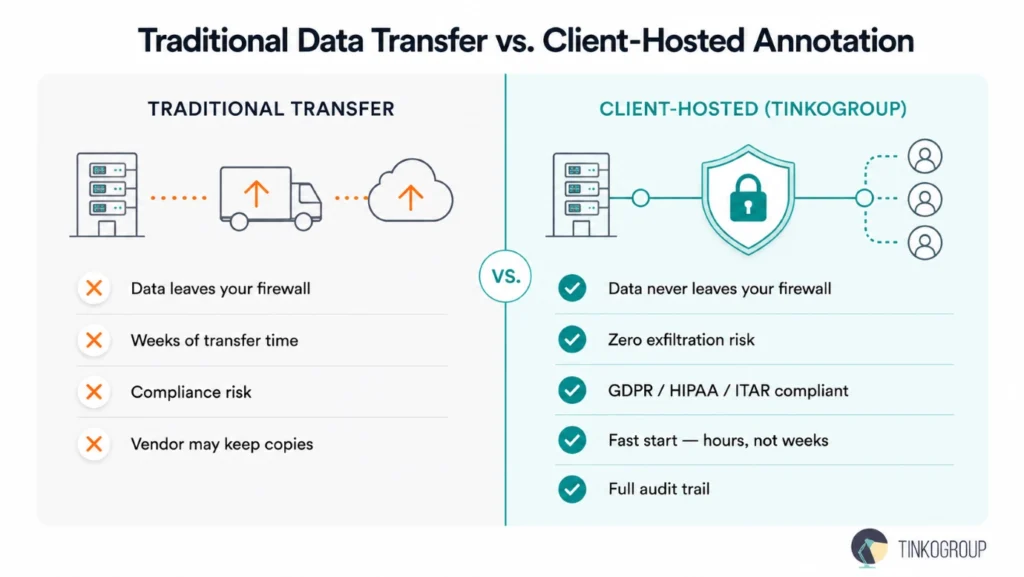
To fully understand the value of the client-hosted model, let’s compare it directly with the traditional approach to data annotation.
For years, clients used the default workflow. Clients packaged data, uploaded it to cloud storage, or even shipped it physically on encrypted drives. Then, vendors downloaded the data, processed it in their own environments, and returned the results. Today, security requirements are getting stricter, and the minuses of the traditional approach are obvious. Organizations handling sensitive datasets should also understand how to protect sensitive information during annotation to reduce compliance risks and strengthen data governance.
| Annotation approach | Pros | Cons |
| Traditional Data Transfer (shipping hard drives or cloud links) | • Simple to start if the data is already packaged • No need to manage remote access infrastructure • Works with any labeling tool, anywhere | • High risk of data loss or theft during transit • Weeks of delay for shipping + uploads • Compliance issues if data crosses borders • Vendor can accidentally keep copies |
| Client-Hosted (Tinkogroup Model) (data stays in your environment; annotators connect via VPN/VDI) | • Data never leaves your firewall or cloud • Data exfiltration prevention – no downloads, copy-paste, or USB saves • Fully auditable – every click is logged in your system • Compliance with GDPR, HIPAA, ITAR • Fast start – hours, not weeks • You keep your own tools (CVAT, Labelbox, etc.) | • Requires stable, high-speed internet for annotators (low latency) • Initial setup of VPN or VDI takes coordination with your IT team • Slightly higher operational complexity than the traditional approach • Not ideal for tiny datasets (overkill) |
When Does Client-Hosted Annotation Make the Most Sense?
This model is not a universal solution. Traditional approaches are actually more suitable for small projects with non-sensitive data. But for organizations that fit any of the following profiles, client-hosted annotation is the right choice:
- Healthcare and life sciences – working with patient data, medical imaging, or clinical records subject to HIPAA or similar regulations.
- Autonomous systems – managing terabytes of video, LiDAR, and sensor data that cannot be moved efficiently.
- Financial services – handling transaction data, personal financial information, or other regulated data.
- Government and defense – subject to ITAR, export controls, or national security requirements.
- Any organization with compliance obligations that restrict cross-border data transfer or third-party data sharing.
If your data can cause significant harm if exposed, then you should prioritize data safety and keep it inside your environment.
Conclusion
Scaling AI responsibly means handling data at volume – without sacrificing security. Client-hosted annotation environments deliver exactly that – experts operate inside your fortified perimeter, under your complete control, with zero data exfiltration risk. Whether you run CVAT on-premises, Label Studio in your private cloud, or a fully custom pipeline, the model scales to any sensitivity level and any industry.
Security constraints don’t have to slow annotation projects down. Tinkogroup offers secure, client-hosted annotation workflows that accelerate your AI initiatives and satisfy the strictest regulatory standards. Our teams achieve 99% annotation accuracy, deliver 2.5× faster model training readiness, and operate with 100% manual verification through rigorous multi-stage quality control.
Your data belongs inside your environment – and so does your annotation workflow. Tinkogroup teams operate directly within your infrastructure: no file transfers, no exposure, no compliance gaps. If you’re evaluating a more secure approach to AI data preparation, we’re ready to run a scoped pilot inside your environment. Reach out to discuss how our managed data services fit your security requirements.
What is client-hosted annotation?
Client-hosted annotation is a secure data labeling model where datasets remain entirely inside the client’s infrastructure while external annotators access annotation tools through controlled environments such as VPN or VDI. Instead of transferring sensitive files to a vendor, organizations bring the annotation workforce to the data, which reduces security and compliance risks.
Why is client-hosted annotation more secure than traditional data transfer?
Traditional annotation workflows require datasets to be copied, uploaded, or shipped to external vendors, which increases the risk of data leaks, unauthorized copies, and compliance violations. Client-hosted annotation minimizes these risks because the data never leaves the client’s environment. Organizations can also enforce strict controls such as disabling downloads, blocking USB access, restricting screenshots, and maintaining full audit trails for every annotator action.
Which industries benefit most from client-hosted annotation?
Client-hosted annotation is especially valuable for industries that handle sensitive or regulated data. This includes healthcare and life sciences, autonomous vehicle development, financial services, government and defense, and enterprise AI teams working under GDPR, HIPAA, or ITAR requirements. It is particularly useful when datasets are too large, sensitive, or regulated to move safely outside the organization’s infrastructure.